Windows 7 Forums Search
Welcome to Windows 7 Forums. Our forum is dedicated to helping you find solutions with any problems, errors or issues you are experiencing with Windows 7. The Windows 7 forum also covers news and updates and has an extensive Windows 7 tutorial section that covers a wide range of tips and tricks.


Windows 7 - Speeding up browsing of large folders

 
01-15-2012   #1


Windows 7 Ultimate x64


Speeding up browsing of large folders

I have several folders with large numbers of files, which takes Explorer a long time to scan before opening. I also have the indexing service turned off on my system. Would turning indexing back on speed up the opening of folders?

If not, is there any other way to open folders with large numbers of files without incurring a long wait -- or are there any Explorer replacement programs that read folders faster?

Thanks.

My System SpecsSystem Spec
01-15-2012   #2


ultimate 64 sp1


hi wallywalters, and welcome to sevenforums,

when you say large numbers of files, what sort of numbers are we talking about?

it could be that your AV (antivirus) software is slowing you down - i noticed this with mse on one of my machines. what AV are you using?

try temporarily disabling your AV and see if that helps any - don't forget to turn it back on after the testing!

if it is your AV, then you can normally set it to exclude certain folders ion the future...

of course, it may have nothing to do with AV, but it's gotta be worth a try!
My System SpecsSystem Spec
01-15-2012   #3


Windows 7 Ultimate 64bit


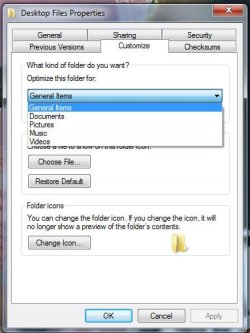
If they are video, music, or pictures files, or have combination of any of them, then it could be the folder options causing it to slow down.
I had that issue in the past and was told to right click on the folder, click on properties, and then go to customize, then "Optimize this folder for:" and select General Items, then click OK.
this will speed up the folder access time.
My System SpecsSystem Spec
.


01-15-2012   #4


Windows 7 Ultimate x64


The problem folders typically contain 800 or more files. The anti-virus isn't at fault, as there is no anti-virus on the machine in question.

And I know I could speed things up by creating more subdirectories, but that would be impractical for my purposes for other reasons.
My System SpecsSystem Spec
01-15-2012   #5


Windows 7 Ultimate x64


Thanks, Zephyr, but I have the "optimize" functionality turned off.
My System SpecsSystem Spec
01-15-2012   #6


Windows 7 Ultimate 64bit


Quote   Quote: Originally Posted by wallywalters View Post
Thanks, Zephyr, but I have the "optimize" functionality turned off.
Check the folder anyways and see what it is set for.
My System SpecsSystem Spec
01-15-2012   #7


WCP ONLY


Quote   Quote: Originally Posted by wallywalters View Post
I have several folders with large numbers of files, which takes Explorer a long time to scan before opening. I also have the indexing service turned off on my system. Would turning indexing back on speed up the opening of folders?

If not, is there any other way to open folders with large numbers of files without incurring a long wait -- or are there any Explorer replacement programs that read folders faster?

Thanks.

We could use you system specs so we know what hardware we are dealing with
My System SpecsSystem Spec
01-15-2012   #8


Windows 7 Ultimate 64bit


this is the folder customization options,
Attached Thumbnails
Speeding up browsing of large folders-folder-options.jpg  
My System SpecsSystem Spec
01-15-2012   #9


Windows 7 Ultimate x64


System specs are an Athlon X2 645, 16 GB DDR3, 2x2TB hard drives, Windows 7 Ultimate x64.
My System SpecsSystem Spec
01-15-2012   #10


Windows 7 32 bit


Quote   Quote: Originally Posted by wallywalters View Post
System specs are an Athlon X2 645, 16 GB DDR3, 2x2TB hard drives, Windows 7 Ultimate x64.
Are you opening Explorer in details view? That should be the fastest. If they are media files or images, you can turn thumbnails off in folder options. If none of that helps, try Q-Dir native 64 bit portable:

Q-Dir the Quad Explorer for Windows - Q-Dir
My System SpecsSystem Spec
Reply

 Speeding up browsing of large folders problems?


Thread Tools


Similar Threads for: Speeding up browsing of large folders
Thread Forum
Large amount of network traffic while browsing network share Network & Sharing
Large System32 and SysWOW64 Folders (>15GB ea.) Performance & Maintenance
How can I set large images as defult setting when browsing for images? General Discussion
Want to sync large folders (300GB) Alternatives to Synctoy? General Discussion
Explorer SLOW on large folders Performance & Maintenance


All times are GMT -5. The time now is 07:52 PM.


Windows 7 Forums is an independent web site and has not been authorized,
sponsored, or otherwise approved by Microsoft Corporation.
"Windows 7" and related materials are trademarks of Microsoft Corp.
© Designer Media Ltd
  

1 2 3 4 5 6 7 8 9 10 11 12 13 14 15 16 17 18 19 20 21 22 23 24 25 26 27 28 29 30