| | Welcome to Windows 7 Forums. Our forum is dedicated to helping you find solutions with any problems, errors or issues you are experiencing with Windows 7. The Windows 7 forum also covers news and updates and has an extensive Windows 7 tutorial section that covers a wide range of tips and tricks. | Windows 7 - tell me how to delete System Volume Information on D:
|
08-14-2009
|
#1 | | Windows 7 build 7100, XP SP3 |
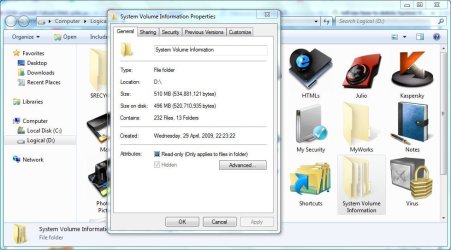
tell me how to delete System Volume Information on D: I delete it, but it stays there, nothing happened. How can I delete it?
And is it safe to do?
| My System Specs | | System Manufacturer/Model Number Desktop OS Windows 7 build 7100, XP SP3 CPU QX6850 Motherboard DFI LANParty UT P45 T3RS Memory Patriot 4GB Viper II Graphics Card ASUS HD4890 Monitor(s) Displays Asus LS201 LCD 20" PSU CoolerMaster Real Power 850w Case Thermaltake Armor Hard Drives Hitachi 160GB x2 Internet Speed 768kbps DSL |
08-14-2009
|
#3 | | |

Quote: Originally Posted by Julio Andretti I delete it, but it stays there, nothing happened. How can I delete it?
And is it safe to do? Check the box at "hide system files", you won't even know it's there. | My System Specs | | OS Win7 Build 7600 x86 CPU Pentium II 300MHz Motherboard Asus Memory 32mb EDO RAM Graphics Card Diamond Viper Sound Card Soundblaster 16 Monitor(s) Displays 14" AOC CRT 16K color Screen Resolution 800x600 Keyboard Trust Ergonomic Mouse Generic PSU 110 Watts Cooling Passive Hard Drives 300mb Quantum fireball Internet Speed 256K u 128K d |
08-14-2009
|
#4 | | |
System information is were your System Restore points and other stuff are stored.
The System Volume Information can get bloated pretty fast over time; mainly by installing and uninstalling programs.
Open the Disk Cleanup utility, go to the More Options tab and and Cleanup the System Restore.
it will delete all your restore points except the last one.
moontan | My System Specs | | |
08-17-2009
|
#5 | | |
You can set the max allocated space in System Volume Information for each disk by System Restore.
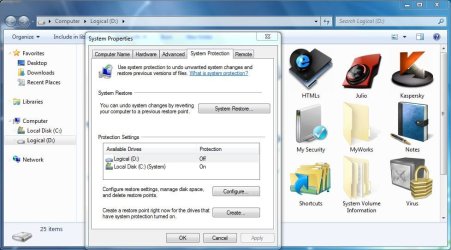
Open the Control Panel and click System, or right-click on Computer / Properties. The System window will open, where you can see your WEI, comp name, etc. On the left click on System protection to open that dialog. One by one select each drive under Protection Settings and click Configure. There you can select the max amount it will use for the drive's System Volume Information folder, or none at all. I only enable it for my system drive. | My System Specs | | System Manufacturer/Model Number Custom workstation /// Lenovo X61t tablet notebook OS Windows 7 RTM x64 CPU Core i7 980X @ 4.04GHz OC /// Core Duo L7500 @ 1.6GHz Motherboard Asus P6T6 WS Revolution /// Memory 12GB G. Skill @ DDR-1600 OC /// 4GB Graphics Card Saphire HD4870 Toxic 1GB /// Intel Mobile GMA X3100 Monitor(s) Displays Dual Eizo 24" SX2461W /// 12" Screen Resolution 1920x1200 /// 1400x1050 Keyboard Logitech Edge /// Mouse Logitech Wireless Optical Trackball PSU Tagan ITZ 1100 Case GHS-1500 /// Cooling Thermalright IFX-14 + a slew of stealth fans /// Hard Drives Workstation:
5x 750GB Barracuda-11 on Areca ARC-1220;
4x 1.5TB Barracuda-11 on Intel ICH10R;
Volumes:
300GB RAID 0, 2.7TB RAID 10 on Intel;
100GB RAID 0, 1.4TB RAID 10 on Areca ///
Notebook: G.Skill Titan 256GB SSD Internet Speed 5Mbps down / 820Kbps up Other Info Main use: photography;
DVD Drive: L.G GGW-H20L Blu-Ray / DVD;
OC: QPI/DRAM @ 1.33v, CPU @ 1.293v, DRAM Bus @ 1.65v, CPU PLL @ 1.88v, CPU mult = 25x, BCLK = 160, DDR3-1604 @ 7-8-7-24 OS Windows 7 Ultimate x64 CPU Intel Pentium e5200 @ 3.8HZ (380 X 10) Motherboard Giga-byte GA-EP35-DS3L Memory Mushkin 4GB DDR2 800 @ 760MHZ 4-4-3-10 @ +0.3v Graphics Card SAPPHIRE 100245L Radeon HD 4850 512MB 256-bit GDDR3 Sound Card Sound Blaster Audigy 2 Monitor(s) Displays Acer AL2216Wbd 22" Screen Resolution 1680 x 1050 Keyboard Logitech KB Mouse Logitech KB PSU Corsair 520HX Case Super Antec Lanboy Cooling Thermaltake Big Typhoon + intake and outtake 120mm fans Hard Drives Seagate 160GB @ 7200rpm Internet Speed 2MB |
08-17-2009
|
#7 | | |

Quote: Originally Posted by TGSoldier Disable system restore. Only if you have a safe image of your system, because it saved me many times while testing stuff. | My System Specs | | OS win7 7600x64 RTM CPU Q9300 Motherboard P5N-D Memory DDR2 Corsair 4*1gb 800Mhz Graphics Card Nvidia Ge Force 9800 gtx Sound Card SB audigy Monitor(s) Displays Samsung syncmaster 2232bw Screen Resolution 1680*1050 PSU thermaltake 750w Case Thermaltake(something :P) Cooling Normal fans // Cpu cooler+fan(Thermaltake) Hard Drives 1*60gb SSD (system)
2*500gb Sata 7200rpm (raid 0)
1*1tb external(backup) |
08-17-2009
|
#8 | | |

Quote: Originally Posted by monstron Only if you have a safe image of your system, because it saved me many times while testing stuff. +++1
I do system backups fairly often but still like sys restore for those tweaks that didn't quite work as advertsed  . Especially with Win 7 where I've been trying all kinds of things to see what works and what doesn't, sys restore has been a real boon. | My System Specs | | System Manufacturer/Model Number Custom workstation /// Lenovo X61t tablet notebook OS Windows 7 RTM x64 CPU Core i7 980X @ 4.04GHz OC /// Core Duo L7500 @ 1.6GHz Motherboard Asus P6T6 WS Revolution /// Memory 12GB G. Skill @ DDR-1600 OC /// 4GB Graphics Card Saphire HD4870 Toxic 1GB /// Intel Mobile GMA X3100 Monitor(s) Displays Dual Eizo 24" SX2461W /// 12" Screen Resolution 1920x1200 /// 1400x1050 Keyboard Logitech Edge /// Mouse Logitech Wireless Optical Trackball PSU Tagan ITZ 1100 Case GHS-1500 /// Cooling Thermalright IFX-14 + a slew of stealth fans /// Hard Drives Workstation:
5x 750GB Barracuda-11 on Areca ARC-1220;
4x 1.5TB Barracuda-11 on Intel ICH10R;
Volumes:
300GB RAID 0, 2.7TB RAID 10 on Intel;
100GB RAID 0, 1.4TB RAID 10 on Areca ///
Notebook: G.Skill Titan 256GB SSD Internet Speed 5Mbps down / 820Kbps up Other Info Main use: photography;
DVD Drive: L.G GGW-H20L Blu-Ray / DVD;
OC: QPI/DRAM @ 1.33v, CPU @ 1.293v, DRAM Bus @ 1.65v, CPU PLL @ 1.88v, CPU mult = 25x, BCLK = 160, DDR3-1604 @ 7-8-7-24 |
08-17-2009
|
#9 | | Windows 7 Ultimate x64 + x86 + Windows 8 x64 |

Quote: Originally Posted by DJG You can set the max allocated space in System Volume Information for each disk by System Restore.
Open the Control Panel and click System, or right-click on Computer / Properties. The System window will open, where you can see your WEI, comp name, etc. On the left click on System protection to open that dialog. One by one select each drive under Protection Settings and click Configure. There you can select the max amount it will use for the drive's System Volume Information folder, or none at all. I only enable it for my system drive. Highlight is mine
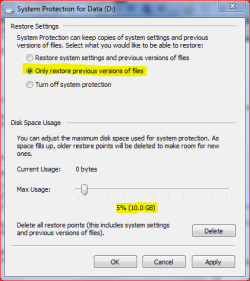
You need to be careful with this on multi drive/partition systems as the System volume information also holds the shadow copy data for Files in addition to the restore points. I would recommend that for a data drive you use a setting such as shown in the following screen (The percentage would be based on the amount of files you work with and the overall drive size) ...
This will provide some protection for your data, although I agree that the system restore on a data drive is not of any use as the system restore ignores data files.
The ammount required for a system drive is variable from system to system and is best set by observation - delete all but the last restore point and check the size then set the max to this figure times how many points you want to retain. 3-5 times is a good compromise (personal preference will decide the actual amount of restore points you wish to keep) | My System Specs | | System Manufacturer/Model Number Real World Computing (Me + a little help from Acer) OS Windows 7 Ultimate x64 + x86 + Windows 8 x64 CPU AMD Phenom II X6 1035T 2.6 GHz Motherboard Aspire M3400 Memory 4Gb PC10600 DDR3 1333 MHz Graphics Card NVIDIA GeForce 315 512MB Sound Card OnBoard - Realtek High Definition Audio Monitor(s) Displays Philips 32" HDTV, (HDMI) + 26" TV (VGA) Screen Resolution 1920 x 1080 @60Hz + 1360 x 768 @60Hz Keyboard Microsoft Wireless 800 or Stock Acer, (depends where I sit) Mouse Microsoft Wireless 800 or Stock Acer, (depends where I sit) PSU Stock (400W) Case Acer M3400 Cooling Stock Hard Drives 500 GB Seagate ST3500418AS SATA II
1 TB Hitachi HDS5C1010CLA382 SATAII
1 TB Samsung Spinpoint F1 HD103SI SATA II (external)
Plus various other (client ) HDDs as needed Internet Speed Temporaray 3G Dongle Other Info USB Capture + Webcam(s)
Also run Acer AspireOne 530h Netbook, Dual Core Atom + 1GB (Win7 Ult x86) |
08-17-2009
|
#10 | | Windows 7 build 7100, XP SP3 |
I have disabled system protection (system restore) on drive D, but it's still standing. | My System Specs | | System Manufacturer/Model Number Desktop OS Windows 7 build 7100, XP SP3 CPU QX6850 Motherboard DFI LANParty UT P45 T3RS Memory Patriot 4GB Viper II Graphics Card ASUS HD4890 Monitor(s) Displays Asus LS201 LCD 20" PSU CoolerMaster Real Power 850w Case Thermaltake Armor Hard Drives Hitachi 160GB x2 Internet Speed 768kbps DSL tell me how to delete System Volume Information on D: problems? All times are GMT -5. The time now is 07:13 AM. |  |