
AlastairCunning
New member
- Local time
- 7:25 AM
- Messages
- 2
Hi Guys,
I have Windows 7 Professional 64bit. Recently my CPU usage started to get really high, even when seemingly idle. % varies from 10-100% and fluctuates pretty wildly. Any normal activity sends it up into the 60%+ zone.
Here are my specs:
Intel Core 2 Duo P9700 2.80GHz
RAM 2x2GB
So far I've done a system scan (command prompt, sfc/scannow) and came up clean.
I've re-installed windows 7 twice and even before i do anything its already higher than one would expect.
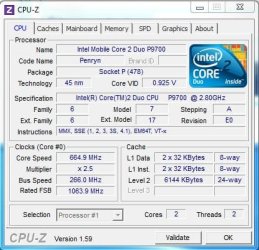
After reading some post is ran CPU-Z (see attachment). Am i right in thinking that my core speed is way down?
If not, any ideas what i can do to diagnose/fix my problem?
Thanks in advance!
I have Windows 7 Professional 64bit. Recently my CPU usage started to get really high, even when seemingly idle. % varies from 10-100% and fluctuates pretty wildly. Any normal activity sends it up into the 60%+ zone.
Here are my specs:
Intel Core 2 Duo P9700 2.80GHz
RAM 2x2GB
So far I've done a system scan (command prompt, sfc/scannow) and came up clean.
I've re-installed windows 7 twice and even before i do anything its already higher than one would expect.
After reading some post is ran CPU-Z (see attachment). Am i right in thinking that my core speed is way down?
If not, any ideas what i can do to diagnose/fix my problem?
Thanks in advance!
Attachments
My Computer
At a glance
windows 7 professional 64bitIntel Core 2 Duo P9700 2.80GHz2 x 2GB
- OS
- windows 7 professional 64bit
- CPU
- Intel Core 2 Duo P9700 2.80GHz
- Memory
- 2 x 2GB
- Hard Drives
- 120Gb SSD


