
 |
Welcome to Windows 7 Forums. Our forum is dedicated to helping you find solutions with any problems, errors or issues you are experiencing with Windows 7. The Windows 7 forum also covers news and updates and has an extensive Windows 7 tutorial section that covers a wide range of tips and tricks.
Windows 7 - Hibernation only locks computer; pagefile problem? |
01-19-2012
|
#1 | | MS Windows 7 Ultimate 64-bit SP1 |
Hibernation only locks computer; pagefile problem? I have a fairly unique computer setup, so let me start by explaining it. I own a Dell Inspiron 1545 running Windows 7 Ultimate 64 bit. That has 4GB RAM, a 64-bit processor, and a 320GB hard drive. Any other relevant specs should be filled out in my system specs. The unique part of it is that I'm booting and running Window directly off my 2TB external USB drive, after setting it up using this program if it matters. I did this mainly because my 320GB internal HD was too small and I wanted an easy space upgrade, and I just though it would be cool
So my problem: whenever I try to get my computer to hibernate, the screen goes black for a moment like it should, and then it jumps right to the lock screen. In other words, trying to hibernate only locks my computer. This happens no matter how I try to get it to hibernate, whether directly through the start menu or using a gadget. I know my computer supports it because it works just fine when I run the Windows Vista Home Premium x64 that is still installed on my internal drive, and I'm pretty sure this fact also rules out the possibility of a problem with my BIOS.
I did some searching on Google and found that this can sometimes be a problem with dual booting, because it causes an issue with the page file. I assume that the page file is somewhat responsible for hibernation, which reminded me of another important quirk in my computer:
Every time I boot up Windows 7, I get this error message:
It then takes me to this window:
At which point I just hit OK and my computer works without an issue, besides this hibernation problem.
Figuring it must a page file issue, I went into Disk Management and checked the flags on both my internal drive (that can still boot Vista Home Premium) and the external drive that Windows 7 is running on. My internal drive with Vista has the Page File flag on it, but my Windows 7 drive does not. So for starters, I'd like to know how to set or activate the page file on that drive, and if that doesn't solve my problem, I'd like more help getting hibernate to work. Thanks! | My System Specs | | System Manufacturer/Model Number Dell Inspiron 1545 OS MS Windows 7 Ultimate 64-bit SP1 CPU Intel Mobile Core 2 Duo T6400 @ 2.00GHz, Penryn 45nm Motherboard Dell Inc. 0G848F (Microprocessor) Memory 4.00 GB Dual-Channel DDR2 @ 399MHz (6-6-6-18) Graphics Card Mobile Intel(R) 4 Series Express Chipset Family (Integrated) Sound Card IDT High Definition Audio CODEC Monitor(s) Displays Generic PnP Monitor (DPMS) (1366x768@60Hz) Screen Resolution 1366x768 (16:9) Keyboard Laptop Mouse Touchpad, and Logitech wireless USB mouse. PSU Laptop Case Laptop Cooling Laptop vent Hard Drives 2TB External, with ~1TB partition booting OS Internet Speed ~150 kb/s Other Info I'm running Windows COMPLETELY off a 2TB portable hard drive (since my 300GB internal drive just isn't big enough). It works exactly the same as it would normally, only it has to be constantly connected to my USB port. Obviously. I'll show you how to do it, if you ask! It's pretty cool.
Specs via Speccy |
01-20-2012
|
#2 | | MS Windows 7 Ultimate 64-bit SP1 |
| My System Specs | | System Manufacturer/Model Number Dell Inspiron 1545 OS MS Windows 7 Ultimate 64-bit SP1 CPU Intel Mobile Core 2 Duo T6400 @ 2.00GHz, Penryn 45nm Motherboard Dell Inc. 0G848F (Microprocessor) Memory 4.00 GB Dual-Channel DDR2 @ 399MHz (6-6-6-18) Graphics Card Mobile Intel(R) 4 Series Express Chipset Family (Integrated) Sound Card IDT High Definition Audio CODEC Monitor(s) Displays Generic PnP Monitor (DPMS) (1366x768@60Hz) Screen Resolution 1366x768 (16:9) Keyboard Laptop Mouse Touchpad, and Logitech wireless USB mouse. PSU Laptop Case Laptop Cooling Laptop vent Hard Drives 2TB External, with ~1TB partition booting OS Internet Speed ~150 kb/s Other Info I'm running Windows COMPLETELY off a 2TB portable hard drive (since my 300GB internal drive just isn't big enough). It works exactly the same as it would normally, only it has to be constantly connected to my USB port. Obviously. I'll show you how to do it, if you ask! It's pretty cool.
Specs via Speccy |
01-23-2012
|
#3 | | MS Windows 7 Ultimate 64-bit SP1 |
| My System Specs | | System Manufacturer/Model Number Dell Inspiron 1545 OS MS Windows 7 Ultimate 64-bit SP1 CPU Intel Mobile Core 2 Duo T6400 @ 2.00GHz, Penryn 45nm Motherboard Dell Inc. 0G848F (Microprocessor) Memory 4.00 GB Dual-Channel DDR2 @ 399MHz (6-6-6-18) Graphics Card Mobile Intel(R) 4 Series Express Chipset Family (Integrated) Sound Card IDT High Definition Audio CODEC Monitor(s) Displays Generic PnP Monitor (DPMS) (1366x768@60Hz) Screen Resolution 1366x768 (16:9) Keyboard Laptop Mouse Touchpad, and Logitech wireless USB mouse. PSU Laptop Case Laptop Cooling Laptop vent Hard Drives 2TB External, with ~1TB partition booting OS Internet Speed ~150 kb/s Other Info I'm running Windows COMPLETELY off a 2TB portable hard drive (since my 300GB internal drive just isn't big enough). It works exactly the same as it would normally, only it has to be constantly connected to my USB port. Obviously. I'll show you how to do it, if you ask! It's pretty cool.
Specs via Speccy |
01-24-2012
|
#4 | | |
Set a paging file for your Windows 7 hard drive:
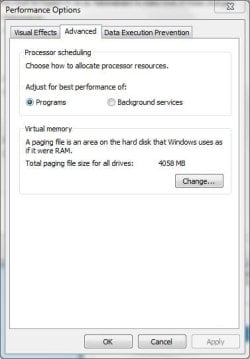
Start-Control Panel-System&Security-System-Advanced System Settings (on the left)-Settings (in the Performance panel)-Advanced (tab @ the top)-Virtual Memory-Change.
Allow Windows 7 to manage it and reboot. | My System Specs | | System Manufacturer/Model Number 8 home-builds from the 80's into 2004 OS W7 Home Premium 32bit |
01-24-2012
|
#5 | | MS Windows 7 Ultimate 64-bit SP1 |
No change. Still gives me the error on startup, still won't let me hibernate. | My System Specs | | System Manufacturer/Model Number Dell Inspiron 1545 OS MS Windows 7 Ultimate 64-bit SP1 CPU Intel Mobile Core 2 Duo T6400 @ 2.00GHz, Penryn 45nm Motherboard Dell Inc. 0G848F (Microprocessor) Memory 4.00 GB Dual-Channel DDR2 @ 399MHz (6-6-6-18) Graphics Card Mobile Intel(R) 4 Series Express Chipset Family (Integrated) Sound Card IDT High Definition Audio CODEC Monitor(s) Displays Generic PnP Monitor (DPMS) (1366x768@60Hz) Screen Resolution 1366x768 (16:9) Keyboard Laptop Mouse Touchpad, and Logitech wireless USB mouse. PSU Laptop Case Laptop Cooling Laptop vent Hard Drives 2TB External, with ~1TB partition booting OS Internet Speed ~150 kb/s Other Info I'm running Windows COMPLETELY off a 2TB portable hard drive (since my 300GB internal drive just isn't big enough). It works exactly the same as it would normally, only it has to be constantly connected to my USB port. Obviously. I'll show you how to do it, if you ask! It's pretty cool.
Specs via Speccy |
01-25-2012
|
#6 | | Windows 7 Ultimate x86 SP1 & Back Track 5 Dual Boot with BURG |
Hi Adam,
I doubt I'll be able to help you with this, but I'll reply to your PM.
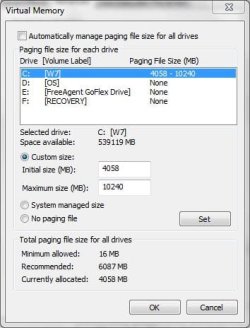
It might be helpful if you post a screenshot of this screen:
Use this tutorial to get to there: Move your Windows 7 Pagefile to a New Location | Worldstart's Tech Tips Newsletter
Tom | My System Specs | | System Manufacturer/Model Number Dell Vostro 1500 OS Windows 7 Ultimate x86 SP1 & Back Track 5 Dual Boot with BURG CPU Intel Core 2 Duo CPU T7250 @ 2.00GHz Motherboard ASUS SK8N (I think??) Memory 2048MB DDR2 Graphics Card NVIDIA GeForce 8600M GT - 256MB Sound Card Haven't a clue Monitor(s) Displays 15.4" Dell Generic PnP Monitor Screen Resolution 1440x900 Keyboard Dell Keyboard Mouse Dell Optical Premium USB Mouse PSU Haven't a clue Case Haven't a clue Cooling Fan Hard Drives ST9160821AS ATA Device [160gb]
2x Seagate FreeAgent [500gb] Internet Speed 2.4 mb/sec Download 1.3 mb/sec Upload |
01-25-2012
|
#7 | | MS Windows 7 Ultimate 64-bit SP1 |
Thanks for the reply;
Here's the shot-
Just as an explanation, C is the partition of my external drive that is running Windows 7 Ultimate; D is my normal internal laptop drive with Vista Home Premium; E is the partition on my external drive that I use for data storage; and F is the recovery partition on my internal drive for Vista, that came pre-installed with my laptop.
I've custom set my pagefile (or tried to, at least) to such a high amount because I can afford to burn up space for "extra" RAM, and I imagine it will be somewhat helpful for editing videos if I can ever get it to work. Although at this point I'd be happy to shrink it back to normal size if it'd make hibernation work again.
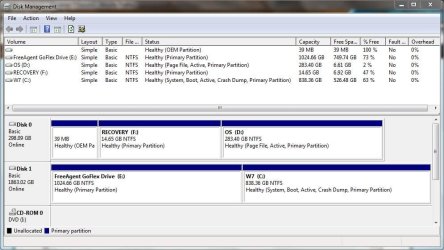
Also, here's the screenshot of my Disk Management Screen-
You can see here that D (my internal Vista drive) has the page file flag set, but C (my Windows 7 drive) does not, no matter what I change the settings to in that virtual memory window.
Just a few other misc. details:
I do have Write-caching enabled on the Windows 7 drive, so in theory it should support a page file, at least by my understanding.
Also, I will note that when I boot into Vista, it has Vista on the C drive and my two HD partitions (the Windows 7 and data storage one) on other drive letters. This is normal behavior since the OS's operate independently, and were both installed to occupy the C drive. I only mention it in case someone wants me to do something from the Vista installation, so they know that whichever OS I'm using will be on C. | My System Specs | | System Manufacturer/Model Number Dell Inspiron 1545 OS MS Windows 7 Ultimate 64-bit SP1 CPU Intel Mobile Core 2 Duo T6400 @ 2.00GHz, Penryn 45nm Motherboard Dell Inc. 0G848F (Microprocessor) Memory 4.00 GB Dual-Channel DDR2 @ 399MHz (6-6-6-18) Graphics Card Mobile Intel(R) 4 Series Express Chipset Family (Integrated) Sound Card IDT High Definition Audio CODEC Monitor(s) Displays Generic PnP Monitor (DPMS) (1366x768@60Hz) Screen Resolution 1366x768 (16:9) Keyboard Laptop Mouse Touchpad, and Logitech wireless USB mouse. PSU Laptop Case Laptop Cooling Laptop vent Hard Drives 2TB External, with ~1TB partition booting OS Internet Speed ~150 kb/s Other Info I'm running Windows COMPLETELY off a 2TB portable hard drive (since my 300GB internal drive just isn't big enough). It works exactly the same as it would normally, only it has to be constantly connected to my USB port. Obviously. I'll show you how to do it, if you ask! It's pretty cool.
Specs via Speccy |
01-26-2012
|
#8 | | |
Windows 7 is not meant to be installed to USB drive. I'm amazed it works at all or isn't slow as molasses. That you only have the hibernation problem is surprising.
Install it to an internal HD or SSD and you should see the problem go away and get much better performance. | My System Specs | | |
01-26-2012
|
#9 | | MS Windows 7 Ultimate 64-bit SP1 |
I know it isn't, but it works better this way than Vista does on my normal hard drive (and Vista runs at a more or less normal speed). And this way it's on a bigger 1TB partition, instead of my little 320GB internal drive, so I don't plan to change it. I just want to try to enable the pagefile on it and see if that fixes my hibernation problem. Even if it doesn't, I'll continue to use it this way because it gives me equal or better performance and is on a MUCH bigger disk.
I won't be surprised if it's impossible to get hibernation to work with this setup, but I think it's worth a try.
Just as a note about installing Windows on a USB drive: from what I've read, the only reason you can't normally is because Microsoft's installer for the OS is configured not to let it. That program link is a program that basically just makes the boot environment think your USB drive is a normal drive, so everything installs like it should. It will more than likely have issues if you try to boot it on different computers, but as long as I'm only using it on my laptop, this hibernation/pagefile issue is the only problem you're really likely to encounter. It also helps that my external drive is an actual spinning hard drive with a USB 3.0 connection (which works fine with my legacy USB 2.0 laptop ports) and not a flash drive. I imaging a flash drive would have major problems running it.
So there's my spiel about it  I'd say just pretend it's having these problems on a normal installation and see if any of the normal solutions for a problem like this will work. I don't really expect specialized help for this problem if it's directly related to my unique setup, so normal suggestions are welcome. Thanks! | My System Specs | | System Manufacturer/Model Number Dell Inspiron 1545 OS MS Windows 7 Ultimate 64-bit SP1 CPU Intel Mobile Core 2 Duo T6400 @ 2.00GHz, Penryn 45nm Motherboard Dell Inc. 0G848F (Microprocessor) Memory 4.00 GB Dual-Channel DDR2 @ 399MHz (6-6-6-18) Graphics Card Mobile Intel(R) 4 Series Express Chipset Family (Integrated) Sound Card IDT High Definition Audio CODEC Monitor(s) Displays Generic PnP Monitor (DPMS) (1366x768@60Hz) Screen Resolution 1366x768 (16:9) Keyboard Laptop Mouse Touchpad, and Logitech wireless USB mouse. PSU Laptop Case Laptop Cooling Laptop vent Hard Drives 2TB External, with ~1TB partition booting OS Internet Speed ~150 kb/s Other Info I'm running Windows COMPLETELY off a 2TB portable hard drive (since my 300GB internal drive just isn't big enough). It works exactly the same as it would normally, only it has to be constantly connected to my USB port. Obviously. I'll show you how to do it, if you ask! It's pretty cool.
Specs via Speccy |
01-26-2012
|
#10 | | |
What happens when you set it to System Managed as suggested previously?
Try placing it on one of the other partitions as well. But first turn it off by ticking No Paging File and reboot to delete it. | My System Specs | | Hibernation only locks computer; pagefile problem? problems? All times are GMT -5. The time now is 07:54 PM. |  |