|  | | |
28 Jan 2012
|
#1 | | W7x64 Pro, SuSe 12.1/** W7 x64 Pro, XP MCE Indian Territory |
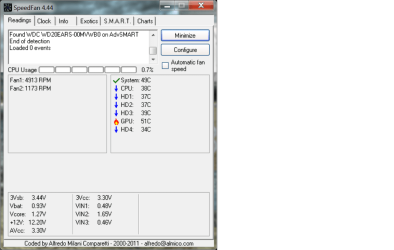
System Temp. While working on another unrelated problem, I opened SpeedFan and found that the system temperature was much higher than I had seen before, as can be seen in the screenshot. Currently, I have both sides of the case open, and since none of the component temperatures come even close to comparing, I don't understand how it could be so high, since the room temperature is at normal also.
Is this just some kind of glitch in readings, or is there some else that could possibly be awry?
EDIT: I just checked the chipset fan, and it appears to be running normally, without any noticeable dirt in the HS fins. | My System Specs |
| System Manufacturer/Model Number DIY OS W7x64 Pro, SuSe 12.1/** W7 x64 Pro, XP MCE CPU Phenom II 1090T w/Noctua NH-D14 /**4400+ X2 w/CM Hyper TX 3 Motherboard ASRock 890FX Deluxe 4/**A8N-SLI Memory 2 x 2GB Patriot PGS34g1600LLKA/**4x1GB Corsair VS Graphics Card EVGA GTX460 SC/**EVGA 8800GTS Sound Card Asus Xonar D2X/**Xonar D1 Monitor(s) Displays Acer X233H, Dell E152FPc /**LG M237-WD Screen Resolution 1920x1080 & 1024x768/**1980x1080 Keyboard Logitech Media USB/**Saitek Eclipse Mouse Cordless Trackman Wheel/**Ditto PSU CM RS600 w/ APC BX1000G/**Antec 500 TP w/ APC BX1000 Case HAF922/**Antec 1040IIB Cooling 3x200mm, 1x140 and 1x120mm/**5x80mm fans Hard Drives WDC 2TB, 1.5TB, 1TB, 500GB,Seagate 500GB , Maxtor 80GB /**500GB Seagate & WDC 1TB Black Internet Speed 3.3Mbps Other Info SB 560 5.1 w/ Sennheiser RS140/**Creative T20 speakers, Dvico FusionHDTV7 Gold RT, Cisco E3000, HP 5510V AIO, Linksys E3000, Belkin F5U237 hub and **F5D8055 adapter
(** = 2nd rig) |
28 Jan 2012
|
#2 | | W7x64 Pro, SuSe 12.1/** W7 x64 Pro, XP MCE Indian Territory |
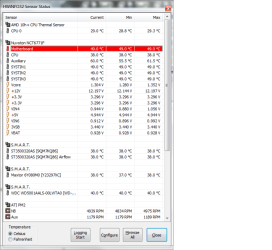
I checked the temperatures in SpeedFan's configuration window, and it shows an aux temp that is even higher. I'm not at all sure what the definition of aux temp is, or how it might relate to the sys temp? | My System Specs | | System Manufacturer/Model Number DIY OS W7x64 Pro, SuSe 12.1/** W7 x64 Pro, XP MCE CPU Phenom II 1090T w/Noctua NH-D14 /**4400+ X2 w/CM Hyper TX 3 Motherboard ASRock 890FX Deluxe 4/**A8N-SLI Memory 2 x 2GB Patriot PGS34g1600LLKA/**4x1GB Corsair VS Graphics Card EVGA GTX460 SC/**EVGA 8800GTS Sound Card Asus Xonar D2X/**Xonar D1 Monitor(s) Displays Acer X233H, Dell E152FPc /**LG M237-WD Screen Resolution 1920x1080 & 1024x768/**1980x1080 Keyboard Logitech Media USB/**Saitek Eclipse Mouse Cordless Trackman Wheel/**Ditto PSU CM RS600 w/ APC BX1000G/**Antec 500 TP w/ APC BX1000 Case HAF922/**Antec 1040IIB Cooling 3x200mm, 1x140 and 1x120mm/**5x80mm fans Hard Drives WDC 2TB, 1.5TB, 1TB, 500GB,Seagate 500GB , Maxtor 80GB /**500GB Seagate & WDC 1TB Black Internet Speed 3.3Mbps Other Info SB 560 5.1 w/ Sennheiser RS140/**Creative T20 speakers, Dvico FusionHDTV7 Gold RT, Cisco E3000, HP 5510V AIO, Linksys E3000, Belkin F5U237 hub and **F5D8055 adapter
(** = 2nd rig) |
28 Jan 2012
|
#3 | | Windows 7 Ultimate SP1 x64 Macedonia |
Hello seekermeister, I don't know what's AUX mean, but I made a search and found this: [Solved] What is AUX temperature? - Other-Components - CPU-Components
Also, you're temperatures are not so low. First one, I guess is the mobo temp, that its pretty high for idle pc.
As I see in you're system specs, you have pretty good cooling system in your pc. Check that you're fans are working propertly. Maybe something is wrong with them, that's my opinion. | My System Specs | | OS Windows 7 Ultimate SP1 x64 CPU Intel Pentium G630 @2.7GHz 3MB Motherboard Asus P8H61-M LX3 PLUS Memory Corsair 4GB DDR3 / 1066MHz 9-9-9-24 2T Graphics Card Intel HD Graphics Sound Card Integrated Monitor(s) Displays Philips 192EL Screen Resolution 1366 x 768 Keyboard Delux K5108 Mouse Genius PSU Hantol 500W Case Delux costumized... Cooling 120mm Hantol, Spire 80mm Hard Drives WD Caviar Blue 500GB / 16MB Internet Speed 15 Mbit Other Info Genius SW-2.1 355 Speakers,Camera,Joystick
Asus K55VJ(i5 3210, GT635M / 2GB, 8GB DDR3, 500GB HDD) |
28 Jan 2012
|
#4 | | W7x64 Pro, SuSe 12.1/** W7 x64 Pro, XP MCE Indian Territory |
Thanks for the link, I guess I can ignore aux temp, but the same isn't true of system temp, which was my main concern. All visible fan are spinning normally. The only one that I can't see is the middle fan on my CPU HS/F, but that shouldn't have any effect on the system temp. | My System Specs | | System Manufacturer/Model Number DIY OS W7x64 Pro, SuSe 12.1/** W7 x64 Pro, XP MCE CPU Phenom II 1090T w/Noctua NH-D14 /**4400+ X2 w/CM Hyper TX 3 Motherboard ASRock 890FX Deluxe 4/**A8N-SLI Memory 2 x 2GB Patriot PGS34g1600LLKA/**4x1GB Corsair VS Graphics Card EVGA GTX460 SC/**EVGA 8800GTS Sound Card Asus Xonar D2X/**Xonar D1 Monitor(s) Displays Acer X233H, Dell E152FPc /**LG M237-WD Screen Resolution 1920x1080 & 1024x768/**1980x1080 Keyboard Logitech Media USB/**Saitek Eclipse Mouse Cordless Trackman Wheel/**Ditto PSU CM RS600 w/ APC BX1000G/**Antec 500 TP w/ APC BX1000 Case HAF922/**Antec 1040IIB Cooling 3x200mm, 1x140 and 1x120mm/**5x80mm fans Hard Drives WDC 2TB, 1.5TB, 1TB, 500GB,Seagate 500GB , Maxtor 80GB /**500GB Seagate & WDC 1TB Black Internet Speed 3.3Mbps Other Info SB 560 5.1 w/ Sennheiser RS140/**Creative T20 speakers, Dvico FusionHDTV7 Gold RT, Cisco E3000, HP 5510V AIO, Linksys E3000, Belkin F5U237 hub and **F5D8055 adapter
(** = 2nd rig) |
28 Jan 2012
|
#5 | | Windows 7x64 Home Premium SP1 x 2 Australia |
I wouldn't be happy with that idle system temperature even on a really hot day.
Is Fan 1 speed correct? Seems high.
You could try comparing the results using HWiNFO, HWiNFO32 & HWiNFO64 - Hardware Information and Analysis Tools
or CPUID - System & hardware benchmark, monitoring, reporting | My System Specs | | System Manufacturer/Model Number Own build (+ Recased Acer Aspire x1800) OS Windows 7x64 Home Premium SP1 x 2 CPU Intel i7 2600k Motherboard ASUS P8Z68 Deluxe Memory G.Skill Ripjaws (DDR3-1600) 2x4GB Graphics Card Nvidia GeForce GTS 450; Intel HD Graphics 3000(GT2+) Monitor(s) Displays Dell Ultrasharp IPS panel U2311H, Samsung SyncMaster P2350 Screen Resolution 1920x1080 Keyboard Logitech MK520 (wireless) Mouse Logitech MK520 PSU Seasonic M12II 520W Case Lian Li Lancool PC-K60 Cooling Case: 1x120mm, 3x140mm CPU: Hyper 212+ Hard Drives Crucial M4 128GB (000F), Seagates 1TB Barracuda ST31000528AS + Internet Speed 6-7 Mbps Antivirus Norton NIS, Malwarebytes on 2 (MSE on 3rd PC) Browser FireFox Other Info Audio: Logitech Z523 2.1 |
28 Jan 2012
|
#6 | | W7x64 Pro, SuSe 12.1/** W7 x64 Pro, XP MCE Indian Territory |
Yes, it is correct. That is the CPU fans, which I have set on high...but again, that shouldn't have anything to do with the system temp. Fan 2 is the chipset fan, but as I recall, that is the same speed that it has run since I installed the motherboard. | My System Specs | | System Manufacturer/Model Number DIY OS W7x64 Pro, SuSe 12.1/** W7 x64 Pro, XP MCE CPU Phenom II 1090T w/Noctua NH-D14 /**4400+ X2 w/CM Hyper TX 3 Motherboard ASRock 890FX Deluxe 4/**A8N-SLI Memory 2 x 2GB Patriot PGS34g1600LLKA/**4x1GB Corsair VS Graphics Card EVGA GTX460 SC/**EVGA 8800GTS Sound Card Asus Xonar D2X/**Xonar D1 Monitor(s) Displays Acer X233H, Dell E152FPc /**LG M237-WD Screen Resolution 1920x1080 & 1024x768/**1980x1080 Keyboard Logitech Media USB/**Saitek Eclipse Mouse Cordless Trackman Wheel/**Ditto PSU CM RS600 w/ APC BX1000G/**Antec 500 TP w/ APC BX1000 Case HAF922/**Antec 1040IIB Cooling 3x200mm, 1x140 and 1x120mm/**5x80mm fans Hard Drives WDC 2TB, 1.5TB, 1TB, 500GB,Seagate 500GB , Maxtor 80GB /**500GB Seagate & WDC 1TB Black Internet Speed 3.3Mbps Other Info SB 560 5.1 w/ Sennheiser RS140/**Creative T20 speakers, Dvico FusionHDTV7 Gold RT, Cisco E3000, HP 5510V AIO, Linksys E3000, Belkin F5U237 hub and **F5D8055 adapter
(** = 2nd rig) |
28 Jan 2012
|
#7 | | W7x64 Pro, SuSe 12.1/** W7 x64 Pro, XP MCE Indian Territory |
Wrong again...I rebooted into the BIOS to check the chipset fan speed setting, and while it is set on high, it is the higher speed fan shown in SpeedFan. The lower speed fan is the fan I have mounted on the bottom of the case.
I also checked the system temp and CPU temp while in the BIOS, and while the CPU temp is a little hotter than shown in SpeedFan, the system temp is 5 degrees cooler. I'm accustomed to the CPU temp being hotter in the BIOS, because that has been true on every system that I've built, but I can't remember that might hold with the system temp temp? | My System Specs | | System Manufacturer/Model Number DIY OS W7x64 Pro, SuSe 12.1/** W7 x64 Pro, XP MCE CPU Phenom II 1090T w/Noctua NH-D14 /**4400+ X2 w/CM Hyper TX 3 Motherboard ASRock 890FX Deluxe 4/**A8N-SLI Memory 2 x 2GB Patriot PGS34g1600LLKA/**4x1GB Corsair VS Graphics Card EVGA GTX460 SC/**EVGA 8800GTS Sound Card Asus Xonar D2X/**Xonar D1 Monitor(s) Displays Acer X233H, Dell E152FPc /**LG M237-WD Screen Resolution 1920x1080 & 1024x768/**1980x1080 Keyboard Logitech Media USB/**Saitek Eclipse Mouse Cordless Trackman Wheel/**Ditto PSU CM RS600 w/ APC BX1000G/**Antec 500 TP w/ APC BX1000 Case HAF922/**Antec 1040IIB Cooling 3x200mm, 1x140 and 1x120mm/**5x80mm fans Hard Drives WDC 2TB, 1.5TB, 1TB, 500GB,Seagate 500GB , Maxtor 80GB /**500GB Seagate & WDC 1TB Black Internet Speed 3.3Mbps Other Info SB 560 5.1 w/ Sennheiser RS140/**Creative T20 speakers, Dvico FusionHDTV7 Gold RT, Cisco E3000, HP 5510V AIO, Linksys E3000, Belkin F5U237 hub and **F5D8055 adapter
(** = 2nd rig) |
28 Jan 2012
|
#8 | | Windows 7x64 Home Premium SP1 x 2 Australia |
I don't believe the temperature in the BIOS measures "idle" system temperature. It also depends what they are measuring after a BIOS upgrade ASUS went from measuring Tcore to Tcase.
The programs I mentioned (which you may have) give a good approximation of Tcore. They provide an accurate Tsystem for my motherboard. | My System Specs | | System Manufacturer/Model Number Own build (+ Recased Acer Aspire x1800) OS Windows 7x64 Home Premium SP1 x 2 CPU Intel i7 2600k Motherboard ASUS P8Z68 Deluxe Memory G.Skill Ripjaws (DDR3-1600) 2x4GB Graphics Card Nvidia GeForce GTS 450; Intel HD Graphics 3000(GT2+) Monitor(s) Displays Dell Ultrasharp IPS panel U2311H, Samsung SyncMaster P2350 Screen Resolution 1920x1080 Keyboard Logitech MK520 (wireless) Mouse Logitech MK520 PSU Seasonic M12II 520W Case Lian Li Lancool PC-K60 Cooling Case: 1x120mm, 3x140mm CPU: Hyper 212+ Hard Drives Crucial M4 128GB (000F), Seagates 1TB Barracuda ST31000528AS + Internet Speed 6-7 Mbps Antivirus Norton NIS, Malwarebytes on 2 (MSE on 3rd PC) Browser FireFox Other Info Audio: Logitech Z523 2.1 |
28 Jan 2012
|
#9 | | W7x64 Pro, SuSe 12.1/** W7 x64 Pro, XP MCE Indian Territory |
HWINFO agrees with SpeedFan on the system temp, but I'm beginning to think that the temp is invalid anyway, because on one reboot, it read 42 degrees (2 degrees hotter than before), and on the last reboot, it read 49 degrees (9 degrees hotter than original). Since these temp don't seem to change over time, I think that there is a problem with the way that either the programs are reading it, or something awry in how the motherboard is measuring it.
Your last post threw me a bit, because my motherboard is ASRock, not Asus, and I have never flashed the BIOS, so I don't know if it uses Tcase or Tcore. However, I was thinking that Tcore was for the processor, not the chipset... | My System Specs | | System Manufacturer/Model Number DIY OS W7x64 Pro, SuSe 12.1/** W7 x64 Pro, XP MCE CPU Phenom II 1090T w/Noctua NH-D14 /**4400+ X2 w/CM Hyper TX 3 Motherboard ASRock 890FX Deluxe 4/**A8N-SLI Memory 2 x 2GB Patriot PGS34g1600LLKA/**4x1GB Corsair VS Graphics Card EVGA GTX460 SC/**EVGA 8800GTS Sound Card Asus Xonar D2X/**Xonar D1 Monitor(s) Displays Acer X233H, Dell E152FPc /**LG M237-WD Screen Resolution 1920x1080 & 1024x768/**1980x1080 Keyboard Logitech Media USB/**Saitek Eclipse Mouse Cordless Trackman Wheel/**Ditto PSU CM RS600 w/ APC BX1000G/**Antec 500 TP w/ APC BX1000 Case HAF922/**Antec 1040IIB Cooling 3x200mm, 1x140 and 1x120mm/**5x80mm fans Hard Drives WDC 2TB, 1.5TB, 1TB, 500GB,Seagate 500GB , Maxtor 80GB /**500GB Seagate & WDC 1TB Black Internet Speed 3.3Mbps Other Info SB 560 5.1 w/ Sennheiser RS140/**Creative T20 speakers, Dvico FusionHDTV7 Gold RT, Cisco E3000, HP 5510V AIO, Linksys E3000, Belkin F5U237 hub and **F5D8055 adapter
(** = 2nd rig) |
28 Jan 2012
|
#10 | | Windows 7x64 Home Premium SP1 x 2 Australia |
Tcore/case is for the CPU but you just mentioned the CPU above which is why I mentioned it. My mention of ASUS was I had experience with it's confusing BIOS temp measures and ASRock was a spinoff - yes tenuous link.
Is it possible your system temp sensor is faulty. This may be a dumb suggestion but assuming you don't have a thermocouple type thermometer could you use a conventional thermometer to get a sanity check at least - 46 C is hot. | My System Specs | | System Manufacturer/Model Number Own build (+ Recased Acer Aspire x1800) OS Windows 7x64 Home Premium SP1 x 2 CPU Intel i7 2600k Motherboard ASUS P8Z68 Deluxe Memory G.Skill Ripjaws (DDR3-1600) 2x4GB Graphics Card Nvidia GeForce GTS 450; Intel HD Graphics 3000(GT2+) Monitor(s) Displays Dell Ultrasharp IPS panel U2311H, Samsung SyncMaster P2350 Screen Resolution 1920x1080 Keyboard Logitech MK520 (wireless) Mouse Logitech MK520 PSU Seasonic M12II 520W Case Lian Li Lancool PC-K60 Cooling Case: 1x120mm, 3x140mm CPU: Hyper 212+ Hard Drives Crucial M4 128GB (000F), Seagates 1TB Barracuda ST31000528AS + Internet Speed 6-7 Mbps Antivirus Norton NIS, Malwarebytes on 2 (MSE on 3rd PC) Browser FireFox Other Info Audio: Logitech Z523 2.1 All times are GMT -5. The time now is 01:01 PM. | |