|
Welcome to Windows 7 Forums. Our forum is dedicated to helping you find solutions with any problems, errors or issues you are experiencing with Windows 7. The Windows 7 forum also covers news and updates and has an extensive Windows 7 tutorial section that covers a wide range of tips and tricks.
Windows 7 - Extra long shutdown |
01-29-2012
|
#1 | | Vista and Windows7, sometimes Ubuntu and Fedora |
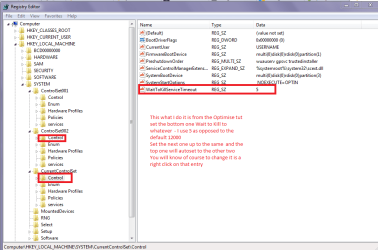
Extra long shutdown On my desktop with an i7 and a M4 SSD, the time to shutdown is almost longer than the boot time. I have already set the registry to 2000ms, but the system seems to ignore that.
In contrast, my laptop with an i5 and a Vertex2 shuts down almost instantly. It has a quasi identical Windows 7 setup.
The desktop shutdown does not bother me when I walk away from it at night. But for the occasional restart, it is a bit of a pain. Does anybody have an idea what else can be done to speed that up.
| My System Specs | | System Manufacturer/Model Number HP, Dell, Gateway - 2 laptops and 2 desktops OS Vista and Windows7, sometimes Ubuntu and Fedora CPU from 1.6GHz Duo to 2.5GHz Quad Monitor(s) Displays 2x HP w2207 Keyboard with trackball - no mices Mouse terrible devices, who wants them Hard Drives 5x HDD, 2x SSD, 6x Externals Internet Speed DSL 6000 |
01-29-2012
|
#2 | | |
wolfgang, have you tried these tweaks? Code: [HKEY_CURRENT_USER\Control Panel\Desktop]
"AutoEndTasks"="1"
"HungAppTimeout"="200"
"MenuShowDelay"="0"
"WaitToKillAppTimeout"="200"
"LowLevelHooksTimeout"="200"
[HKEY_LOCAL_MACHINE\SYSTEM\ControlSet002\Control]
"WaitToKillServiceTimeout"="200"
[HKEY_LOCAL_MACHINE\SYSTEM\ControlSet001\Control]
"WaitToKillServiceTimeout"="200"
[HKEY_LOCAL_MACHINE\SYSTEM\CurrentControlSet\Control]
"WaitToKillServiceTimeout"="200"
[HKEY_LOCAL_MACHINE\SYSTEM\CurrentControlSet\Control\Session Manager\Memory Management]
"ClearPageFileAtShutdown"=dword:00000000
[HKEY_USERS\S-1-5-19\Control Panel\Desktop]
"AutoEndTasks"="1"
"HungAppTimeout"="200"
"MenuShowDelay"="0"
"WaitToKillAppTimeout"="200"
[HKEY_USERS\S-1-5-20\Control Panel\Desktop]
"AutoEndTasks"="1"
"HungAppTimeout"="200"
"MenuShowDelay"="0"
"WaitToKillAppTimeout"="200" or merge the attached registry file.
you may want to experiment a bit with the numbers - and make sure that it still asks to save opened files.
i used to use these on my old rig with great success - it would shut down very quickly, fortunately i don't seem to need it any more.  Warning i know whs knows this, but for any other readers, please please backup your registry before mucking around with it! | My System Specs | | System Manufacturer/Model Number mickey megabyte 1234 OS ultimate 64 sp1 CPU i5 2500K 3.3@4.2GHz Motherboard MSI P67A-GD53 Memory 8 gigs GSkill Ripjaws 1600 Graphics Card amd hd6950 Sound Card creative x-fi gamer Monitor(s) Displays samsung 24" Screen Resolution 1920x1080 Keyboard saitek eclipse ii Mouse logitech g3 PSU antec 550 Case antec three hundred Cooling i'm a cooling fan Hard Drives ocz vertex 2e 60 gig, samsung f3 1tb, buffalo 2tb ext Internet Speed about 4 Mbps Other Info i love win7 |
01-29-2012
|
#3 | | |
You could always take a trace, via my tutorial, of the shutdown process and get a visualization of what's causing it too... | My System Specs | | System Manufacturer/Model Number HP Z400 workstation OS Windows Server 2008 R2 CPU Intel Xeon 3550 @3.06GHz Motherboard HP Memory 16GB DDR3 Graphics Card Nvidia Quadro 600 Sound Card Realtek ALC262 Monitor(s) Displays 2x Hanns-G HG281 Screen Resolution 1920x1200 Keyboard Microsoft Natural Ergonomic Keyboard 7000 Mouse Microsoft Intellimouse Explorer 3.0 PSU HP Case HP Hard Drives 1x Samsung 160GB SSD
2x WD 1TB (RAID1) |
01-29-2012
|
#4 | | Vista and Windows7, sometimes Ubuntu and Fedora |
Thanks Mickey. I have already done that using 2000ms. But the shutdown still is a lot longer. The system seems to ignore my settings.
Thanks Carl. I will try the trace. Looks promising. | My System Specs | | System Manufacturer/Model Number HP, Dell, Gateway - 2 laptops and 2 desktops OS Vista and Windows7, sometimes Ubuntu and Fedora CPU from 1.6GHz Duo to 2.5GHz Quad Monitor(s) Displays 2x HP w2207 Keyboard with trackball - no mices Mouse terrible devices, who wants them Hard Drives 5x HDD, 2x SSD, 6x Externals Internet Speed DSL 6000 |
01-29-2012
|
#5 | | |
Are those trace commands case-sensitive? | My System Specs | | System Manufacturer/Model Number 8 home-builds from the 80's into 2004 OS W7 Home Premium 32bit |
01-30-2012
|
#6 | | |
No, they are not. However, there's a ton of text, so case-sensitive means it's easier to read (and it's an old habit). | My System Specs | | System Manufacturer/Model Number HP Z400 workstation OS Windows Server 2008 R2 CPU Intel Xeon 3550 @3.06GHz Motherboard HP Memory 16GB DDR3 Graphics Card Nvidia Quadro 600 Sound Card Realtek ALC262 Monitor(s) Displays 2x Hanns-G HG281 Screen Resolution 1920x1200 Keyboard Microsoft Natural Ergonomic Keyboard 7000 Mouse Microsoft Intellimouse Explorer 3.0 PSU HP Case HP Hard Drives 1x Samsung 160GB SSD
2x WD 1TB (RAID1) |
01-30-2012
|
#7 | | Windows 7 Professional 64bit |
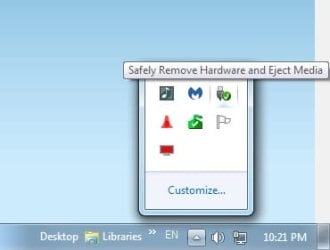
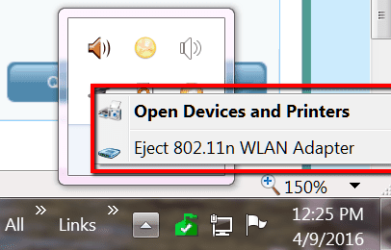
Do you have external drives USB connected that you leave on? If so, try closing the drives first. You really need to read this before disconnecting drives: Safely Remove Hardware - Eject Device | My System Specs | | System Manufacturer/Model Number Laptop OS Windows 7 Professional 64bit CPU Intel Core i7 2820QM 2.3GHz Memory 8GB ( 1666 MHz ) Graphics Card ATI Fire Pro M8900 Sound Card M-Audio Fast Track Ultra ( external ) Screen Resolution 1200 Keyboard It lights up Mouse Logitech laser Hard Drives 250GB 7200 rpm Internet Speed Blazing |
01-30-2012
|
#8 | | Vista and Windows7, sometimes Ubuntu and Fedora |

Quote: Originally Posted by voiceartistusa Do you have external drives USB connected that you leave on? If so, try closing the drives first. You really need to read this before disconnecting drives: Safely Remove Hardware - Eject Device My box looks like a porcupine. 12 USB ports have devices hanging on the box. It would be completely impractical disconnecting those. For some I would have to crawl under the desk and go into the back of the box. Try that at age 74. | My System Specs | | System Manufacturer/Model Number HP, Dell, Gateway - 2 laptops and 2 desktops OS Vista and Windows7, sometimes Ubuntu and Fedora CPU from 1.6GHz Duo to 2.5GHz Quad Monitor(s) Displays 2x HP w2207 Keyboard with trackball - no mices Mouse terrible devices, who wants them Hard Drives 5x HDD, 2x SSD, 6x Externals Internet Speed DSL 6000 Extra long shutdown problems? All times are GMT -5. The time now is 07:57 PM. |  |