| Windows 7: Is it beneficial to use multiple ReadyBoost flash drives? |
05 Feb 2012
|
#1 | | Win7 Ultimate x64 SP1 / WCP x64 / Ubuntu 11 x64 Pearl of the Orient Seas |
Is it beneficial to use multiple ReadyBoost flash drives? Having 4gb of physical ram and an 8gb flash drive (4gb used) for ReadyBoost. Would it be beneficial to use more flash drives for ready boost? | My System Specs |
| OS Win7 Ultimate x64 SP1 / WCP x64 / Ubuntu 11 x64 |
05 Feb 2012
|
#2 | | Win7 Ultimate SP1 x64 / Windows 8 Pro / Android Mauritius |
No, ReadyBoost is only effective on systems with around 1GB of RAM or less, don't use it as a replacement for RAM. | My System Specs | | System Manufacturer/Model Number Custom Build OS Win7 Ultimate SP1 x64 / Windows 8 Pro / Android CPU Intel Core 2 Quad Q8200 OC'd 3.08GHz Motherboard Asus Rampage formula LGA775 Memory 8GB DDR2 900Mhz Graphics Card Zotac GTX 460OC 2GB GDDR5/Asus EN9600GT 1GB DDR3 PhyX Sound Card Supreme FX2 Monitor(s) Displays AOC 22' Screen Resolution 1680x1050 Keyboard Prolink keyboard Mouse Prolink optical mouse PSU Cooler Master GX 650W Cooling Cooler Master V6 + 3X fans Hard Drives 3X500GB hitachi, 2TB internal, 500GB Seagate FreeAgent, 640GB Samsung Internet Speed 1MiB/s Other Info 5.1 System + 2.1 System |
05 Feb 2012
|
#3 | | |

Quote: Originally Posted by yowanvista No, ReadyBoost is only effective on systems with around 1GB of RAM or less, don't use it as a replacement for RAM. Ah, good to know. I wondered what the cut-off was for any benefits.
Seems that most computers made today (desktops) have a minimum of 4gb of ram which would make Ready Boost pointless. | My System Specs | | System Manufacturer/Model Number Custom Build OS 7 Ultimate 64bit CPU Core i72600K OC'd to 4.3GHz Motherboard Asus Maximus Gene-Z Memory Corsair Vengeance 16G Graphics Card GTS250 PSU Corsair TX750M Case Corsair 500R Cooling Corsair H100 Hard Drives Corsair Force GT 120GB SSD
Seagate 1TB HDD |
05 Feb 2012
|
#4 | | |
I think this Guide explains it all. ReadyBoost - Setup and Use | My System Specs | | OS Windows 7 Ultimate x64 CPU Intel Core i5 2500k at 3.3 GhZ Memory 2x4GB DDR3 1333Hz Graphics Card Ati Radeon 6770 Sound Card Speakers Monitor(s) Displays 1x 15" HD 572 Screen Resolution 1024x768 Keyboard Wired Keyboard Mouse Wired Mouse PSU 500W Cooling 3x Fans Hard Drives 2x500GB Internet Speed 10MB/s Other Info Netbook: Dell Inspiron Mini |
05 Feb 2012
|
#5 | | |
Readyboost isn't really about RAM (although if you have less than 2GB of RAM, it will indeed help as an additional Superfetch cache), it is more about the type, speed, and usage of the hard disk (it's not just for extending the superfetch cache, it can be used to supplement hard disk cache). If you have 8+GB of RAM, obviously you aren't very likely to need additional Superfetch cache - however, if you have slower hard disks (5400-7200RPM) with low amounts of cache (16MB or less), you might actually benefit from a Readyboost key or two. On Windows 7 you can use up to 32GB of a USB key for cache (and since it's 2:1 compressed, that ends up being more like 60-64MB of Readyboost cache), so a fast, big key is somewhat preferable to multiple small keys. However, if you don't do a lot of random I/O (other than during boot) as a normal usage pattern, do not have slow disks with small amounts of disk cache, or have 2GB of RAM or less in your system (especially an x64 install), you won't see much benefit from Readyboost. Also, since Readyboost is running off of a USB key, it's not as fast as main RAM, so adding more RAM (if possible) will be far more beneficial than adding USB keys for Readyboost. | My System Specs | | System Manufacturer/Model Number HP Z400 workstation OS Windows Server 2008 R2 CPU Intel Xeon 3550 @3.06GHz Motherboard HP Memory 16GB DDR3 Graphics Card Nvidia Quadro 600 Sound Card Realtek ALC262 Monitor(s) Displays 2x Hanns-G HG281 Screen Resolution 1920x1200 Keyboard Microsoft Natural Ergonomic Keyboard 7000 Mouse Microsoft Intellimouse Explorer 3.0 PSU HP Case HP Hard Drives 1x Samsung 160GB SSD
2x WD 1TB (RAID1) |
05 Feb 2012
|
#6 | | Vista, Windows7, Mint Mate, Zorin, Windows 8 Florida in winter, Black Forest/Germany |

Quote: Originally Posted by Influx Having 4gb of physical ram and an 8gb flash drive (4gb used) for ReadyBoost. Would it be beneficial to use more flash drives for ready boost? With 4GB, forget it. In fact it will probably slow your system down because of the extra write operations. Use the stick for something else. | My System Specs | | System Manufacturer/Model Number HP, Dell, Gateway, Toshiba - 4 laptops and 2 desktops OS Vista, Windows7, Mint Mate, Zorin, Windows 8 CPU from 1.6GHz Duo to i7 Monitor(s) Displays 2x HP w2207 Keyboard with trackball - no mices Mouse Trackball mice Hard Drives 5x HDD, 7x SSD, 12x Externals Internet Speed DSL 6000 |
06 Feb 2012
|
#7 | | Win7 Ultimate x64 SP1 / WCP x64 / Ubuntu 11 x64 Pearl of the Orient Seas |

Quote: Originally Posted by yowanvista No, ReadyBoost is only effective on systems with around 1GB of RAM or less, don't use it as a replacement for RAM. Thanks, I don't use it as a replacement for RAM, it can never be. | My System Specs | | OS Win7 Ultimate x64 SP1 / WCP x64 / Ubuntu 11 x64 |
14 Feb 2012
|
#8 | | Windows 7 Professional 64 Bit SP1 St Thomas, Virgin Islands |
For Ready Boost Skeptics... Recently, I've been doing a lot of research on Ready Boost, SSDs, & Ramdisks.
Many people believe that Ready Boost serves as added ram for users with small amounts of ram. This appears to be untrue, based on a test I ran. (I'm probably not the first to try this.) My system has 8GB of ram & I have NEVER maxed out my ram usage, soooo.....
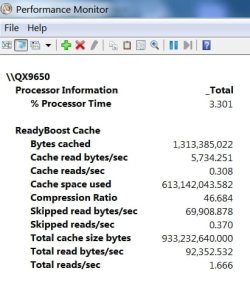
I experimented with Ready Boost by creating a 1GB Ramdisk & dedicated it to Ready Boost. I then set up logging for Ready Boost & ran it for about 7 minutes while I was doing other things on my PC. Please note again that I still never even came close to maxing out my ram. I'm attaching the report from the log file.
As you can see, Ready Boost is performing caching functions. Win 7 is definitely making use of Ready Boost, regardless of the amount of available/unused ram. I believe their is some slight benefit. I'm thinking the new Rapid Storage Technology on the Z68 chipped motherboards may be a variation/refinement of Ready Boost.
Improvements from using Ready Boost will vary, based on the media used. Some flash memory is faster than others. Also, there is the speed difference between USB 2 & USB 3. A Ramdisk is much faster than the average flash drive, & should be the best option for Ready Boost.
Any corrections or comments are welcome, as - by my avatar/logo implies - I'm no expert. I just find this subject interesting.
Also - please note that Ready Boost will only be useful when your OS is on a mechanical HD.
Last edited by TBoyd; 14 Feb 2012 at 05:51 PM..
| My System Specs | | System Manufacturer/Model Number Custom Build OS Windows 7 Professional 64 Bit SP1 CPU Intel QX9650 - Mild Overclock to 3.5Ghz Motherboard ASUS P5Q SE Plus Memory 16GB G.Skill F2-6400 at 840Mhz Graphics Card nVidia Ge Force GTX 550ti Sound Card On Board Monitor(s) Displays HP w2408h Screen Resolution 1920 x 1200 Keyboard Logitech Illuminated Mouse Logitech Wireless Trackball M570 PSU Antec Basiq BP500U Case CoolerMaster ATX ATC-210 Cooling Non-Stock Heatsink w/high speed CPU fan Hard Drives CRUCIAL M4 128Gb SSD, --
Two - WDC WD1001FALS-00J7B0 SATA's, -- One
WDC WD2001FASS-00U0B0 SATA |
14 Feb 2012
|
#9 | | |
Interesting - how do you generate that report? I got into the resource monitor, but I am lost after that... | My System Specs | | System Manufacturer/Model Number Custom Build OS 7 Ultimate 64bit CPU Core i72600K OC'd to 4.3GHz Motherboard Asus Maximus Gene-Z Memory Corsair Vengeance 16G Graphics Card GTS250 PSU Corsair TX750M Case Corsair 500R Cooling Corsair H100 Hard Drives Corsair Force GT 120GB SSD
Seagate 1TB HDD |
14 Feb 2012
|
#10 | | Vista, Windows7, Mint Mate, Zorin, Windows 8 Florida in winter, Black Forest/Germany |
Yeah, but a RAM disk is something completely different than a slow stick. And you only have to look into Resource Monitor > Memory tab > the graph on the bottom right to see that there are very few hard page faults (with 3GB of RAM or more). But yes, some programs generate faults even if there is plenty of available RAM. But for those rare occasions it is not necessary to install Ready Boost - especially not with a stick. It will only produce additional overhead. | My System Specs | | System Manufacturer/Model Number HP, Dell, Gateway, Toshiba - 4 laptops and 2 desktops OS Vista, Windows7, Mint Mate, Zorin, Windows 8 CPU from 1.6GHz Duo to i7 Monitor(s) Displays 2x HP w2207 Keyboard with trackball - no mices Mouse Trackball mice Hard Drives 5x HDD, 7x SSD, 12x Externals Internet Speed DSL 6000 Is it beneficial to use multiple ReadyBoost flash drives? problems? All times are GMT -5. The time now is 11:07 PM. | |