Windows 7 Forums Search
Welcome to Windows 7 Forums. Our forum is dedicated to helping you find solutions with any problems, errors or issues you are experiencing with Windows 7. The Windows 7 forum also covers news and updates and has an extensive Windows 7 tutorial section that covers a wide range of tips and tricks.


Windows 7 - Laptop gets extremely hot.

 
02-10-2012   #1


Windows 7 x64


Laptop gets extremely hot.

After doing a clean install of windows 7 64 bit, laptop gets unusually extremely hot which has not happened when I am using windows 7 32 bit. The laptop became laggy and very hot and I decided to restart, then the laptop would automatically shut down and not passing the boot process. Anyone knows why? and I noticed in resource monitor that a process namend ".Net Runtime Optimization Service" takes too much cpu which makes my cpu usage at a constant 100%


Last edited by beklogxd; 02-10-2012 at 06:49 AM.. Reason: added question
My System SpecsSystem Spec
02-10-2012   #2


Windows 7 Ultimate 64 bit


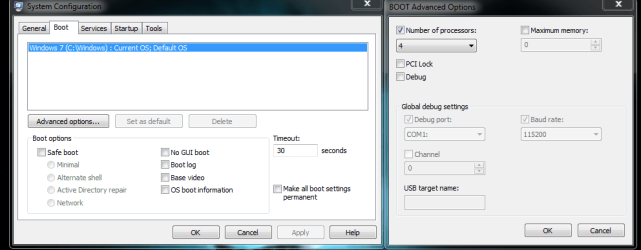
When you upgraded to the 64 bit OS, did you install all the 64 bit drivers? Have you cleaned out all the ports and intake and exhaust vents from dust? Have you gone into system configuration, boot tab, advanced options and checked the box for how many cores are to be activated...windows 7 natively sets it to 1. So if you have a multi-core that needs to change to how ever many cores you have. This could help the over heating problem.


Laptop gets extremely hot.-system-config.png
My System SpecsSystem Spec
02-10-2012   #3


Windows 7 x64


Quote   Quote: Originally Posted by bassfisher6522 View Post
When you upgraded to the 64 bit OS, did you install all the 64 bit drivers? Have you cleaned out all the ports and intake and exhaust vents from dust? Have you gone into system configuration, boot tab, advanced options and checked the box for how many cores are to be activated...windows 7 natively sets it to 1. So if you have a multi-core that needs to change to how ever many cores you have. This could help the over heating problem.


Attachment 197614
Yes, I think I have, I used my laptop's drive installer which I got when I bought the laptop and when installing it didn't ask whether I am using 64 or 32 bit, so I guess I did install all? Yup, I just did when I noticed the unusual heating of my laptop, I think the problem is that I didn't set for how many cores are to be activated and that I have a multi core processor. thank you sir!
My System SpecsSystem Spec
.


02-11-2012   #4


Windows 7 Ultimate 64 bit


How's the overheating doing?
My System SpecsSystem Spec
02-11-2012   #5


Windows 7 ultimate x64


You could also try the cooling pads they sell at Walmart.
My System SpecsSystem Spec
02-11-2012   #6


Windows 7 Home Premium x64


Clean the heatsink, it might be clogged with dust.
My System SpecsSystem Spec
Reply

 Laptop gets extremely hot. problems?


Thread Tools


Similar Threads for: Laptop gets extremely hot.
Thread Forum
Extremely odd problem! Please help Crashes and Debugging
VAIO Laptop Battery EXTREMELY Fast Out Hardware & Devices
Dell laptop screen occasionally shakes extremely Drivers
Extremely aggravated - Help? General Discussion


All times are GMT -5. The time now is 08:00 PM.


Windows 7 Forums is an independent web site and has not been authorized,
sponsored, or otherwise approved by Microsoft Corporation.
"Windows 7" and related materials are trademarks of Microsoft Corp.
© Designer Media Ltd
  

1 2 3 4 5 6 7 8 9 10 11 12 13 14 15 16 17 18 19 20 21 22 23 24 25 26 27 28 29 30