Windows 7 Forums


Windows 7: Power Options Not Working

28 Mar 2012  
priuscat

windows 7 ultimate x64
21 posts
 
 
Power Options Not Working

I have Windows 7 Ultimate x64 on my laptop and my desktop. My monitor no longer turns off after 20 minutes (what I have set in "when to turn Monitor Off") So I set when to turn monitor of after 1 minute, Results: monitors stay on all the time, never turning off on both my Laptop and my Desktop.

My System SpecsSystem Spec

28 Mar 2012  
Ztruker

Windows 7 Pro X64
3,616 posts
Space Coast of Florida


Try going to Control Panel\All Control Panel Items\Power Options\Edit Plan Settings then click on Restore Default Setting For This Plan. Save changes, see what happens.
My System SpecsSystem Spec
28 Mar 2012  
priuscat

windows 7 ultimate x64
21 posts


did that, same results. monitor stays on always, never shuts off
My System SpecsSystem Spec
.


28 Mar 2012  
Ztruker

Windows 7 Pro X64
3,616 posts
Space Coast of Florida


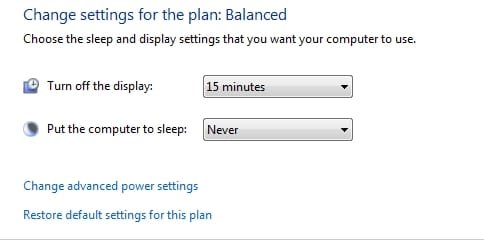
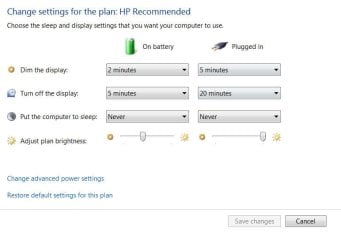
Does it show the same in both places?

Power Options Not Working-powerop1.jpg

Power Options Not Working-powerop2.jpg
My System SpecsSystem Spec
28 Mar 2012  
priuscat

windows 7 ultimate x64
21 posts


Quote   Quote: Originally Posted by Ztruker View Post
Does it show the same in both places?

Attachment 204787

Attachment 204788
well one's a laptop and the other a desktop, so, no they're not the same, the laptop has battery settings, the desktop doesn't. but both monitors are staying on well past 20 minutes
My System SpecsSystem Spec
28 Mar 2012  
priuscat

windows 7 ultimate x64
21 posts


Power Options Not Working-laptop-power-settings.jpg
My System SpecsSystem Spec
28 Mar 2012  
priuscat

windows 7 ultimate x64
21 posts


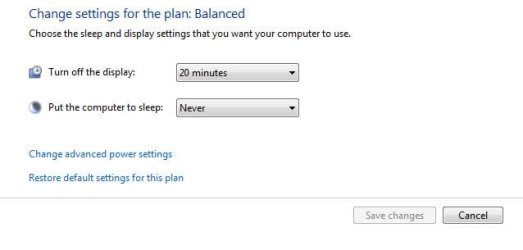
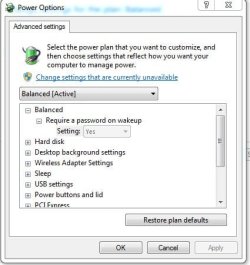
Power Options Not Working-desktop-power-settings.jpgPower Options Not Working-advanced-settings-desktop.jpgPower Options Not Working-advanced-settings-desktop-part-2.jpgPower Options Not Working-advanced-settings-laptop.jpgPower Options Not Working-advanced-settings-laptop-part-2.jpg

Last edited by priuscat; 28 Mar 2012 at 09:42 PM..
My System SpecsSystem Spec
29 Mar 2012  
priuscat

windows 7 ultimate x64
21 posts


Thank you for your submittal to the NVIDIA Product Feedback Page.
We will carefully review your submission and may contact you for further information if needed as we attempt to reproduce your issue.
Sincerely,
NVIDIA Customer Care

To access your issue from our support site, click here.


Issue Reference #120329-000130
Summary: Monitors on both my laptop and desktop don't shut off after the prescribed 20 mi...
Product Level 1: GeForce graphics
Date Created: 03/29/2012 12:20 PM
Last Updated: 03/29/2012 12:20 PM
Status: New
Choose OS: Microsoft Windows 7 64bit
Product Name: GTX 580 GT9600M
Driver Version: 296.10

Discussion Thread
Customer By Web Form (RICHARD ZIMMERMAN) 03/29/2012 12:20 PM
Monitors on both my laptop and desktop don't shut off after the prescribed 20 minutes set in power options. Reverting back to driver 280.36 resolves this issue.

Update: After my monitor turned of after 30 minutes two different times, Now the monitor stays on all the time.

Last edited by priuscat; 29 Mar 2012 at 05:28 PM.. Reason: problem not fixed
My System SpecsSystem Spec
29 Mar 2012  
Ztruker

Windows 7 Pro X64
3,616 posts
Space Coast of Florida


Sure sounds like a driver issue. Have you tried updating your Nvidia driver to the latest available version?

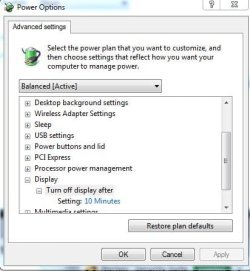
Also, with all the images you posted you didn't show what Display was set to under Advanced Options (my 2nd image and what I meant by the same in both places).
My System SpecsSystem Spec
29 Mar 2012  
priuscat

windows 7 ultimate x64
21 posts


Power Options Not Working-turn-off-display-desktop.jpg
Quote   Quote: Originally Posted by Ztruker View Post
Sure sounds like a driver issue. Have you tried updating your Nvidia driver to the latest available version?

Also, with all the images you posted you didn't show what Display was set to under Advanced Options (my 2nd image and what I meant by the same in both places).
296.10 is the latest as I stated in my post I went to Microsoft's FIXIT program, which is the idiots fixit program because it just went to power options and reset the options to default which I already did by myself, it didn't "fix" anything

Last edited by priuscat; 29 Mar 2012 at 06:58 PM.. Reason: turn off display setting
My System SpecsSystem Spec
Reply

 Power Options Not Working problems?


Thread Tools


Similar help and support threads for: Power Options Not Working
Thread Forum
Max processor state not working correctly under power options Performance & Maintenance
screensaver and power options not working on windows 7 Performance & Maintenance
How to set Advanced options in Power Options (64 bit Ultimate) Performance & Maintenance
Sleep Mode, Screensaver, Power Options not working General Discussion
Power Options/Power plan settings? Performance & Maintenance


All times are GMT -5. The time now is 01:16 PM.


Windows 7 Forums is an independent web site and has not been authorized,
sponsored, or otherwise approved by Microsoft Corporation.
"Windows 7" and related materials are trademarks of Microsoft Corp.
© Designer Media Ltd