
Some months ago, my PC suddenly started taking 10 minutes to boot. The shutdown time increased dramatically as well.
This happened after I installed a game (through Steam) that had some kind of DRM install with it. The install also, I recall, seemed to force a DirectX install. After that my PC started having this problem. Aside from startup/shutdown time increase (from 1 minute to 10 minutes), one software I use started acting up in one way: loading a plugin inside the software shows a progress bar "Scanning DirectX FX... " & "Scanning 2/7: Tee/Sink-to-Sink Converter". The problem with this, is that it now takes like 30 seconds when it was nearly instant before.
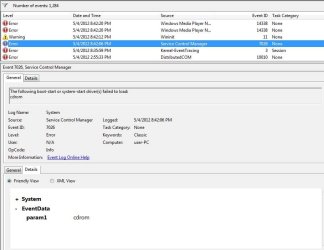
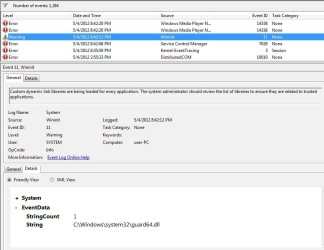
Otherwise everything seems fine. Really hope I don't have to do a clean OS install. Attached images of event viewer, which show the 3 errors beginning at startup.
This happened after I installed a game (through Steam) that had some kind of DRM install with it. The install also, I recall, seemed to force a DirectX install. After that my PC started having this problem. Aside from startup/shutdown time increase (from 1 minute to 10 minutes), one software I use started acting up in one way: loading a plugin inside the software shows a progress bar "Scanning DirectX FX... " & "Scanning 2/7: Tee/Sink-to-Sink Converter". The problem with this, is that it now takes like 30 seconds when it was nearly instant before.
Otherwise everything seems fine. Really hope I don't have to do a clean OS install. Attached images of event viewer, which show the 3 errors beginning at startup.
Attachments

My Computer
At a glance
Windows 7 Home Premium 64
- OS
- Windows 7 Home Premium 64


