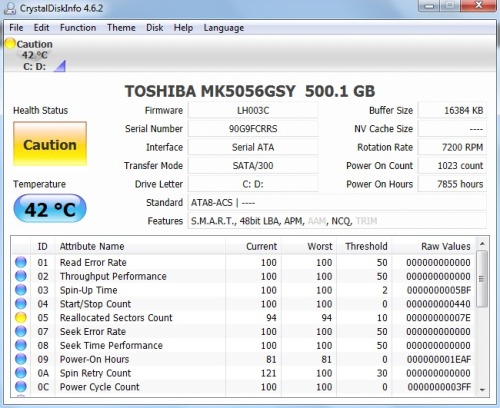
I recently did a reformat on my 1.5 yr laptop (windows 7 home premium 64 bit)
because it was acting a bit laggy and the videos I recorded using hypercam (a screen recorder) turned out very jumpy even though the images I was recording were not jumpy.
I was also getting error messages sometimes when I boot up that said "there is no drive/disk to boot from. insert disk and press any key"
I usually just pressed the power down button and restarted in the hopes that it would go to desktop which it sometimes did. (I noticed that these error messages came most often when I had an external hd plugged in)
so i used my recovery disks and did a system restore. but if anything the lag got worse. the error message at bootup still happens sometimes. it takes a lot longer to startup. and actions that used to be instantaneous like deleting small images now sometimes 3 seconds. when I type, the letters appear several seconds afterwards
do i have to install some video drivers or something? the windows update says it installed the Intel Corporation display Intel(r) HD graphics. I assumed those were the video drivers and that the rest of the drivers were installed when I used the recovery disks (but honestly I dont know. I don't know anything about computers)
are there are tests I could run to see if theres a hardware problem? I dont know which programs to scan computers for problems are real and which ones are actually spyware.
I ran an AVG scan but nothing showed up.
the weird thing is that there are moments when the laptop is fine. as in the typing is instanteous. other times its like the computer cant keep up with my typing speed (which has never been a problem)
my screen recording stuff with hypercam was fine for a day after reformatting and then the jumpiness of the recorded video came back after a day.
please help and sorry for the long post
edit: it might just be my mind playing tricks on me but my laptop seems even laggier after windows update installed service pack 1 (or it might have been one of the seven other updates they made me install) dunno
because it was acting a bit laggy and the videos I recorded using hypercam (a screen recorder) turned out very jumpy even though the images I was recording were not jumpy.
I was also getting error messages sometimes when I boot up that said "there is no drive/disk to boot from. insert disk and press any key"
I usually just pressed the power down button and restarted in the hopes that it would go to desktop which it sometimes did. (I noticed that these error messages came most often when I had an external hd plugged in)
so i used my recovery disks and did a system restore. but if anything the lag got worse. the error message at bootup still happens sometimes. it takes a lot longer to startup. and actions that used to be instantaneous like deleting small images now sometimes 3 seconds. when I type, the letters appear several seconds afterwards
do i have to install some video drivers or something? the windows update says it installed the Intel Corporation display Intel(r) HD graphics. I assumed those were the video drivers and that the rest of the drivers were installed when I used the recovery disks (but honestly I dont know. I don't know anything about computers)
are there are tests I could run to see if theres a hardware problem? I dont know which programs to scan computers for problems are real and which ones are actually spyware.
I ran an AVG scan but nothing showed up.
the weird thing is that there are moments when the laptop is fine. as in the typing is instanteous. other times its like the computer cant keep up with my typing speed (which has never been a problem)
my screen recording stuff with hypercam was fine for a day after reformatting and then the jumpiness of the recorded video came back after a day.
please help and sorry for the long post
edit: it might just be my mind playing tricks on me but my laptop seems even laggier after windows update installed service pack 1 (or it might have been one of the seven other updates they made me install) dunno
My Computer
At a glance
Windows 7 Home Premium 64bit
- OS
- Windows 7 Home Premium 64bit