
DailyGamer
New member
- Local time
- 11:21 PM
- Messages
- 14
~System Info in the picture~ Hi guys i have a problem with my cpu temps /: its get extremly hot , it idles around like 40's high 40's sometimes and i have reapplied thermal paste several times, and my cpu fan is on securely trust me, i am currently using radio shack thermal paste (Silicon) i don't know if that has anything to do with it , i was told to purchase a thermal pad but... i picked up thermal paste before i was told that.. and my cpu fan is a standard stock dell, i game all the time.. i play games like battlefield 3 , recently tera online and minecraft... they all run fine! no lag or anything at all for that matter but see when i was playing tera today my cpu temp hit 78 usually wouldn't go over that and my cores were hitting 95's+ quite sure this isn't normal but.. i mean usually if the cpu gets too hot it would cause some lag or loss of framerates maybe? my game usually plays perfect.. maybe a couple lag spikes here and there quite sure from my internet since my family is on netflix have the time.. anyways i need help guys is this safe to play? do i need to upgrade to cpu liquid cooler? i don't really have money right now so bare with me /: is there anything i could possibly do to fix this problem without spending alot of money... i don't really have money for a liquid fan but if its recommended please tell me... i would really just like to know the problem? and also awnsers to questions like these am i safe to keep playing games like bf3 or tera without ending up with a burnt chip, i don't have 300$ to replace a chip, i'm just a High school graduate.... /: Thanks in advance
Attachments
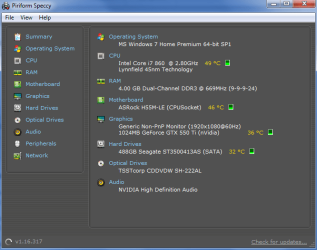
My Computer
At a glance
MS Windows 7 Home Premium 64-bit SP1Intel Core i7 860 Lynnfield(2) DDR3 DUAL 2g sticksNVIDIA GeForce GTX 550 Ti
- Computer Manufacturer/Model Number
- ALLPCZONE
- OS
- MS Windows 7 Home Premium 64-bit SP1
- CPU
- Intel Core i7 860 Lynnfield
- Motherboard
- ASRock H55M-LE
- Memory
- (2) DDR3 DUAL 2g sticks
- Graphics Card(s)
- NVIDIA GeForce GTX 550 Ti
- Sound Card
- NVIDIA High Definition Audio
- Monitor(s) Displays
- ELETT221
- Screen Resolution
- 1920x1080
- Hard Drives
- ST3500413AS Seagate Sata
- PSU
- 600 watt cosair ( not positive )
- Case
- bcc voyager mid-tower atx
- Cooling
- Stock Intel Standard Cpu Cooler - And The Fan On My Case
- Keyboard
- HID Keyboard Device
- Mouse
- HID-compliant mouse
- Internet Speed
- Comcast High-Speed Internet
- Other Info
- Built Computer

 ! Any good news!??


