Hi there.
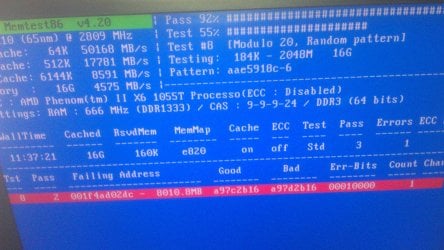
I've been trying to figure out a way to optimize my page file on my SSD for the last few days. I keep ending up with MEMORY_MANAGEMENT errors or PAGE FAULT IN NON PAGED AREA.
I'm running an OCZ Vertex 3 128gb with only the OS and Adobe Web Design Premium suite installed on it and i'm already down to 60Gb.
The OS is automatically creating a 16GB-20GB page file on the HDD. I don't get why it's doing this because I have 16GB of RAM that barely goes past 30% usage even when I've got Photoshop, Dreamweaver and Illustrator open at the same time.
I've tried reducing the page file size to something like 4gb, and then i start getting those BSODS i mentioned, i tried moving it to my 2gb storage HDD, but I get BSODS.
I really have no idea what to do
Any help and advice would be great! Thanks guys
Also just to save time, I've ran MemTestx86 several times and had no errors, along with Windows Memory Diagnostic. This is brand new RAM that i bought a week ago, 16GB dual channel Corsair Vengeance, 4x 4GB sticks, all in a matched kit.
I've been trying to figure out a way to optimize my page file on my SSD for the last few days. I keep ending up with MEMORY_MANAGEMENT errors or PAGE FAULT IN NON PAGED AREA.
I'm running an OCZ Vertex 3 128gb with only the OS and Adobe Web Design Premium suite installed on it and i'm already down to 60Gb.
The OS is automatically creating a 16GB-20GB page file on the HDD. I don't get why it's doing this because I have 16GB of RAM that barely goes past 30% usage even when I've got Photoshop, Dreamweaver and Illustrator open at the same time.
I've tried reducing the page file size to something like 4gb, and then i start getting those BSODS i mentioned, i tried moving it to my 2gb storage HDD, but I get BSODS.
I really have no idea what to do
Any help and advice would be great! Thanks guys
Also just to save time, I've ran MemTestx86 several times and had no errors, along with Windows Memory Diagnostic. This is brand new RAM that i bought a week ago, 16GB dual channel Corsair Vengeance, 4x 4GB sticks, all in a matched kit.
Last edited:
My Computer
At a glance
Windows 7 Pro x64AMD Phenom(tm) II X6 1055T Processor (6 CPUs)...16GB DDR3 Corsair Vengeance 1600 MHz CAS 9 XMPBFG NVIDIA GeForce 9800 GTX/9800 GTX+
- Computer Manufacturer/Model Number
- Me
- OS
- Windows 7 Pro x64
- CPU
- AMD Phenom(tm) II X6 1055T Processor (6 CPUs), ~2.8GHz
- Motherboard
- ASUS M4A87TD/USB 3
- Memory
- 16GB DDR3 Corsair Vengeance 1600 MHz CAS 9 XMP
- Graphics Card(s)
- BFG NVIDIA GeForce 9800 GTX/9800 GTX+
- Hard Drives
- OCZ Vertex 3 SSD 128gb (OS)
2gb Seagate Barracuda 7200rpm NCQ (Storage)