Windows 7 Forums Search
Welcome to Windows 7 Forums. Our forum is dedicated to helping you find solutions with any problems, errors or issues you are experiencing with Windows 7. The Windows 7 forum also covers news and updates and has an extensive Windows 7 tutorial section that covers a wide range of tips and tricks.


Windows 7 - help.. RAM not displaying correct MHz


09-10-2009   #1


Windows 7 Ultimate x64 {SP1}, Windows 8 DP x64


help.. RAM not displaying correct MHz

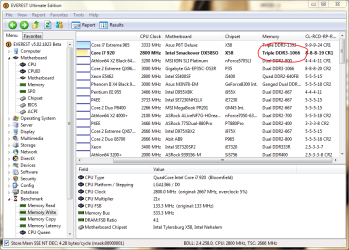
can some one tell me why in everest ultimate edition and in Bios aslo (ram is showing only 1066 Mhz but i have Corsair 6GB 1333Mhz)....


but here intel says 1066 Mhz is default value....... ( Processors - Frequently asked questions )
so i want to know that how to increase Ram's Mhz to 1333Mhz..!!!

please post any screenshot or any link with screenshots if possible........i'll be very thankful..!!!!

Attached Thumbnails
help.. RAM not displaying correct MHz-pic.png  
My System SpecsSystem Spec
09-10-2009   #2


Win7 64bit Ultimate


In your BIOS you should have a setting that will allow you to manually clock your ram. You might have to enable the option if it is off. That is where you can adjust the frequency of the ram to 1333.
My System SpecsSystem Spec
09-10-2009   #3


Quote   Quote: Originally Posted by Corpsecrank View Post
In your BIOS you should have a setting that will allow you to manually clock your ram. You might have to enable the option if it is off. That is where you can adjust the frequency of the ram to 1333.
warning   Warning
This is not recommended to do by yourself!!!
My System SpecsSystem Spec
.


09-10-2009   #4


Windows 7 Ultimate x64 {SP1}, Windows 8 DP x64


Quote   Quote: Originally Posted by Corpsecrank View Post
In your BIOS you should have a setting that will allow you to manually clock your ram. You might have to enable the option if it is off. That is where you can adjust the frequency of the ram to 1333.

anything else will increase with frequency or not (core voltage)
My System SpecsSystem Spec
09-10-2009   #5


Windows 7 Ultimate x64 {SP1}, Windows 8 DP x64


Quote   Quote: Originally Posted by Sassa View Post
Quote   Quote: Originally Posted by Corpsecrank View Post
In your BIOS you should have a setting that will allow you to manually clock your ram. You might have to enable the option if it is off. That is where you can adjust the frequency of the ram to 1333.
warning   Warning
This is not recommended to do by yourself!!!

so what to do Sassa????
My System SpecsSystem Spec
09-10-2009   #6


Go to computer shop where you bought a computer and ask them to fix that.
It's much safer that way...
I can guide you, but I can't see what you are doing and I don't want to be responsible if something goes wrong.
My System SpecsSystem Spec
09-10-2009   #7


Your RAM IS showing the correct MHz. You are the victim of marketing. The default MHz is 1066. The RAM is capable of running, overclocked, at 1333. I am not looking at the specs, but I will wager that 1333 is not in your RAM's SPD.

Your local computer shop, even if they are willing to OC your system for you, will charge you more money than it is worth, IMO. As a shop owner, I would not OC your system - I would not accept the liability.

If you are still in the first 30 days, I would demand a swap out on the RAM for RAM that includes 1333 in the SPD - RAM that defaults to 1333. This depends, of course, on whether or not the company that sold you the system claimed the RAM would run out of the box at 1333.
My System SpecsSystem Spec
09-10-2009   #8


Besides, it is not that big of a hinderance. In real world experience, you are not likely to notice a difference.

I am just as angry at Kingston and Asus for marketing 1066 RAM to me that actually runs at 800. I have to double my FSB from 266 to 533 to get 1066.
My System SpecsSystem Spec
09-11-2009   #9


Quote   Quote: Originally Posted by Antman View Post
Your RAM IS showing the correct MHz. You are the victim of marketing. The default MHz is 1066. The RAM is capable of running, overclocked, at 1333. I am not looking at the specs, but I will wager that 1333 is not in your RAM's SPD.

Your local computer shop, even if they are willing to OC your system for you, will charge you more money than it is worth, IMO. As a shop owner, I would not OC your system - I would not accept the liability.

If you are still in the first 30 days, I would demand a swap out on the RAM for RAM that includes 1333 in the SPD - RAM that defaults to 1333. This depends, of course, on whether or not the company that sold you the system claimed the RAM would run out of the box at 1333.
Quote   Quote: Originally Posted by Antman View Post
Besides, it is not that big of a hinderance. In real world experience, you are not likely to notice a difference.

I am just as angry at Kingston and Asus for marketing 1066 RAM to me that actually runs at 800. I have to double my FSB from 266 to 533 to get 1066.
Antman, as usual, you are right.
+1
My System SpecsSystem Spec
09-12-2009   #10


I found a new RAM kit.
Attached Images
 
My System SpecsSystem Spec
Reply

help.. RAM not displaying correct MHz problems?


Thread Tools


Similar Threads for: help.. RAM not displaying correct MHz
Thread Forum
Solved Disk Management is not displaying correct HDD size. Partition issues? Installation & Setup
Is this (clone) correct? Performance & Maintenance
Correct PSU? Hardware & Devices
What is the correct temperature of a CPU? Performance & Maintenance
System not displaying the correct date & time Crashes and Debugging


All times are GMT -5. The time now is 09:38 AM.


Windows 7 Forums is an independent web site and has not been authorized,
sponsored, or otherwise approved by Microsoft Corporation.
"Windows 7" and related materials are trademarks of Microsoft Corp.
© Designer Media Ltd
  

1 2 3 4 5 6 7 8 9 10 11 12 13 14 15 16 17 18 19 20 21 22 23 24 25 26 27 28 29 30