| Windows 7: what is the best maintenance/repair/etc software for hard drive |
13 Aug 2012
|
#1 | | |
what is the best maintenance/repair/etc software for hard drive what is the best software for fixing errors, fixing bad sectors, maintenance, defragging, analysis and etc
for maintenace and detecting if theres something wrong
just the best software for hard drive maintenance | My System Specs |
| |
14 Aug 2012
|
#2 | | Windows 7 SP1, Home Premium, 64-bit |
The built-in tools work fine---Windows Defrag, Windows Disk Cleanup, Checkdisk, for ordinary maintenance.
If you suspect hard drive problems, you can also use the drive manufacturer's downloadable utility. The SMART values can indicate impending problems.
The more obsessive you are, the less likely you are to be satisfied with the built-in tools---regardless of whether they provide any measurable improvement. | My System Specs | | System Manufacturer/Model Number Ignatz Special; 4 speed manual gearbox; factory air conditioning; one of one OS Windows 7 SP1, Home Premium, 64-bit CPU Intel Sandy Bridge i5-2500, not overclocked Motherboard Gigabyte H67A-UD3H-B3, full ATX Memory 4 GB Crucial DDR3-1333 Graphics Card none; graphics are integrated on CPU Sound Card onboard: Realtek ALC892; external: USB Behringer UF0-202 Monitor(s) Displays NEC 90GX2-BK 19" LCD Screen Resolution 800 x 640 Keyboard Leopold Tenkeyless with Cherry Blue switches, USB Mouse Logitech or Microsoft optical wired; either USB or PS 2 PSU Seasonic SS-560KM, modular Case Antec Solo II Cooling CPU: Scythe Big Shuriken; Case: Scythe Slipstream 800 & 500 Hard Drives System: Intel 320 Series SSD, 80 GB;
Data: Samsung Spinpoint 103SJ, 1 TB;
Backup: WD Caviar Green WD15EADS-00P8B0, 1.5TB Other Info Power consumption of this system, including monitor: 68 watts at idle; 144 watts at full load |
14 Aug 2012
|
#3 | | |
no im not really satisfied with the built in tools
is there any software that is better than these which has almost complete maintenance ,tuning, etc for hard drive | My System Specs | | |
14 Aug 2012
|
#4 | | Windows 7 Ultimate x64 Service Pack 1 Doncaster, UK |
What is wrong with the built-in tools? They do the job that they were designed for, they can be set to run on a schedule as well as on demand and since they are included with Windows they are able to do so without causing problems with the OS. In fact, some (but not all) of the 3rd party programs actually use the Windows routines to do the work, whilst merely providing a different graphical interface.
If setup properly, i.e. set to run on a weekly schedule (or less/more often if required), they can generally be left to their own devices and will carry out their jobs according to the schedule. If you schedule them to run when you are not using the computer (say overnight), then this might be more beneficial. | My System Specs | | Computer type PC/Desktop System Manufacturer/Model Number Dwarf Dwf/11/2012 OS Windows 7 Ultimate x64 Service Pack 1 CPU Intel Core-i5-3570K 4-core @ 3.4GHz (Ivy Bridge) (OC 4.2GHz) Motherboard ASRock Z77 Extreme4-M Memory 4 x 4GB DDR3-1600 Corsair Vengeance CMZ8GX3M2A1600C9B (16GB) Graphics Card 2 x AMD Radeon HD7770 1GB CrossFired (OC 1100MHz/1250MHz) Sound Card Realtek High Definition on board solution (ALC 898) Monitor(s) Displays ViewSonic VA1912w Widescreen (VGA) Screen Resolution 1440x900 Keyboard Microsoft Comfort Curve Keyboard 3000 (USB) Mouse Microsoft Comfort Mouse 3000 for Business (USB) PSU XFX Pro Series 850W Semi-Modular Case Gigabyte IF233 Cooling 1 x 120mm Front Inlet 1 x 120mm Rear Exhaust Hard Drives OCZ Agility 3 SSD 120GB SATA III x2 (RAID 0)
Samsung HD501LJ 500GB SATA II x2
Hitachi HDS721010CLA332 1TB SATA II
Iomega 1.5TB Ext USB 2.0
WD 2.0TB Ext USB 3.0 Internet Speed NetGear DG834Gv3 ADSL Modem/Router (Ethernet) ~4.0 Mb/s (O2) Antivirus Avast! 8.0.1483 Browser IE 9 Other Info Optical Drive: HL-DT-ST BD-RE BH10LS30 SATA Bluray
Lexmark S305 Printer/Scanner/Copier (USB)
CTF-430 Tablet & Pen
WEI Score: 7.7/7.9/7.4/7.4/7.9
Asus Eee PC 1011PX Netbook (Windows 7 x86 Starter) |
14 Aug 2012
|
#5 | | |
I dont know of any all in one tools.
certianly for checking bad sectors, filesystem etc. I would trust the built in chkdsk the most as its made by the people who made the OS microsoft.
for defrag thats open for debate, the defrag in this evrsion of windows seems much improved over previous windows versions tho and its the one that will probably work the most well on prefetch files.
Other defrag tools I have tried which on paper sound good, like the gaps made to catch new files, reordering of types of files, dirs etc. But ultimately the system didnt feel any faster over the default defrag. | My System Specs | | System Manufacturer/Model Number home built OS windows 7 ultimate x64 CPU intel i5 750 Motherboard asus p7p55d-e modded 1601 bios to get 11.2 intel option rom Memory 16 gig ram ddr3 @ 1333 9-9-9-24 CR2 Graphics Card evga 460 GTX 1 GIG SC Sound Card asus xonar D2X Monitor(s) Displays dell 2209WA Screen Resolution 1680x1050 Keyboard microsoft business ps2 keyboard Mouse microsoft optical black mouse PSU coolermaster silent pro 600watt modular Case antec P182 Cooling artic freezer 7 pro rev 2, 3 case fans Hard Drives Samsung 830 SSD 128gig - boot device wooosh - P55
WD black cavalier 640gig WD6401AALS - P55
WD 500gig WD5000AAKS - P55
Seagate 500gig ST3500630AS - P55
Samsung 750gig HD753LG - Marvell ide mode (drive doesnt like ahci) Internet Speed 30 meg cable Other Info All drives listed as P55 using AHCI |
14 Aug 2012
|
#6 | | |

Quote: Originally Posted by Dwarf What is wrong with the built-in tools? They do the job that they were designed for, they can be set to run on a schedule as well as on demand and since they are included with Windows they are able to do so without causing problems with the OS. In fact, some (but not all) of the 3rd party programs actually use the Windows routines to do the work, whilst merely providing a different graphical interface.
If setup properly, i.e. set to run on a weekly schedule (or less/more often if required), they can generally be left to their own devices and will carry out their jobs according to the schedule. If you schedule them to run when you are not using the computer (say overnight), then this might be more beneficial. for the error-checking i got a problem, it says: disk check could not perform because disk check utility needs acces to some windows files on the disk. these files can be accessed only by restarting windows.
then i restarted it then nothing happens, i also check it again then that message appears again
how do i schedule for error-checking and i only want it to run for one time not everyday
Last edited by nfsworldpinoy; 14 Aug 2012 at 04:42 PM..
Reason: forgot another word
| My System Specs | | |
16 Aug 2012
|
#8 | | MS Windows 7 Ultimate SP1 64-bit Austin, Texas |

Quote: Originally Posted by nfsworldpinoy what is the best software for fixing errors, fixing bad sectors, maintenance, defragging, analysis and etc
for maintenace and detecting if theres something wrong
just the best software for hard drive maintenance Spinrite. **Home of Gibson Research Corporation** | My System Specs | | System Manufacturer/Model Number Toshiba Satellite S875D-S7239 laptop OS MS Windows 7 Ultimate SP1 64-bit CPU AMD A10-4600M Motherboard AMD Pumori (Socket FT1) Memory 6.00 GB Dual-Channel DDR3 @ 798MHz (11-11-12-28) Graphics Card AMD Radeon HD 7660G Sound Card High Definition Audio Device Monitor(s) Displays Generic PnP Monitor (1600x900@60Hz) Screen Resolution 1600x900@60Hz Keyboard Standard PS/2 Keyboard Mouse HP Wireless Optical Mobile Mouse Model FHA-3410 Hard Drives SSD 119GB Corsair CSSD-V128GB2 ATA Device Internet Speed What the local pub, local coffee shop offers. Other Info Optical Drive:MATSHITA BD-CMB UJ160B ATA Device
Also have an Asus ha1002xp netbook with Win 7 Ultimate installed. |
17 Aug 2012
|
#9 | | Windows 7 Home Premium 32 bit |
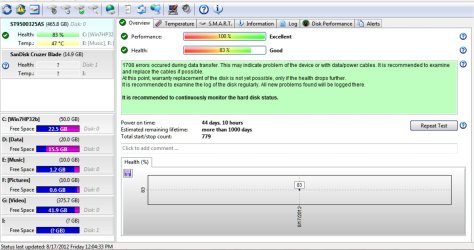
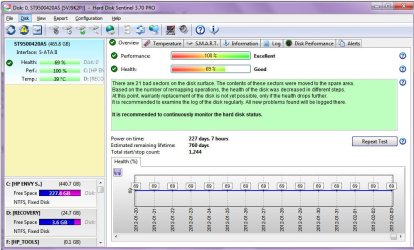
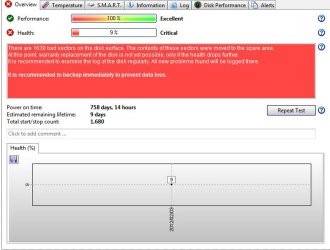
My recommendation: Hard Disk Sentinel Pro Hard Disk Sentinel - HDD health and temperature monitoring "Hard Disk Sentinel (HDSentinel) is a multi-OS SSD and HDD monitoring and analysis software. Its goal is to find, test, diagnose and repair hard disk drive problems, report and display SSD and HDD health, performance degradations and failures. Hard Disk Sentinel gives complete textual description, tips and displays/reports the most comprehensive information about the hard disks and solid state disks inside the computer and in external enclosures (USB hard disks / e-SATA hard disks). Many different alerts and report options are available to ensure maximum safety of your valuable data. No need to use separate tools to verify internal hard disks, external hard disks, SSDs, disks in RAID arrays as these are all included in a single software. Hard Disk Sentinel monitors hard disk drive / HDD status including health, temperature and all S.M.A.R.T. (Self-Monitoring, Analysis and Reporting Technology) values for all hard disks. Also it measures the disk transfer speed in real time which can be used as a benchmark or to detect possible hard disk failures, performance degradations. HDSentinel is the perfect data protection solution: it can be effectively used to prevent HDD failure and SSD / HDD data loss because it has the most sensitive disk health rating system which is extremely sensitive to disk problems. This way even a small HDD problem can't be missed. The Professional version has scheduled and automatic (on-problem) disk backup options to prevent data loss caused by not only failure but by malware or accidental delete also." It is on day-one on my Zotac Mini-PC and I am impressed.( Regular price USD 35; currently available at 40% discount with coupon code. I paid INR 1267 as against 2112) A screenshot: (When I tried to image it (new HDD) after a fresh install of Windows7 Home premium with Paragon, it refused saying the HDD had errors and I should run the manufacturer's utility to diagnose/repair - by contrast Shadowprotect Desktop indicated that there were "non-fatal" errors but all the same imaged it. Jolted, I ran SeaTools for DOS and it indeed found countless errors and repaired it. Paragon then imaged the HDD without any problem. Now two years on the HDD is still going strong with periodical imaging with Paragon. I am impressed because HDSentinel brought out a problem report on its first run. Health 83% but not a concern as long as the HDD continues to maintain it.) Two screenshots plugged out from two users: A complete run-through on this software Hard Disk Sentinel Professional can Monitor, Inspect, Fix Errors in HDD and SSD: Review & Giveaway - Insights in Technology (I really like Sujoy's reviews which deals with all the features of any software and his own personal conceptions on these.) Note:The software may not work with its full potential with RAID. The author says that most RAID controllers/drivers hide the information. If you intend to use it with your RAID, download the trial software and check before putting your money on it. I think a compatibility list is also available on the author's website.
Last edited by jumanji; 17 Aug 2012 at 12:19 PM..
Reason: typos corrected
| My System Specs | | OS Windows 7 Home Premium 32 bit what is the best maintenance/repair/etc software for hard drive problems? All times are GMT -5. The time now is 04:00 AM. | |