| Windows 7: Remove C and System reserved from Defrag |
31 Aug 2012
|
#1 | | MS Windows 7 Professional 64-bit SP1 United States |
Remove C and System reserved from Defrag I just recently got an SSD and I was wondering if I could remove the C drive and System Reserved from defrag, but leave my other hard drive in there so I don't accidentally defrag my SSD. | My System Specs |
| System Manufacturer/Model Number Custom Built OS MS Windows 7 Professional 64-bit SP1 CPU Intel(R) Core(TM) i5-2400 CPU @ 3.10GHz Motherboard Asus P8Z77-V LK Memory G.SKILL Ares 8GB (2x4GB) Graphics Card EVGA nVidia GeForce GTX 550 Ti Sound Card Realtek High Definition Audio Monitor(s) Displays 22 inch LG Flatron W2240T Screen Resolution 1920x1080 Keyboard Logitech K360 (Wireless) Mouse Logitech M215 (Wireless) PSU Raidmax RX-630SS Case NZXT Crafted Series Tempest 410 Elite Cooling Air Cooled Hard Drives Mushkin Chronos 120GB SSD (OS), 1TB Seagate HDD (Data) Internet Speed 1.14 MB/s (9.6 mbps) |
31 Aug 2012
|
#2 | | Windows 7 SP1, Home Premium, 64-bit |
SSDs are typically recognized as SSDs by Windows and are NOT part of a standard defragmentation.
But you can certainly confirm your defrag settings to be sure that regular hard drives are defragged and SSDs are not.
Right click the drive, choose properties, then tools, then defragment now. Then "configure schedule". In my case, the SSD is not even listed as a choice under "select disks". | My System Specs | | System Manufacturer/Model Number Ignatz Special; 4 speed manual gearbox; factory air conditioning; one of one OS Windows 7 SP1, Home Premium, 64-bit CPU Intel Sandy Bridge i5-2500, not overclocked Motherboard Gigabyte H67A-UD3H-B3, full ATX Memory 4 GB Crucial DDR3-1333 Graphics Card none; graphics are integrated on CPU Sound Card onboard: Realtek ALC892; external: USB Behringer UF0-202 Monitor(s) Displays NEC 90GX2-BK 19" LCD Screen Resolution 800 x 640 Keyboard Leopold Tenkeyless with Cherry Blue switches, USB Mouse Logitech or Microsoft optical wired; either USB or PS 2 PSU Seasonic SS-560KM, modular Case Antec Solo II Cooling CPU: Scythe Big Shuriken; Case: Scythe Slipstream 800 & 500 Hard Drives System: Intel 320 Series SSD, 80 GB;
Data: Samsung Spinpoint 103SJ, 1 TB;
Backup: WD Caviar Green WD15EADS-00P8B0, 1.5TB Other Info Power consumption of this system, including monitor: 68 watts at idle; 144 watts at full load |
31 Aug 2012
|
#3 | | MS Windows 7 Professional 64-bit SP1 United States |

Quote: Originally Posted by ignatzatsonic SSDs are typically recognized as SSDs by Windows and are NOT part of a standard defragmentation.
But you can certainly confirm your defrag settings to be sure that regular hard drives are defragged and SSDs are not.
Right click the drive, choose properties, then tools, then defragment now. Then "configure schedule". In my case, the SSD is not even listed as a choice under "select disks". I go to the defrag and it still shows the c drive and system reserved, which is my SSD. So it still shows it in the defrag. I'll probably use the defrag for my tb drive that I have, but I don't want to accidentally defrag my SSD. | My System Specs | | System Manufacturer/Model Number Custom Built OS MS Windows 7 Professional 64-bit SP1 CPU Intel(R) Core(TM) i5-2400 CPU @ 3.10GHz Motherboard Asus P8Z77-V LK Memory G.SKILL Ares 8GB (2x4GB) Graphics Card EVGA nVidia GeForce GTX 550 Ti Sound Card Realtek High Definition Audio Monitor(s) Displays 22 inch LG Flatron W2240T Screen Resolution 1920x1080 Keyboard Logitech K360 (Wireless) Mouse Logitech M215 (Wireless) PSU Raidmax RX-630SS Case NZXT Crafted Series Tempest 410 Elite Cooling Air Cooled Hard Drives Mushkin Chronos 120GB SSD (OS), 1TB Seagate HDD (Data) Internet Speed 1.14 MB/s (9.6 mbps) |
31 Aug 2012
|
#4 | | Windows 7 SP1, Home Premium, 64-bit |

Quote: Originally Posted by UnknownReverent
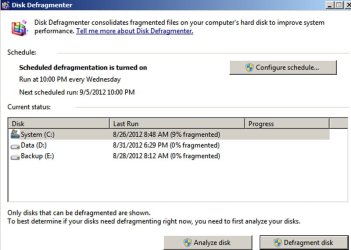
I go to the defrag and it still shows the c drive and system reserved, which is my SSD. Post a screen shot of the screen in which the C drive is shown.
Just because it is shown in the screen below doesn't mean it will be defragged.
C is an SSD on my system. It is not defragged and is not part of the defrag schedule. | My System Specs | | System Manufacturer/Model Number Ignatz Special; 4 speed manual gearbox; factory air conditioning; one of one OS Windows 7 SP1, Home Premium, 64-bit CPU Intel Sandy Bridge i5-2500, not overclocked Motherboard Gigabyte H67A-UD3H-B3, full ATX Memory 4 GB Crucial DDR3-1333 Graphics Card none; graphics are integrated on CPU Sound Card onboard: Realtek ALC892; external: USB Behringer UF0-202 Monitor(s) Displays NEC 90GX2-BK 19" LCD Screen Resolution 800 x 640 Keyboard Leopold Tenkeyless with Cherry Blue switches, USB Mouse Logitech or Microsoft optical wired; either USB or PS 2 PSU Seasonic SS-560KM, modular Case Antec Solo II Cooling CPU: Scythe Big Shuriken; Case: Scythe Slipstream 800 & 500 Hard Drives System: Intel 320 Series SSD, 80 GB;
Data: Samsung Spinpoint 103SJ, 1 TB;
Backup: WD Caviar Green WD15EADS-00P8B0, 1.5TB Other Info Power consumption of this system, including monitor: 68 watts at idle; 144 watts at full load |
31 Aug 2012
|
#5 | | MS Windows 7 Professional 64-bit SP1 United States |
It shows it exactly like that with the system reserved as well. They're both the SSD. I don't want to accidentally click it and hit defrag. I'm a bit of a perfectionist too, so it will annoy me if it shows how much it's fragmented. It will make me want to defrag it. Lol. I'm a bit OCD about it I guess. | My System Specs | | System Manufacturer/Model Number Custom Built OS MS Windows 7 Professional 64-bit SP1 CPU Intel(R) Core(TM) i5-2400 CPU @ 3.10GHz Motherboard Asus P8Z77-V LK Memory G.SKILL Ares 8GB (2x4GB) Graphics Card EVGA nVidia GeForce GTX 550 Ti Sound Card Realtek High Definition Audio Monitor(s) Displays 22 inch LG Flatron W2240T Screen Resolution 1920x1080 Keyboard Logitech K360 (Wireless) Mouse Logitech M215 (Wireless) PSU Raidmax RX-630SS Case NZXT Crafted Series Tempest 410 Elite Cooling Air Cooled Hard Drives Mushkin Chronos 120GB SSD (OS), 1TB Seagate HDD (Data) Internet Speed 1.14 MB/s (9.6 mbps) |
31 Aug 2012
|
#6 | | Windows 7 SP1, Home Premium, 64-bit |

Quote: Originally Posted by UnknownReverent it will annoy me if it shows how much it's fragmented. It will make me want to defrag it. If it annoys you, why would you voluntarily open defrag to take a look?
That's a rhetorical question.
Do you have a similar impulse to delete partitions when you examine them in Disk Management? | My System Specs | | System Manufacturer/Model Number Ignatz Special; 4 speed manual gearbox; factory air conditioning; one of one OS Windows 7 SP1, Home Premium, 64-bit CPU Intel Sandy Bridge i5-2500, not overclocked Motherboard Gigabyte H67A-UD3H-B3, full ATX Memory 4 GB Crucial DDR3-1333 Graphics Card none; graphics are integrated on CPU Sound Card onboard: Realtek ALC892; external: USB Behringer UF0-202 Monitor(s) Displays NEC 90GX2-BK 19" LCD Screen Resolution 800 x 640 Keyboard Leopold Tenkeyless with Cherry Blue switches, USB Mouse Logitech or Microsoft optical wired; either USB or PS 2 PSU Seasonic SS-560KM, modular Case Antec Solo II Cooling CPU: Scythe Big Shuriken; Case: Scythe Slipstream 800 & 500 Hard Drives System: Intel 320 Series SSD, 80 GB;
Data: Samsung Spinpoint 103SJ, 1 TB;
Backup: WD Caviar Green WD15EADS-00P8B0, 1.5TB Other Info Power consumption of this system, including monitor: 68 watts at idle; 144 watts at full load |
31 Aug 2012
|
#7 | | MS Windows 7 Professional 64-bit SP1 United States |

Quote: Originally Posted by ignatzatsonic 
Quote: Originally Posted by UnknownReverent it will annoy me if it shows how much it's fragmented. It will make me want to defrag it. If it annoys you, why would you voluntarily open defrag to take a look?
That's a rhetorical question.
Do you have a similar impulse to delete partitions when you examine them in Disk Management? Lol, no. I don't open disk management unless I'm making partitions. I open defrag to check how much a disk is fragmented to defrag it. This is my first SSD and I'm not used to seeing something fragmented that I shouldn't defrag. I am a bit curious why you don't have a system reserved though. | My System Specs | | System Manufacturer/Model Number Custom Built OS MS Windows 7 Professional 64-bit SP1 CPU Intel(R) Core(TM) i5-2400 CPU @ 3.10GHz Motherboard Asus P8Z77-V LK Memory G.SKILL Ares 8GB (2x4GB) Graphics Card EVGA nVidia GeForce GTX 550 Ti Sound Card Realtek High Definition Audio Monitor(s) Displays 22 inch LG Flatron W2240T Screen Resolution 1920x1080 Keyboard Logitech K360 (Wireless) Mouse Logitech M215 (Wireless) PSU Raidmax RX-630SS Case NZXT Crafted Series Tempest 410 Elite Cooling Air Cooled Hard Drives Mushkin Chronos 120GB SSD (OS), 1TB Seagate HDD (Data) Internet Speed 1.14 MB/s (9.6 mbps) |
31 Aug 2012
|
#8 | | Windows 7 SP1, Home Premium, 64-bit |

Quote: Originally Posted by UnknownReverent I am a bit curious why you don't have a system reserved though. System Reserved partitions are optional.
I chose not to have one when I installed. | My System Specs | | System Manufacturer/Model Number Ignatz Special; 4 speed manual gearbox; factory air conditioning; one of one OS Windows 7 SP1, Home Premium, 64-bit CPU Intel Sandy Bridge i5-2500, not overclocked Motherboard Gigabyte H67A-UD3H-B3, full ATX Memory 4 GB Crucial DDR3-1333 Graphics Card none; graphics are integrated on CPU Sound Card onboard: Realtek ALC892; external: USB Behringer UF0-202 Monitor(s) Displays NEC 90GX2-BK 19" LCD Screen Resolution 800 x 640 Keyboard Leopold Tenkeyless with Cherry Blue switches, USB Mouse Logitech or Microsoft optical wired; either USB or PS 2 PSU Seasonic SS-560KM, modular Case Antec Solo II Cooling CPU: Scythe Big Shuriken; Case: Scythe Slipstream 800 & 500 Hard Drives System: Intel 320 Series SSD, 80 GB;
Data: Samsung Spinpoint 103SJ, 1 TB;
Backup: WD Caviar Green WD15EADS-00P8B0, 1.5TB Other Info Power consumption of this system, including monitor: 68 watts at idle; 144 watts at full load |
31 Aug 2012
|
#9 | | MS Windows 7 Professional 64-bit SP1 United States |

Quote: Originally Posted by ignatzatsonic 
Quote: Originally Posted by UnknownReverent I am a bit curious why you don't have a system reserved though. System Reserved partitions are optional.
I chose not to have one when I installed. I've only seen Windows 7 do this, but I was always curious why there was one and if there would be a difference without one. | My System Specs | | System Manufacturer/Model Number Custom Built OS MS Windows 7 Professional 64-bit SP1 CPU Intel(R) Core(TM) i5-2400 CPU @ 3.10GHz Motherboard Asus P8Z77-V LK Memory G.SKILL Ares 8GB (2x4GB) Graphics Card EVGA nVidia GeForce GTX 550 Ti Sound Card Realtek High Definition Audio Monitor(s) Displays 22 inch LG Flatron W2240T Screen Resolution 1920x1080 Keyboard Logitech K360 (Wireless) Mouse Logitech M215 (Wireless) PSU Raidmax RX-630SS Case NZXT Crafted Series Tempest 410 Elite Cooling Air Cooled Hard Drives Mushkin Chronos 120GB SSD (OS), 1TB Seagate HDD (Data) Internet Speed 1.14 MB/s (9.6 mbps) |
31 Aug 2012
|
#10 | | Windows 7 SP1, Home Premium, 64-bit |
System Reserved contains files--but those files can be placed on C if you prefer. If they are on C, you don't need System Reserved. | My System Specs | | System Manufacturer/Model Number Ignatz Special; 4 speed manual gearbox; factory air conditioning; one of one OS Windows 7 SP1, Home Premium, 64-bit CPU Intel Sandy Bridge i5-2500, not overclocked Motherboard Gigabyte H67A-UD3H-B3, full ATX Memory 4 GB Crucial DDR3-1333 Graphics Card none; graphics are integrated on CPU Sound Card onboard: Realtek ALC892; external: USB Behringer UF0-202 Monitor(s) Displays NEC 90GX2-BK 19" LCD Screen Resolution 800 x 640 Keyboard Leopold Tenkeyless with Cherry Blue switches, USB Mouse Logitech or Microsoft optical wired; either USB or PS 2 PSU Seasonic SS-560KM, modular Case Antec Solo II Cooling CPU: Scythe Big Shuriken; Case: Scythe Slipstream 800 & 500 Hard Drives System: Intel 320 Series SSD, 80 GB;
Data: Samsung Spinpoint 103SJ, 1 TB;
Backup: WD Caviar Green WD15EADS-00P8B0, 1.5TB Other Info Power consumption of this system, including monitor: 68 watts at idle; 144 watts at full load Remove C and System reserved from Defrag problems? All times are GMT -5. The time now is 04:03 AM. | |