- Local time
- 8:23 PM
- Messages
- 544
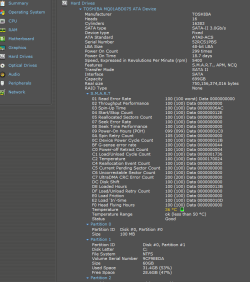
According to a benchmark I ran on my laptop, the HDD is only getting a read speed of 1 MBps... that is literally a third of my internet download speed... The laptop is also VERY slow to boot up, and load anything off the HDD...
Specs of laptop:
8 GB 1333 MHz DDR3
500 GB 7200 RPM HDD 16MB cache SATA2
Intel Core i7 740 QM
ATI Mobility Radeon HD 5650 1 GB
Windows 7 x64 Ultimate Edition SP1
Is there anything I can do about this aside from replacing the HDD (definitely going for an SSD if I have to though)?
Specs of laptop:
8 GB 1333 MHz DDR3
500 GB 7200 RPM HDD 16MB cache SATA2
Intel Core i7 740 QM
ATI Mobility Radeon HD 5650 1 GB
Windows 7 x64 Ultimate Edition SP1
Is there anything I can do about this aside from replacing the HDD (definitely going for an SSD if I have to though)?
My Computer
At a glance
Windows 8 Pro x64Intel Core i7 92012GB (2GB x6) Triple Channel DDR3 1333 MHzATI Radeon HD 4870 X2 2GB GDDR5
- Computer Manufacturer/Model Number
- iBuyPower Chimera X58
- OS
- Windows 8 Pro x64
- CPU
- Intel Core i7 920
- Motherboard
- Asus P6T Deluxe V2
- Memory
- 12GB (2GB x6) Triple Channel DDR3 1333 MHz
- Graphics Card(s)
- ATI Radeon HD 4870 X2 2GB GDDR5
- Sound Card
- Integrated Digital HD 7.1 Surround Sound
- Monitor(s) Displays
- 24.6-inch ASUS VW246H 20000:1 Contrast, 2 ms response time,
- Screen Resolution
- 1920x1080
- Hard Drives
- 1 TB 7200 RPM SATA II 3 GBps 16MB cache
- PSU
- NZXT 800W Gaming Series
- Case
- Guardian Inferno (Custom Painted NZXT Guardian 921)
- Cooling
- Thermaltake V1 Fan Cooling System OC Proof
- Keyboard
- Razer Lycosa
- Mouse
- iBuyPower Ergonomical Internet Mouse
- Internet Speed
- 11 MBps High-speed Cable