|  | | |
20 Sep 2012
|
#31 | | Windows 7 SP1, Home Premium, 64-bit |
You may as well download the rest of the stuff HP has at that site for your particular PC.
You may not need it or even want it, but just in case, now is the time to get it rather than later.
If you do a clean install, you will get a bunch of drivers directly from the install disc and you may not need much or anything from the HP downloads.
I'd probably try the HP recovery as a last resort before a clean install---if you don't get any further assistance in this thread.
When you get that Windows 7 ISO downloaded and burned, you should confirm that you can in fact boot from it. If you can't boot from it, it's useless. If it boots, you can cancel out at the first screen, remove the disc from the DVD drive, and reboot to your current installation.
If you figured out your exact model number, you may as well add it to your system specs. | My System Specs |
| System Manufacturer/Model Number Ignatz Special; 4 speed manual gearbox; factory air conditioning; one of one OS Windows 7 SP1, Home Premium, 64-bit CPU Intel Sandy Bridge i5-2500, not overclocked Motherboard Gigabyte H67A-UD3H-B3, full ATX Memory 4 GB Crucial DDR3-1333 Graphics Card none; graphics are integrated on CPU Sound Card onboard: Realtek ALC892; external: USB Behringer UF0-202 Monitor(s) Displays NEC 90GX2-BK 19" LCD Screen Resolution 800 x 640 Keyboard Leopold Tenkeyless with Cherry Blue switches, USB Mouse Logitech or Microsoft optical wired; either USB or PS 2 PSU Seasonic SS-560KM, modular Case Antec Solo II Cooling CPU: Scythe Big Shuriken; Case: Scythe Slipstream 800 & 500 Hard Drives System: Intel 320 Series SSD, 80 GB;
Data: Samsung Spinpoint 103SJ, 1 TB;
Backup: WD Caviar Green WD15EADS-00P8B0, 1.5TB Other Info Power consumption of this system, including monitor: 68 watts at idle; 144 watts at full load |
20 Sep 2012
|
#32 | | Windows 7 Home Premium 64bit |
I'll download all. I am not sure about boot but once I have the disk I may need help for clean installing | My System Specs | | System Manufacturer/Model Number Hewlett-Packard / dv6 notebook PC OS Windows 7 Home Premium 64bit CPU Intel(R) Core(TM) i5 CPU M 450 @ 2.40GHz, 2 core Motherboard Hewlett-Packard 144A Memory 4 GB Graphics Card ATI Sound Card ATI High Definition Audio Device Monitor(s) Displays Name Intel(R) HD Graphics Screen Resolution Resolution 1366 x 768 x 60 hertz Hard Drives 466GB TOSHIBA TOSHIBA MK5056GSY (SATA)
C: 223.09 GB
G: 220.99 GB (partition) |
20 Sep 2012
|
#33 | | Win7 x 6 PC's California, Florida, Boston |
These steps have worked without fail countless times so you must have a bad burn of the CD. Try again:
The problem is that you converted your HD to Dynamic which is only meant to be used to span a partition across multiple HD's. Apparently you didn't see the warning message.
The solution to solve this non-destructively is to boot free Partition Wizard CD version 4.2 which is the last one which offers this as a free feature: pw422.zip ISO - Windows Live.
Download the ISO, rightclick to burn it to CD using Windows Image Burner, or use ImgBurn.
Boot CD, follow these steps: How to convert dynamic disk to basic disk with Partition Wizard?
Then create a new Logical partition in the space you made: Partition Wizard Create Partition Video Help | My System Specs | | |
20 Sep 2012
|
#34 | | Windows 7 Home Premium 64bit |

Quote: Originally Posted by gregrocker These steps have worked without fail countless times so you must have a bad burn of the CD. Try again:
:
:
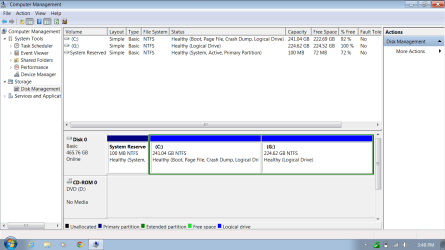
Then create a new Logical partition in the space you made: Partition Wizard Create Partition Video Help Thanks gregrocker. I re-download file and burn to new disc. It worked. I convert my hard drive (Disk 0) to basic space using version PW4.22
After that I run PWv7.6 and converted to all partition to Logical Space. After that Windows 7 didn't start. So I converted system to primary partition > restart pc and Windows 7 started.
I do not know if I do it right or wrong! Do i need to convert C: to primary drive and change status to active?
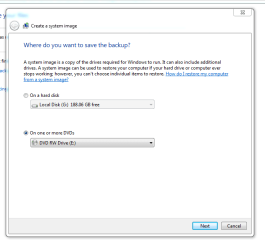
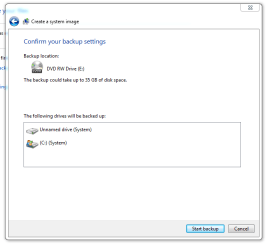
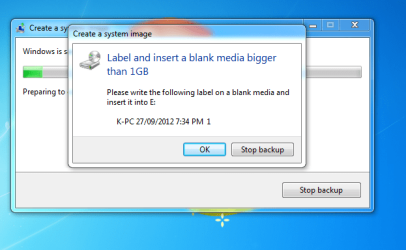
the following pics taken during PWv7.6
Last edited by akp01; 21 Sep 2012 at 01:55 AM..
| My System Specs | | System Manufacturer/Model Number Hewlett-Packard / dv6 notebook PC OS Windows 7 Home Premium 64bit CPU Intel(R) Core(TM) i5 CPU M 450 @ 2.40GHz, 2 core Motherboard Hewlett-Packard 144A Memory 4 GB Graphics Card ATI Sound Card ATI High Definition Audio Device Monitor(s) Displays Name Intel(R) HD Graphics Screen Resolution Resolution 1366 x 768 x 60 hertz Hard Drives 466GB TOSHIBA TOSHIBA MK5056GSY (SATA)
C: 223.09 GB
G: 220.99 GB (partition) |
20 Sep 2012
|
#35 | | Windows 7 Home Premium 64bit |

Quote: Originally Posted by ignatzatsonic You may as well download the rest of the stuff HP has at that site for your particular PC.
You may not need it or even want it, but just in case, now is the time to get it rather than later.
.
.
If you figured out your exact model number, you may as well add it to your system specs. Thanks ignatzatsonic, I downloaded all drivers and I have everything ready now. I may not need it now but I have it if I need in future | My System Specs | | System Manufacturer/Model Number Hewlett-Packard / dv6 notebook PC OS Windows 7 Home Premium 64bit CPU Intel(R) Core(TM) i5 CPU M 450 @ 2.40GHz, 2 core Motherboard Hewlett-Packard 144A Memory 4 GB Graphics Card ATI Sound Card ATI High Definition Audio Device Monitor(s) Displays Name Intel(R) HD Graphics Screen Resolution Resolution 1366 x 768 x 60 hertz Hard Drives 466GB TOSHIBA TOSHIBA MK5056GSY (SATA)
C: 223.09 GB
G: 220.99 GB (partition) |
21 Sep 2012
|
#37 | | Windows 7 SP1, Home Premium, 64-bit |
C should not be active, so it is OK.
The System partition is active as it should be.
The Recovery partition should NOT be logical. It needs to be primary.
C and G can remain logical.
Stay with it. You almost have it done. | My System Specs | | System Manufacturer/Model Number Ignatz Special; 4 speed manual gearbox; factory air conditioning; one of one OS Windows 7 SP1, Home Premium, 64-bit CPU Intel Sandy Bridge i5-2500, not overclocked Motherboard Gigabyte H67A-UD3H-B3, full ATX Memory 4 GB Crucial DDR3-1333 Graphics Card none; graphics are integrated on CPU Sound Card onboard: Realtek ALC892; external: USB Behringer UF0-202 Monitor(s) Displays NEC 90GX2-BK 19" LCD Screen Resolution 800 x 640 Keyboard Leopold Tenkeyless with Cherry Blue switches, USB Mouse Logitech or Microsoft optical wired; either USB or PS 2 PSU Seasonic SS-560KM, modular Case Antec Solo II Cooling CPU: Scythe Big Shuriken; Case: Scythe Slipstream 800 & 500 Hard Drives System: Intel 320 Series SSD, 80 GB;
Data: Samsung Spinpoint 103SJ, 1 TB;
Backup: WD Caviar Green WD15EADS-00P8B0, 1.5TB Other Info Power consumption of this system, including monitor: 68 watts at idle; 144 watts at full load |
21 Sep 2012
|
#38 | | Windows 7 Home Premium 64bit |
I can convert recovery ti primary. Do recovery partition status need to be active? | My System Specs | | System Manufacturer/Model Number Hewlett-Packard / dv6 notebook PC OS Windows 7 Home Premium 64bit CPU Intel(R) Core(TM) i5 CPU M 450 @ 2.40GHz, 2 core Motherboard Hewlett-Packard 144A Memory 4 GB Graphics Card ATI Sound Card ATI High Definition Audio Device Monitor(s) Displays Name Intel(R) HD Graphics Screen Resolution Resolution 1366 x 768 x 60 hertz Hard Drives 466GB TOSHIBA TOSHIBA MK5056GSY (SATA)
C: 223.09 GB
G: 220.99 GB (partition) |
21 Sep 2012
|
#39 | | |

Quote: Originally Posted by akp01 I can convert recovery ti primary. Do recovery partition status need to be active? No, you're fine with System being the only partition marked as active. | My System Specs | | OS Windows 7 Ultimate x64 |
21 Sep 2012
|
#40 | | Windows 7 Home Premium 64bit |

Quote: Originally Posted by gregrocker To keep HP System and Recovery bootable they should remain Primary partitions, while C can be converted to Logical then shrunk to add as many adjacent Logical partitions as you want with PW CD.
:
Until then you can Clean Up Factory Bloatware Thanks Greg, I have done factory boltware clean up. It's great. I see my Computer starts up quicker and performing faster...
I am not confident that I will able to do clean re installation by my self. I am thinking to hold it for a while. | My System Specs | | System Manufacturer/Model Number Hewlett-Packard / dv6 notebook PC OS Windows 7 Home Premium 64bit CPU Intel(R) Core(TM) i5 CPU M 450 @ 2.40GHz, 2 core Motherboard Hewlett-Packard 144A Memory 4 GB Graphics Card ATI Sound Card ATI High Definition Audio Device Monitor(s) Displays Name Intel(R) HD Graphics Screen Resolution Resolution 1366 x 768 x 60 hertz Hard Drives 466GB TOSHIBA TOSHIBA MK5056GSY (SATA)
C: 223.09 GB
G: 220.99 GB (partition) All times are GMT -5. The time now is 10:28 AM. | |