|  | | |
16 Sep 2012
|
#1 | | Windows 7 Home Premium 64bit |
Memory Full HI, I am using Windows 7 Home Premium 64bit. All programms are on C drive and I have partition G: drive (220GB) for data only. For last few days I've noticed My G drive is igetting full and now 5 MB left!!! Last month it was 20GB left, Last week 5 GB left and today it is 5MB only. Niether I used 20GB from last month nor 5 GB in Last week. I hardly used 8GB since last month.
So my quetion is how the memory is getting full eventhough I havent used it!!
Please Help! | My System Specs |
| System Manufacturer/Model Number Hewlett-Packard / dv6 notebook PC OS Windows 7 Home Premium 64bit CPU Intel(R) Core(TM) i5 CPU M 450 @ 2.40GHz, 2 core Motherboard Hewlett-Packard 144A Memory 4 GB Graphics Card ATI Sound Card ATI High Definition Audio Device Monitor(s) Displays Name Intel(R) HD Graphics Screen Resolution Resolution 1366 x 768 x 60 hertz Hard Drives 466GB TOSHIBA TOSHIBA MK5056GSY (SATA)
C: 223.09 GB
G: 220.99 GB (partition) |
17 Sep 2012
|
#2 | | Win 7 Pro 64-bit South Central Texas |
Hello akp01 and welcome to Sevne Forums.
First, it would help if you list your system specs. At the top of any Forum page click on "User CP". Then, in the left column, click "Edit System Spec". If you don't know all of the info a free tool called Speccy can help. Speccy - System Information - Free Download
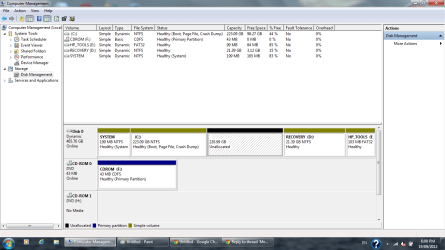
If I'm understanding things correctly, you have one hard drive called C: and it has a partition called G: that is losing hard drive space (not memory) for no apparent reason. Can you post a screen shot of your Disk Management? Maximize the window before posting. How To Access Disk Management in Windows 7 Screenshots and Files - Upload and Post in Seven Forums
It would also help if you use one of these free tools that will show exactly what is being saved to the G: partition. Again, upload a screen shot. WinDirStat - Windows Directory Statistics TreeSize Free - Quickly Scan Directory Sizes and Find Space Hogs | My System Specs | | Computer type Laptop System Manufacturer/Model Number Sony Vaio VPCEB47GM Laptop OS Win 7 Pro 64-bit CPU Intel i5 2.4 Ghz Memory 8GB DDR3 Graphics Card Intel HD 3000 Sound Card IDT High Definition Monitor(s) Displays 15.6 WGXA Anti-Glare LED Screen Resolution 1280x800 Hard Drives 640Gb 7200rpm Antivirus MSE Browser Opera (primary) with IE9 backup |
17 Sep 2012
|
#3 | | Windows 7 Pro SP1 64-bit England, Cheshire |

Quote: Originally Posted by marsmimar This is very good for this kind of issue (at least to find where the space is being taken up).
I use it a lot at work | My System Specs | | System Manufacturer/Model Number Self Built OS Windows 7 Pro SP1 64-bit CPU Intel Core i5-2500K @ 3.30GHz - S1155 Motherboard Asus P8P67 LE Rev3, Intel P67, S115 Memory 8GB Corsair DDR3 XMS3, PC3-12800 Graphics Card 1GB XFX Radeon HD 6770, PCI-E 2.1 (x16) Sound Card On-Board Monitor(s) Displays 2 x 19" {Entended Display} Screen Resolution 1280 x 1024 Keyboard Logitech K120 Mouse World of Warcraft Cataclysm MMO Gaming Mouse PSU 550W Coolermaster GX550 Case Silverstone Precision PS04B Cooling Stock Hard Drives 1TB Seagate Internet Speed 40 MB |
17 Sep 2012
|
#4 | | Windows 7 Home Premium 64bit |
marsmimar marsmimar Thanks for reply and thanks for helping me how to update my system specs.
I've updated the System Specs.
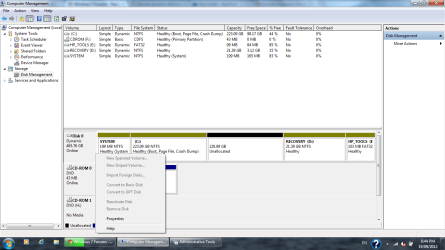
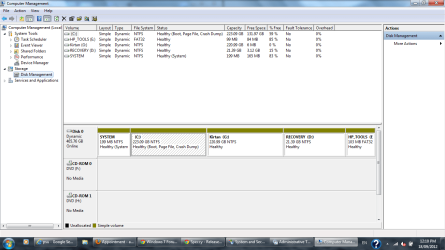
I've attached screenshot of disk management.
Yes, I am losing hard drive space for no reason.
I download TreeSize Free, It give me information of space taken by each folders.
I also did search files by modified last week (using widows search > Date modified > Last week) and it was 232 MB only. And as I mentioned, disk space available last week was 5GB!
I am not good with computers so Please let me know if any important info missing or more info needed. | My System Specs | | System Manufacturer/Model Number Hewlett-Packard / dv6 notebook PC OS Windows 7 Home Premium 64bit CPU Intel(R) Core(TM) i5 CPU M 450 @ 2.40GHz, 2 core Motherboard Hewlett-Packard 144A Memory 4 GB Graphics Card ATI Sound Card ATI High Definition Audio Device Monitor(s) Displays Name Intel(R) HD Graphics Screen Resolution Resolution 1366 x 768 x 60 hertz Hard Drives 466GB TOSHIBA TOSHIBA MK5056GSY (SATA)
C: 223.09 GB
G: 220.99 GB (partition) |
18 Sep 2012
|
#5 | | Windows 7 SP1, Home Premium, 64-bit |
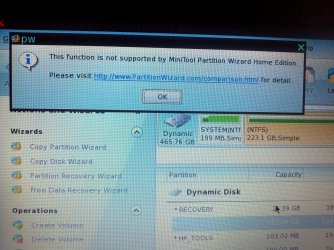
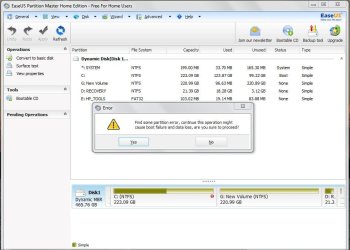
Uh-oh.............the dreaded "dynamic disks", which you are likely going to have to undo. They are generally bad news and to be avoided.
You will need Partition Wizard bootable disk to convert from dynamic.
It's the last link at the bottom of this page. Download it and burn it to disk. http://www.partitionwizard.com/download.html
Get your data backed up before you do anything else.
HP shipped that thing with 4 partitions, the maximum allowed normally. You tried to create a 5th partition and apparently ignored a warning that it would result in dynamic disks. Bad move.
I'd get my data copied elsewhere and re-think my partition ideas. If you MUST have 5 total, you will have to use "logical" partitions.
I don't know if the dynamic disk situation is contributing to the disk filling up, but regardless----copy your data to a safe place. Maybe all of your data will fit on C, at least temporarily?
There are ways to get rid of the System Partition and you may not need the "HP tools" partition, but worry about that after you get rid of dynamic. | My System Specs | | System Manufacturer/Model Number Ignatz Special; 4 speed manual gearbox; factory air conditioning; one of one OS Windows 7 SP1, Home Premium, 64-bit CPU Intel Sandy Bridge i5-2500, not overclocked Motherboard Gigabyte H67A-UD3H-B3, full ATX Memory 4 GB Crucial DDR3-1333 Graphics Card none; graphics are integrated on CPU Sound Card onboard: Realtek ALC892; external: USB Behringer UF0-202 Monitor(s) Displays NEC 90GX2-BK 19" LCD Screen Resolution 800 x 640 Keyboard Leopold Tenkeyless with Cherry Blue switches, USB Mouse Logitech or Microsoft optical wired; either USB or PS 2 PSU Seasonic SS-560KM, modular Case Antec Solo II Cooling CPU: Scythe Big Shuriken; Case: Scythe Slipstream 800 & 500 Hard Drives System: Intel 320 Series SSD, 80 GB;
Data: Samsung Spinpoint 103SJ, 1 TB;
Backup: WD Caviar Green WD15EADS-00P8B0, 1.5TB Other Info Power consumption of this system, including monitor: 68 watts at idle; 144 watts at full load |
18 Sep 2012
|
#6 | | Windows 7 Home Premium 64bit |
ignatzatsonic
Thanks for reply. I'll do that one.
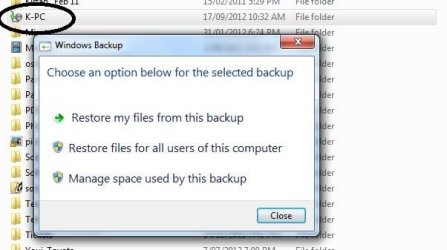
I just noticed that I have a folder called K-PC in G: drive. it shows 0kb. But in TreeSize, it is 189,285 MB. When I double click it, it asking me to chhose option for back-up. I guess I have choose G: drive as a back-up drive and it may filling up space! Is it possible? | My System Specs | | System Manufacturer/Model Number Hewlett-Packard / dv6 notebook PC OS Windows 7 Home Premium 64bit CPU Intel(R) Core(TM) i5 CPU M 450 @ 2.40GHz, 2 core Motherboard Hewlett-Packard 144A Memory 4 GB Graphics Card ATI Sound Card ATI High Definition Audio Device Monitor(s) Displays Name Intel(R) HD Graphics Screen Resolution Resolution 1366 x 768 x 60 hertz Hard Drives 466GB TOSHIBA TOSHIBA MK5056GSY (SATA)
C: 223.09 GB
G: 220.99 GB (partition) |
19 Sep 2012
|
#7 | | Windows 7 Pro SP1 64-bit England, Cheshire |
Let's see how big the backups are...
If you search for 'Backup' in the start menu and then click on ' Backup and Restore'...
You will get a screen that looks like this:
This will show you the backup size.
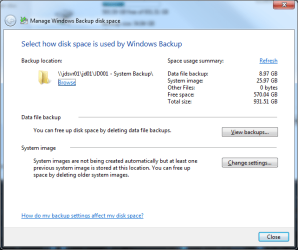
If it is quite big then you can click on ' Manage Space'
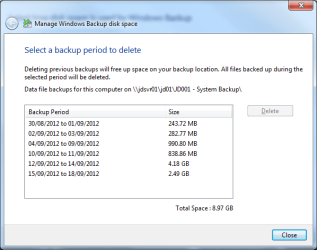
And then click 'View Backups'
From there you will be able to delete them (if you don't want them of course  )
Regards,
JDobbsy1987 | My System Specs | | System Manufacturer/Model Number Self Built OS Windows 7 Pro SP1 64-bit CPU Intel Core i5-2500K @ 3.30GHz - S1155 Motherboard Asus P8P67 LE Rev3, Intel P67, S115 Memory 8GB Corsair DDR3 XMS3, PC3-12800 Graphics Card 1GB XFX Radeon HD 6770, PCI-E 2.1 (x16) Sound Card On-Board Monitor(s) Displays 2 x 19" {Entended Display} Screen Resolution 1280 x 1024 Keyboard Logitech K120 Mouse World of Warcraft Cataclysm MMO Gaming Mouse PSU 550W Coolermaster GX550 Case Silverstone Precision PS04B Cooling Stock Hard Drives 1TB Seagate Internet Speed 40 MB |
19 Sep 2012
|
#8 | | Windows 7 Home Premium 64bit |
It was about 186 GB, I had backup on an external drive. and delete all backup files. It is now 186GB Free on G drive. | My System Specs | | System Manufacturer/Model Number Hewlett-Packard / dv6 notebook PC OS Windows 7 Home Premium 64bit CPU Intel(R) Core(TM) i5 CPU M 450 @ 2.40GHz, 2 core Motherboard Hewlett-Packard 144A Memory 4 GB Graphics Card ATI Sound Card ATI High Definition Audio Device Monitor(s) Displays Name Intel(R) HD Graphics Screen Resolution Resolution 1366 x 768 x 60 hertz Hard Drives 466GB TOSHIBA TOSHIBA MK5056GSY (SATA)
C: 223.09 GB
G: 220.99 GB (partition) |
19 Sep 2012
|
#9 | | Windows 7 Pro SP1 64-bit England, Cheshire |

Quote: Originally Posted by akp01 It was about 186 GB, I had backup on an external drive. and delete all backup files. It is now 186GB Free on G drive. Is this amount of free space more like what you would expect to see or do you still need help with finding more space you can free up?
Regards,
JDobbsy1987 | My System Specs | | System Manufacturer/Model Number Self Built OS Windows 7 Pro SP1 64-bit CPU Intel Core i5-2500K @ 3.30GHz - S1155 Motherboard Asus P8P67 LE Rev3, Intel P67, S115 Memory 8GB Corsair DDR3 XMS3, PC3-12800 Graphics Card 1GB XFX Radeon HD 6770, PCI-E 2.1 (x16) Sound Card On-Board Monitor(s) Displays 2 x 19" {Entended Display} Screen Resolution 1280 x 1024 Keyboard Logitech K120 Mouse World of Warcraft Cataclysm MMO Gaming Mouse PSU 550W Coolermaster GX550 Case Silverstone Precision PS04B Cooling Stock Hard Drives 1TB Seagate Internet Speed 40 MB |
19 Sep 2012
|
#10 | | Windows 7 Home Premium 64bit |
The space is enough for me. Thanks all for help..Now I need to fix my dynamic partition. I am working on it. | My System Specs | | System Manufacturer/Model Number Hewlett-Packard / dv6 notebook PC OS Windows 7 Home Premium 64bit CPU Intel(R) Core(TM) i5 CPU M 450 @ 2.40GHz, 2 core Motherboard Hewlett-Packard 144A Memory 4 GB Graphics Card ATI Sound Card ATI High Definition Audio Device Monitor(s) Displays Name Intel(R) HD Graphics Screen Resolution Resolution 1366 x 768 x 60 hertz Hard Drives 466GB TOSHIBA TOSHIBA MK5056GSY (SATA)
C: 223.09 GB
G: 220.99 GB (partition) All times are GMT -5. The time now is 08:25 PM. | |