Solved Widows won't use all of my RAM???

Henness

New member
Local time
11:24 AM
Messages
13
Okay, I have windows 7 64-bit and when I start my computer it says "Installed memory (RAM): 12.0 GB (7.99 GB usable)" but on the odd occasion it says "Installed memory (RAM): 12.0 GB (3.99 GB usable)" I have flashed my BIOS to the newest version and my BIOS recognizes that I have 12 GB of RAM. But for some reason I cant use the full 12 GB, also my mother board supports up to 24 GB of RAM. This is my motherboard but its not a refurbished. I also have checked that msconfig is not limiting how much my computer boots with.

If anyone has any ideas on why my computer is doing this it would be very much appreciated!


RamUsage.png


RamUsage2.png


ComputerProporties.png
 
Last edited:

My Computer My Computer

At a glance

Windows 7 Ultimate 64bitIntel Core i7 CPU 950 @ 3.07GHz24GB G.SKILL Ripjaws Series 1600 DDR3(2) EVGA NVIDIA GeForce GTX 460 SE
OS
Windows 7 Ultimate 64bit
CPU
Intel Core i7 CPU 950 @ 3.07GHz
Motherboard
MSI X58A-GD65 LGA 1366 Intel X58
Memory
24GB G.SKILL Ripjaws Series 1600 DDR3
Graphics Card(s)
(2) EVGA NVIDIA GeForce GTX 460 SE
Monitor(s) Displays
(2) SAMSUNG P2450H Rose Black 24" 2ms
Screen Resolution
1080x1920
Hard Drives
SAMSUNG 830 Series 128GB SSD
Western Digital Caviar Black 1TB 7200 RPM
PSU
KINGWIN Mach 1 1220W ATX
Case
Antec Twelve Hundred
Cooling
CORSAIR H50
Keyboard
Logitech G19
Mouse
Logitech Performance MX
Internet Speed
25 Down 5 Up
Antivirus
Microsoft Essetials
Browser
Fire Fox
What does your Bios see for ram amount?
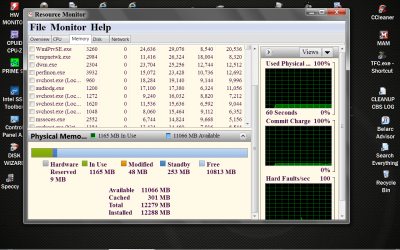
Then show us a picture of your Resource Monitor like this.
Resource Monitor RAM.PNG
 

My Computer My Computer

At a glance

Windows 10 Pro. 64/ version 1709 Windows 7 Pr...Intel i7-6800K @ 4.3Corsair Platinum 16 gig @2400EVGA GTX 1070 OC
Computer type
PC/Desktop
Computer Manufacturer/Model Number
Home made Desktop
OS
Windows 10 Pro. 64/ version 1709 Windows 7 Pro/64
CPU
Intel i7-6800K @ 4.3
Motherboard
ASUS X-99 Deluxe II
Memory
Corsair Platinum 16 gig @2400
Graphics Card(s)
EVGA GTX 1070 OC
Monitor(s) Displays
Asus 27" LED LCD/VE278Q
Screen Resolution
1920-1080 or 1280-720 HDMI
Hard Drives
INTEL SSD 730-240 Gb Sata 3.0/
PSU
EVGA Platium 1200W
Case
Phanteks Luxe Tempered Glass 8 fans/ one radiator
Cooling
XSPC/ Water Cooled CPU
Keyboard
Das 4 Professional
Mouse
Logitech M705/MX Anywhere 2-S
Internet Speed
100 mbits
Antivirus
Microsoft Security Essentials/ Malwarebytes Premium 3.0/ SAS
Browser
I.E. 11 default/Firefox/ ISP Time Warner Cable/Spectrum
Other Info
LG BluRay Burner/
Sound system-KLipsch-THX/
Icy Dock ssd Hot Swap bays.
My BIOS said 12000000K or something like that.

RamUsage.png
 

My Computer My Computer

At a glance

Windows 7 Ultimate 64bitIntel Core i7 CPU 950 @ 3.07GHz24GB G.SKILL Ripjaws Series 1600 DDR3(2) EVGA NVIDIA GeForce GTX 460 SE
OS
Windows 7 Ultimate 64bit
CPU
Intel Core i7 CPU 950 @ 3.07GHz
Motherboard
MSI X58A-GD65 LGA 1366 Intel X58
Memory
24GB G.SKILL Ripjaws Series 1600 DDR3
Graphics Card(s)
(2) EVGA NVIDIA GeForce GTX 460 SE
Monitor(s) Displays
(2) SAMSUNG P2450H Rose Black 24" 2ms
Screen Resolution
1080x1920
Hard Drives
SAMSUNG 830 Series 128GB SSD
Western Digital Caviar Black 1TB 7200 RPM
PSU
KINGWIN Mach 1 1220W ATX
Case
Antec Twelve Hundred
Cooling
CORSAIR H50
Keyboard
Logitech G19
Mouse
Logitech Performance MX
Internet Speed
25 Down 5 Up
Antivirus
Microsoft Essetials
Browser
Fire Fox
I'm thinking you got that from your Bios, is that correct?
 

My Computer My Computer

At a glance

Windows 10 Pro. 64/ version 1709 Windows 7 Pr...Intel i7-6800K @ 4.3Corsair Platinum 16 gig @2400EVGA GTX 1070 OC
Computer type
PC/Desktop
Computer Manufacturer/Model Number
Home made Desktop
OS
Windows 10 Pro. 64/ version 1709 Windows 7 Pro/64
CPU
Intel i7-6800K @ 4.3
Motherboard
ASUS X-99 Deluxe II
Memory
Corsair Platinum 16 gig @2400
Graphics Card(s)
EVGA GTX 1070 OC
Monitor(s) Displays
Asus 27" LED LCD/VE278Q
Screen Resolution
1920-1080 or 1280-720 HDMI
Hard Drives
INTEL SSD 730-240 Gb Sata 3.0/
PSU
EVGA Platium 1200W
Case
Phanteks Luxe Tempered Glass 8 fans/ one radiator
Cooling
XSPC/ Water Cooled CPU
Keyboard
Das 4 Professional
Mouse
Logitech M705/MX Anywhere 2-S
Internet Speed
100 mbits
Antivirus
Microsoft Security Essentials/ Malwarebytes Premium 3.0/ SAS
Browser
I.E. 11 default/Firefox/ ISP Time Warner Cable/Spectrum
Other Info
LG BluRay Burner/
Sound system-KLipsch-THX/
Icy Dock ssd Hot Swap bays.
The 12000000K? ya that's where I got that I went into my bios and checked
 

My Computer My Computer

At a glance

Windows 7 Ultimate 64bitIntel Core i7 CPU 950 @ 3.07GHz24GB G.SKILL Ripjaws Series 1600 DDR3(2) EVGA NVIDIA GeForce GTX 460 SE
OS
Windows 7 Ultimate 64bit
CPU
Intel Core i7 CPU 950 @ 3.07GHz
Motherboard
MSI X58A-GD65 LGA 1366 Intel X58
Memory
24GB G.SKILL Ripjaws Series 1600 DDR3
Graphics Card(s)
(2) EVGA NVIDIA GeForce GTX 460 SE
Monitor(s) Displays
(2) SAMSUNG P2450H Rose Black 24" 2ms
Screen Resolution
1080x1920
Hard Drives
SAMSUNG 830 Series 128GB SSD
Western Digital Caviar Black 1TB 7200 RPM
PSU
KINGWIN Mach 1 1220W ATX
Case
Antec Twelve Hundred
Cooling
CORSAIR H50
Keyboard
Logitech G19
Mouse
Logitech Performance MX
Internet Speed
25 Down 5 Up
Antivirus
Microsoft Essetials
Browser
Fire Fox
Where are you getting the figures of 3.99 and 7.99 usable ram?
 

My Computer My Computer

At a glance

Windows 10 Pro. 64/ version 1709 Windows 7 Pr...Intel i7-6800K @ 4.3Corsair Platinum 16 gig @2400EVGA GTX 1070 OC
Computer type
PC/Desktop
Computer Manufacturer/Model Number
Home made Desktop
OS
Windows 10 Pro. 64/ version 1709 Windows 7 Pro/64
CPU
Intel i7-6800K @ 4.3
Motherboard
ASUS X-99 Deluxe II
Memory
Corsair Platinum 16 gig @2400
Graphics Card(s)
EVGA GTX 1070 OC
Monitor(s) Displays
Asus 27" LED LCD/VE278Q
Screen Resolution
1920-1080 or 1280-720 HDMI
Hard Drives
INTEL SSD 730-240 Gb Sata 3.0/
PSU
EVGA Platium 1200W
Case
Phanteks Luxe Tempered Glass 8 fans/ one radiator
Cooling
XSPC/ Water Cooled CPU
Keyboard
Das 4 Professional
Mouse
Logitech M705/MX Anywhere 2-S
Internet Speed
100 mbits
Antivirus
Microsoft Security Essentials/ Malwarebytes Premium 3.0/ SAS
Browser
I.E. 11 default/Firefox/ ISP Time Warner Cable/Spectrum
Other Info
LG BluRay Burner/
Sound system-KLipsch-THX/
Icy Dock ssd Hot Swap bays.
ComputerProporties.png
 

My Computer My Computer

At a glance

Windows 7 Ultimate 64bitIntel Core i7 CPU 950 @ 3.07GHz24GB G.SKILL Ripjaws Series 1600 DDR3(2) EVGA NVIDIA GeForce GTX 460 SE
OS
Windows 7 Ultimate 64bit
CPU
Intel Core i7 CPU 950 @ 3.07GHz
Motherboard
MSI X58A-GD65 LGA 1366 Intel X58
Memory
24GB G.SKILL Ripjaws Series 1600 DDR3
Graphics Card(s)
(2) EVGA NVIDIA GeForce GTX 460 SE
Monitor(s) Displays
(2) SAMSUNG P2450H Rose Black 24" 2ms
Screen Resolution
1080x1920
Hard Drives
SAMSUNG 830 Series 128GB SSD
Western Digital Caviar Black 1TB 7200 RPM
PSU
KINGWIN Mach 1 1220W ATX
Case
Antec Twelve Hundred
Cooling
CORSAIR H50
Keyboard
Logitech G19
Mouse
Logitech Performance MX
Internet Speed
25 Down 5 Up
Antivirus
Microsoft Essetials
Browser
Fire Fox
Well all the numbers add up. What it is telling you is yes you do have 12 gigs installed. Your are using for hardware,standby and unused the rest of the ram. Now to understand what those things are just hold you cursor over each one and you will see a short explanation of what they are.
Hardware
Modified
Standby
Used
I really don't see a problem.
Does you computer operate correctly? Remember that Windows 7 handles the way the ram is used and it does a great job doing it. When you start do things on your computer Windows 7 will adjust things cache, standby and the like. If you want to free up ram you have to turn things off in the background. If things are working as they should that is not a must to do. Ram is there to be used.
 

My Computer My Computer

At a glance

Windows 10 Pro. 64/ version 1709 Windows 7 Pr...Intel i7-6800K @ 4.3Corsair Platinum 16 gig @2400EVGA GTX 1070 OC
Computer type
PC/Desktop
Computer Manufacturer/Model Number
Home made Desktop
OS
Windows 10 Pro. 64/ version 1709 Windows 7 Pro/64
CPU
Intel i7-6800K @ 4.3
Motherboard
ASUS X-99 Deluxe II
Memory
Corsair Platinum 16 gig @2400
Graphics Card(s)
EVGA GTX 1070 OC
Monitor(s) Displays
Asus 27" LED LCD/VE278Q
Screen Resolution
1920-1080 or 1280-720 HDMI
Hard Drives
INTEL SSD 730-240 Gb Sata 3.0/
PSU
EVGA Platium 1200W
Case
Phanteks Luxe Tempered Glass 8 fans/ one radiator
Cooling
XSPC/ Water Cooled CPU
Keyboard
Das 4 Professional
Mouse
Logitech M705/MX Anywhere 2-S
Internet Speed
100 mbits
Antivirus
Microsoft Security Essentials/ Malwarebytes Premium 3.0/ SAS
Browser
I.E. 11 default/Firefox/ ISP Time Warner Cable/Spectrum
Other Info
LG BluRay Burner/
Sound system-KLipsch-THX/
Icy Dock ssd Hot Swap bays.
Why does my computer use 4GB or sometimes when it chooses 8GB for Hardware??? When Like your computer uses 9MB?
 

My Computer My Computer

At a glance

Windows 7 Ultimate 64bitIntel Core i7 CPU 950 @ 3.07GHz24GB G.SKILL Ripjaws Series 1600 DDR3(2) EVGA NVIDIA GeForce GTX 460 SE
OS
Windows 7 Ultimate 64bit
CPU
Intel Core i7 CPU 950 @ 3.07GHz
Motherboard
MSI X58A-GD65 LGA 1366 Intel X58
Memory
24GB G.SKILL Ripjaws Series 1600 DDR3
Graphics Card(s)
(2) EVGA NVIDIA GeForce GTX 460 SE
Monitor(s) Displays
(2) SAMSUNG P2450H Rose Black 24" 2ms
Screen Resolution
1080x1920
Hard Drives
SAMSUNG 830 Series 128GB SSD
Western Digital Caviar Black 1TB 7200 RPM
PSU
KINGWIN Mach 1 1220W ATX
Case
Antec Twelve Hundred
Cooling
CORSAIR H50
Keyboard
Logitech G19
Mouse
Logitech Performance MX
Internet Speed
25 Down 5 Up
Antivirus
Microsoft Essetials
Browser
Fire Fox
Very sorry I missed that. That is high for hardware to the best of my memory. Lets do a little research and see if we or someone else has a answer. I will be back when I find something.
 

My Computer My Computer

At a glance

Windows 10 Pro. 64/ version 1709 Windows 7 Pr...Intel i7-6800K @ 4.3Corsair Platinum 16 gig @2400EVGA GTX 1070 OC
Computer type
PC/Desktop
Computer Manufacturer/Model Number
Home made Desktop
OS
Windows 10 Pro. 64/ version 1709 Windows 7 Pro/64
CPU
Intel i7-6800K @ 4.3
Motherboard
ASUS X-99 Deluxe II
Memory
Corsair Platinum 16 gig @2400
Graphics Card(s)
EVGA GTX 1070 OC
Monitor(s) Displays
Asus 27" LED LCD/VE278Q
Screen Resolution
1920-1080 or 1280-720 HDMI
Hard Drives
INTEL SSD 730-240 Gb Sata 3.0/
PSU
EVGA Platium 1200W
Case
Phanteks Luxe Tempered Glass 8 fans/ one radiator
Cooling
XSPC/ Water Cooled CPU
Keyboard
Das 4 Professional
Mouse
Logitech M705/MX Anywhere 2-S
Internet Speed
100 mbits
Antivirus
Microsoft Security Essentials/ Malwarebytes Premium 3.0/ SAS
Browser
I.E. 11 default/Firefox/ ISP Time Warner Cable/Spectrum
Other Info
LG BluRay Burner/
Sound system-KLipsch-THX/
Icy Dock ssd Hot Swap bays.
I see you have 2 460 video cards is that correct? They will be reserving a lot of hardware memory. Dual monitors. The more hardware that is attached to the computer the more memory is in hardware reserve. What those amount are per add on I don't know.
 

My Computer My Computer

At a glance

Windows 10 Pro. 64/ version 1709 Windows 7 Pr...Intel i7-6800K @ 4.3Corsair Platinum 16 gig @2400EVGA GTX 1070 OC
Computer type
PC/Desktop
Computer Manufacturer/Model Number
Home made Desktop
OS
Windows 10 Pro. 64/ version 1709 Windows 7 Pro/64
CPU
Intel i7-6800K @ 4.3
Motherboard
ASUS X-99 Deluxe II
Memory
Corsair Platinum 16 gig @2400
Graphics Card(s)
EVGA GTX 1070 OC
Monitor(s) Displays
Asus 27" LED LCD/VE278Q
Screen Resolution
1920-1080 or 1280-720 HDMI
Hard Drives
INTEL SSD 730-240 Gb Sata 3.0/
PSU
EVGA Platium 1200W
Case
Phanteks Luxe Tempered Glass 8 fans/ one radiator
Cooling
XSPC/ Water Cooled CPU
Keyboard
Das 4 Professional
Mouse
Logitech M705/MX Anywhere 2-S
Internet Speed
100 mbits
Antivirus
Microsoft Security Essentials/ Malwarebytes Premium 3.0/ SAS
Browser
I.E. 11 default/Firefox/ ISP Time Warner Cable/Spectrum
Other Info
LG BluRay Burner/
Sound system-KLipsch-THX/
Icy Dock ssd Hot Swap bays.
Why does it fluctuate from 4 to 8 GB if Im not adding or removing any hardware? Also I never had this problem when I had 4 GB I was able to use almost all of it and I had Both monitors.
 

My Computer My Computer

At a glance

Windows 7 Ultimate 64bitIntel Core i7 CPU 950 @ 3.07GHz24GB G.SKILL Ripjaws Series 1600 DDR3(2) EVGA NVIDIA GeForce GTX 460 SE
OS
Windows 7 Ultimate 64bit
CPU
Intel Core i7 CPU 950 @ 3.07GHz
Motherboard
MSI X58A-GD65 LGA 1366 Intel X58
Memory
24GB G.SKILL Ripjaws Series 1600 DDR3
Graphics Card(s)
(2) EVGA NVIDIA GeForce GTX 460 SE
Monitor(s) Displays
(2) SAMSUNG P2450H Rose Black 24" 2ms
Screen Resolution
1080x1920
Hard Drives
SAMSUNG 830 Series 128GB SSD
Western Digital Caviar Black 1TB 7200 RPM
PSU
KINGWIN Mach 1 1220W ATX
Case
Antec Twelve Hundred
Cooling
CORSAIR H50
Keyboard
Logitech G19
Mouse
Logitech Performance MX
Internet Speed
25 Down 5 Up
Antivirus
Microsoft Essetials
Browser
Fire Fox
Okay, here it is with only 3.99 usable. Does anyone have any ideas?

RamUsage2.png
 

My Computer My Computer

At a glance

Windows 7 Ultimate 64bitIntel Core i7 CPU 950 @ 3.07GHz24GB G.SKILL Ripjaws Series 1600 DDR3(2) EVGA NVIDIA GeForce GTX 460 SE
OS
Windows 7 Ultimate 64bit
CPU
Intel Core i7 CPU 950 @ 3.07GHz
Motherboard
MSI X58A-GD65 LGA 1366 Intel X58
Memory
24GB G.SKILL Ripjaws Series 1600 DDR3
Graphics Card(s)
(2) EVGA NVIDIA GeForce GTX 460 SE
Monitor(s) Displays
(2) SAMSUNG P2450H Rose Black 24" 2ms
Screen Resolution
1080x1920
Hard Drives
SAMSUNG 830 Series 128GB SSD
Western Digital Caviar Black 1TB 7200 RPM
PSU
KINGWIN Mach 1 1220W ATX
Case
Antec Twelve Hundred
Cooling
CORSAIR H50
Keyboard
Logitech G19
Mouse
Logitech Performance MX
Internet Speed
25 Down 5 Up
Antivirus
Microsoft Essetials
Browser
Fire Fox
Well I don't know what is causing it. If it was my computer I would start with default.
No over clocking of anything. Make note of ram changes. Using the mother manual I would make sure all my ram is installed correctly. I would check the EVGA motherboard Forum to see it any body else is having this problem.
Then I would use the computer with the onboard video and make note of the changes in ram use. Add one GTX 460SE and make note of ram changes. It's a process of elimination. Some piece of hardware is asking Windows for more ram in reserve at times. I'm thinking because of the large amount be requested it is probably the video cards. Double check and make sure the bios are correct.
 

My Computer My Computer

At a glance

Windows 10 Pro. 64/ version 1709 Windows 7 Pr...Intel i7-6800K @ 4.3Corsair Platinum 16 gig @2400EVGA GTX 1070 OC
Computer type
PC/Desktop
Computer Manufacturer/Model Number
Home made Desktop
OS
Windows 10 Pro. 64/ version 1709 Windows 7 Pro/64
CPU
Intel i7-6800K @ 4.3
Motherboard
ASUS X-99 Deluxe II
Memory
Corsair Platinum 16 gig @2400
Graphics Card(s)
EVGA GTX 1070 OC
Monitor(s) Displays
Asus 27" LED LCD/VE278Q
Screen Resolution
1920-1080 or 1280-720 HDMI
Hard Drives
INTEL SSD 730-240 Gb Sata 3.0/
PSU
EVGA Platium 1200W
Case
Phanteks Luxe Tempered Glass 8 fans/ one radiator
Cooling
XSPC/ Water Cooled CPU
Keyboard
Das 4 Professional
Mouse
Logitech M705/MX Anywhere 2-S
Internet Speed
100 mbits
Antivirus
Microsoft Security Essentials/ Malwarebytes Premium 3.0/ SAS
Browser
I.E. 11 default/Firefox/ ISP Time Warner Cable/Spectrum
Other Info
LG BluRay Burner/
Sound system-KLipsch-THX/
Icy Dock ssd Hot Swap bays.
My motherboard doesn't have on board graphics, Ill go see on the evga forum to see if anyone else has this problem.
 

My Computer My Computer

At a glance

Windows 7 Ultimate 64bitIntel Core i7 CPU 950 @ 3.07GHz24GB G.SKILL Ripjaws Series 1600 DDR3(2) EVGA NVIDIA GeForce GTX 460 SE
OS
Windows 7 Ultimate 64bit
CPU
Intel Core i7 CPU 950 @ 3.07GHz
Motherboard
MSI X58A-GD65 LGA 1366 Intel X58
Memory
24GB G.SKILL Ripjaws Series 1600 DDR3
Graphics Card(s)
(2) EVGA NVIDIA GeForce GTX 460 SE
Monitor(s) Displays
(2) SAMSUNG P2450H Rose Black 24" 2ms
Screen Resolution
1080x1920
Hard Drives
SAMSUNG 830 Series 128GB SSD
Western Digital Caviar Black 1TB 7200 RPM
PSU
KINGWIN Mach 1 1220W ATX
Case
Antec Twelve Hundred
Cooling
CORSAIR H50
Keyboard
Logitech G19
Mouse
Logitech Performance MX
Internet Speed
25 Down 5 Up
Antivirus
Microsoft Essetials
Browser
Fire Fox
It turns out from process of elimination that 3 of my 6 sticks of RAM are defective, and one of them ocationaly works thats why it sometimes would be 3.99GB rather than 7.99GB.

RamUsage3.png
 

My Computer My Computer

At a glance

Windows 7 Ultimate 64bitIntel Core i7 CPU 950 @ 3.07GHz24GB G.SKILL Ripjaws Series 1600 DDR3(2) EVGA NVIDIA GeForce GTX 460 SE
OS
Windows 7 Ultimate 64bit
CPU
Intel Core i7 CPU 950 @ 3.07GHz
Motherboard
MSI X58A-GD65 LGA 1366 Intel X58
Memory
24GB G.SKILL Ripjaws Series 1600 DDR3
Graphics Card(s)
(2) EVGA NVIDIA GeForce GTX 460 SE
Monitor(s) Displays
(2) SAMSUNG P2450H Rose Black 24" 2ms
Screen Resolution
1080x1920
Hard Drives
SAMSUNG 830 Series 128GB SSD
Western Digital Caviar Black 1TB 7200 RPM
PSU
KINGWIN Mach 1 1220W ATX
Case
Antec Twelve Hundred
Cooling
CORSAIR H50
Keyboard
Logitech G19
Mouse
Logitech Performance MX
Internet Speed
25 Down 5 Up
Antivirus
Microsoft Essetials
Browser
Fire Fox
Three out of six I call very bad luck. I'm glad you got it figured out. Those types of things is always a process of elimination and time. Your ram usage in Resource Monitor look great. I keep Resource Monitor on my task bar so I can take a peak at the ram a few times a day to make sure things stay as set.
Mark this thread Solved if you are happy.
Just for information. I have tall heavy ram heat sinks and I added a dual fan cooler. It took me a long time to figure out that the weight of the heat sinks and the ram cooler at times would wiggle a stick or two of ram loose. Reseated the ram and left the cooler off and it has been two weeks with no problem.
 

My Computer My Computer

At a glance

Windows 10 Pro. 64/ version 1709 Windows 7 Pr...Intel i7-6800K @ 4.3Corsair Platinum 16 gig @2400EVGA GTX 1070 OC
Computer type
PC/Desktop
Computer Manufacturer/Model Number
Home made Desktop
OS
Windows 10 Pro. 64/ version 1709 Windows 7 Pro/64
CPU
Intel i7-6800K @ 4.3
Motherboard
ASUS X-99 Deluxe II
Memory
Corsair Platinum 16 gig @2400
Graphics Card(s)
EVGA GTX 1070 OC
Monitor(s) Displays
Asus 27" LED LCD/VE278Q
Screen Resolution
1920-1080 or 1280-720 HDMI
Hard Drives
INTEL SSD 730-240 Gb Sata 3.0/
PSU
EVGA Platium 1200W
Case
Phanteks Luxe Tempered Glass 8 fans/ one radiator
Cooling
XSPC/ Water Cooled CPU
Keyboard
Das 4 Professional
Mouse
Logitech M705/MX Anywhere 2-S
Internet Speed
100 mbits
Antivirus
Microsoft Security Essentials/ Malwarebytes Premium 3.0/ SAS
Browser
I.E. 11 default/Firefox/ ISP Time Warner Cable/Spectrum
Other Info
LG BluRay Burner/
Sound system-KLipsch-THX/
Icy Dock ssd Hot Swap bays.
I would guess more likely a compatibility, stability, or tolerance issue than the DIMMs being bad. Of course, make sure your BIOS are updated. I've heard of a lot of people having issues with getting high capacity and speed RAM to work with multiple DIMMs on more than a few recent motherboards, including EVGA's. Sometimes a BIOS update will resolve the issues.
 
Last edited:

My Computer My Computer

At a glance

Windows 7 Professional SP1 64bit, Manjaro Xfc...Intel i7-3930K @ 4.2GHzCorsair Dominator 64GB Quad Channel DDR3 @ 16...EVGA GeForce GTX Titan Black Superclocked (×2...
Computer type
PC/Desktop
OS
Windows 7 Professional SP1 64bit, Manjaro Xfce, Debian 10 64bit Xfce
CPU
Intel i7-3930K @ 4.2GHz
Motherboard
ASUS P9X79 WS
Memory
Corsair Dominator 64GB Quad Channel DDR3 @ 1600MHz
Graphics Card(s)
EVGA GeForce GTX Titan Black Superclocked (×2, SLI)
Monitor(s) Displays
Sony Bravia 46"
Screen Resolution
1920×1080 (Full Screen), 1366×768 (Windows)
Hard Drives
Samsung 860 PRO 4TB SSD, Samsung 850 EVO 1TB SSD, Western Digital WD Gold 16TB 7200 RPM 512MB Cache HDD
PSU
Corsair AX1200 (1200W, 100.4A @ 12V)
Case
Corsair Obsidian 750D
Cooling
Corsair H110, 5 NOCTUA NF-A14 industrialPPC-3000 PWM Fans
Keyboard
Logitech K360
Mouse
Logitech M220
Browser
Firefox Developer Edition, Pale Moon, Tor
My way of thinking is little different than many others. If I have problem (A) and a bios update address that problem (A) then I update the bios. If a bios update doesn't address problem (A) I look for other methods to repair problem (A). Most bios updated are to address a problem some people are having with their/there system. I keep hand written notes in my motherboard manual of the bios I have used and what was the effect. I'm about 3 updates behind but I'm not having a problem so I won't change them just because their/there is a new update.
 

My Computer My Computer

At a glance

Windows 10 Pro. 64/ version 1709 Windows 7 Pr...Intel i7-6800K @ 4.3Corsair Platinum 16 gig @2400EVGA GTX 1070 OC
Computer type
PC/Desktop
Computer Manufacturer/Model Number
Home made Desktop
OS
Windows 10 Pro. 64/ version 1709 Windows 7 Pro/64
CPU
Intel i7-6800K @ 4.3
Motherboard
ASUS X-99 Deluxe II
Memory
Corsair Platinum 16 gig @2400
Graphics Card(s)
EVGA GTX 1070 OC
Monitor(s) Displays
Asus 27" LED LCD/VE278Q
Screen Resolution
1920-1080 or 1280-720 HDMI
Hard Drives
INTEL SSD 730-240 Gb Sata 3.0/
PSU
EVGA Platium 1200W
Case
Phanteks Luxe Tempered Glass 8 fans/ one radiator
Cooling
XSPC/ Water Cooled CPU
Keyboard
Das 4 Professional
Mouse
Logitech M705/MX Anywhere 2-S
Internet Speed
100 mbits
Antivirus
Microsoft Security Essentials/ Malwarebytes Premium 3.0/ SAS
Browser
I.E. 11 default/Firefox/ ISP Time Warner Cable/Spectrum
Other Info
LG BluRay Burner/
Sound system-KLipsch-THX/
Icy Dock ssd Hot Swap bays.
It ended up being four and they were two sets I bought at the same time, so I think I got a bad batch. And The RAM is bad because my computer wont even post with one of the bad sticks in by them selves. I ended up finding a few things that helped me on the EVGA forums. I tried every thing that person said and the RAM was the only think that didn't check out. The good thing is my RAM has a life time warranty. Thanks for your help.
 

My Computer My Computer

At a glance

Windows 7 Ultimate 64bitIntel Core i7 CPU 950 @ 3.07GHz24GB G.SKILL Ripjaws Series 1600 DDR3(2) EVGA NVIDIA GeForce GTX 460 SE
OS
Windows 7 Ultimate 64bit
CPU
Intel Core i7 CPU 950 @ 3.07GHz
Motherboard
MSI X58A-GD65 LGA 1366 Intel X58
Memory
24GB G.SKILL Ripjaws Series 1600 DDR3
Graphics Card(s)
(2) EVGA NVIDIA GeForce GTX 460 SE
Monitor(s) Displays
(2) SAMSUNG P2450H Rose Black 24" 2ms
Screen Resolution
1080x1920
Hard Drives
SAMSUNG 830 Series 128GB SSD
Western Digital Caviar Black 1TB 7200 RPM
PSU
KINGWIN Mach 1 1220W ATX
Case
Antec Twelve Hundred
Cooling
CORSAIR H50
Keyboard
Logitech G19
Mouse
Logitech Performance MX
Internet Speed
25 Down 5 Up
Antivirus
Microsoft Essetials
Browser
Fire Fox
Back
Top