
| Windows 7: lots of processes |
29 Sep 2012
|
#1 | | Microsoft Windows 7 Ultimate 32-bit 7601 Multiprocessor Free Service Pack 1 |
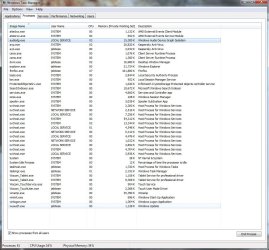
lots of processes Hi, my computer is a bit slow and I checked for processes... I got lots of them.I'm the only user of my computer so I was wondering if all of these (processes) should be here. | My System Specs |
| OS Microsoft Windows 7 Ultimate 32-bit 7601 Multiprocessor Free Service Pack 1 CPU Pentium(R) Dual-Core CPU E5300 @ 2.60GHz Motherboard ASRock G41M-S Memory 3.00 GB Graphics Card ATI Radeon HD 4300/4500 Series Sound Card (1) AMD High Definition Audio Device (2) Realtek High Defi Monitor(s) Displays philips 23ie HD Screen Resolution 1920 x 1080 x 32 bits (4294967296 colors) @ 60 Hz Hard Drives (1) WDC WD3200AAJS-00L7A0 ATA Device (2) WDC WD5000AADS-00S9B0 ATA Device |
29 Sep 2012
|
#2 | | |
Click on the CPU column so if one process is hogging the CPU it will be shown at the top. If there seems to be no culprit then it may be that you can save some CPU cycles by disabling or setting to manual services you do not need. Which services are needed and which not varies by machine and what you are doing with it. It's complex and things can go wrong if you decided to turn off the wrong one.
See this tutorial for a starting point. Before making any changes try to set things up so that you can undo them. Restore Points, registry backup using ERUNT. Image backup of your system if possible, etc.. | My System Specs | | System Manufacturer/Model Number HP Media Center OS Windows 7 32 bit CPU AMD 5200+ dual core Memory 2 GB Graphics Card NVidia GeForce 6150SE 128 MB Monitor(s) Displays CRT Screen Resolution 1280x1024 Keyboard PS/2 Mouse PS/2 Wheel Mouse Hard Drives 500 GB Sata internal :
SIIG USB 3.0 docking stations w/WD Caviar Black 6 Gb/s drives Other Info SIIG USB 3.0 PCIexpress card. |
29 Sep 2012
|
#3 | | Vista, Windows7, Mint Mate, Zorin, Windows 8 Florida in winter, Black Forest/Germany |
I see nothing unusual. 60 +/- processes are normal. | My System Specs | | System Manufacturer/Model Number HP, Dell, Gateway, Toshiba - 4 laptops and 2 desktops OS Vista, Windows7, Mint Mate, Zorin, Windows 8 CPU from 1.6GHz Duo to i7 Monitor(s) Displays 2x HP w2207 Keyboard with trackball - no mices Mouse Trackball mice Hard Drives 5x HDD, 7x SSD, 12x Externals Internet Speed DSL 6000 |
29 Sep 2012
|
#4 | | Windows 7 Professional x64 SP1 Within the radius of 25 miles from LA. |
That's normal. On my laptop with a bunch of devices attached along with their drivers plus some auto update services, I get about 65 - 80. Browsing with IE or Chrome around 15 tabs and you will see 16 processes 15 + 1 parent process. I think it's the harddrive activity that is slowing down your PC. Do a virus scan or check your Resource Monitor to troubleshoot your computer slowing down. Resource Monitor | My System Specs | | Computer type Laptop System Manufacturer/Model Number Dell Optiplex SX270, Lenovo Z470 OS Windows 7 Professional x64 SP1 CPU Intel® Pentium® 4 @ 2.26 GHz, Intel Core i7-2670QM @ 2.20 GH Motherboard Dell, Lenovo Memory 512MB Dual channel DDR SDRAM @ 400MHz 2.5-3-3-7, 8 GB DDR3 Graphics Card Intel 82865G, Nvidia GeForce 520M Graphics Sound Card SoundMax Integrated Audio, Integrated HD Audio Monitor(s) Displays LG W1952 Screen Resolution 1440x900, 1366 x 768 Keyboard Dell SK-8125 USB Keyboard Mouse Dell PS/2 2 button ball mouse with wheel scroll PSU Dell 145 Watt, Lenovo 120 Watt Power Adapter Case Optiplex SX270 Small Form Factor, Laptop Cooling Dell Proprietary Air Cooling, Stock laptop cooling Hard Drives 40 GB 2.5" IDE 4200 RPM HDD, 500 GB 5400 RPM Sata 1.5 + 32 GB SSD Internet Speed 10 Mbit down / 1 kbps up Road Runner Cable Antivirus MSE, Malwarebytes Scanner Browser Internet Explorer 10 Other Info Running Windows Server 2012 Datacenter on a virtural machine to run Metro Apps. |
29 Sep 2012
|
#5 | | Windows 7 SP1, Home Premium, 64-bit |

Quote: Originally Posted by mobius101 I got lots of them. You have 41.
I don't think I have ever seen anyone with fewer processes. | My System Specs | | System Manufacturer/Model Number Ignatz Special; 4 speed manual gearbox; factory air conditioning; one of one OS Windows 7 SP1, Home Premium, 64-bit CPU Intel Sandy Bridge i5-2500, not overclocked Motherboard Gigabyte H67A-UD3H-B3, full ATX Memory 4 GB Crucial DDR3-1333 Graphics Card none; graphics are integrated on CPU Sound Card onboard: Realtek ALC892; external: USB Behringer UF0-202 Monitor(s) Displays NEC 90GX2-BK 19" LCD Screen Resolution 800 x 640 Keyboard Leopold Tenkeyless with Cherry Blue switches, USB Mouse Logitech or Microsoft optical wired; either USB or PS 2 PSU Seasonic SS-560KM, modular Case Antec Solo II Cooling CPU: Scythe Big Shuriken; Case: Scythe Slipstream 800 & 500 Hard Drives System: Intel 320 Series SSD, 80 GB;
Data: Samsung Spinpoint 103SJ, 1 TB;
Backup: WD Caviar Green WD15EADS-00P8B0, 1.5TB Other Info Power consumption of this system, including monitor: 68 watts at idle; 144 watts at full load |
29 Sep 2012
|
#6 | | Windows 7 Home Premium x64 |
What was happening behind the scenes in Firefox (7% CPU) during the snapshot? I didn't see a plugin-container for media. Is it slower only when Firefox is running? The addons (if any) might be an avenue to investigate.
BTW, I have under 35 processes running. WACOM is set to manual, so it doesn't auto-initiate during startup. | My System Specs | | OS Windows 7 Home Premium x64 |
29 Sep 2012
|
#7 | | |

Quote: Originally Posted by gigagiggles What was happening behind the scenes in Firefox (7% CPU) during the snapshot? I didn't see a plugin-container for media. Is it slower only when Firefox is running? The addons (if any) might be an avenue to investigate.
BTW, I have under 35 processes running. WACOM is set to manual, so it doesn't auto-initiate during startup. I saw the Firefox 7% CPU usage. That's the reason I asked the OP to sort by CPU column to see if there was another heavy user.
The OP doesn't say if the system feels sluggish. Vista and Windows 7 can seem like a lot of processes going for no good reason. But it's not just the number. Some run the HD on and some don't. Some use CPU and some hardly effect performance at all.
The OP should comment, such as system feels bogged or he's just curious etc.. And should post another screen shot sorted by CPU usage if it does seem bogged or HD seems to run on incessantly etc.. | My System Specs | | System Manufacturer/Model Number HP Media Center OS Windows 7 32 bit CPU AMD 5200+ dual core Memory 2 GB Graphics Card NVidia GeForce 6150SE 128 MB Monitor(s) Displays CRT Screen Resolution 1280x1024 Keyboard PS/2 Mouse PS/2 Wheel Mouse Hard Drives 500 GB Sata internal :
SIIG USB 3.0 docking stations w/WD Caviar Black 6 Gb/s drives Other Info SIIG USB 3.0 PCIexpress card. lots of processes problems? All times are GMT -5. The time now is 02:53 AM. | |