| Windows 7: How to clean "Recovery C" |
29 Sep 2012
|
#1 | | |
How to clean "Recovery C" Hello,
Recently i have rebooted my Dell Laptop (i think it is called reboot, it is now back to its orginal factory settings). I am trying to install Microsoft Programmes but i have no space. I get notifications that i am running low on memory. Please help in very simple terms. Thank you so much. | My System Specs |
| |
29 Sep 2012
|
#2 | | Windows 7 SP1, Home Premium, 64-bit |
What did you do to restore to factory settings? Did you use some DVDs? Or did you use a menu choice from your programs? Or did you use an F key when rebooting?
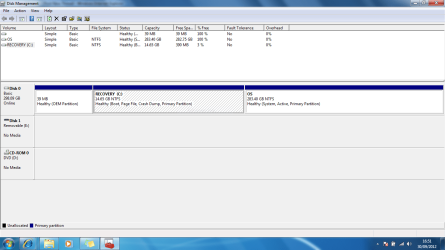
Something went wrong in the process. Look at that second picture.
For whatever reason, the recovery partition is shown as the C drive and is the boot partition. That partition is full and that's why you are getting that message.
Normally, you'd expect the partition shown as "OS" to be shown as the C drive and as the boot partition. It has plenty of free space and is where you would normally install programs.
The "recovery" partition should be left alone. It should not be marked as boot or page file or crash dump.
I'm not sure how you went off the track, but let us know exactly how you did the "recovery". Maybe you can do it again.
It may also be possible to repair this existing installation. Do you have any type of installation disc that may have been provided by Dell? | My System Specs | | System Manufacturer/Model Number Ignatz Special; 4 speed manual gearbox; factory air conditioning; one of one OS Windows 7 SP1, Home Premium, 64-bit CPU Intel Sandy Bridge i5-2500, not overclocked Motherboard Gigabyte H67A-UD3H-B3, full ATX Memory 4 GB Crucial DDR3-1333 Graphics Card none; graphics are integrated on CPU Sound Card onboard: Realtek ALC892; external: USB Behringer UF0-202 Monitor(s) Displays NEC 90GX2-BK 19" LCD Screen Resolution 800 x 640 Keyboard Leopold Tenkeyless with Cherry Blue switches, USB Mouse Logitech or Microsoft optical wired; either USB or PS 2 PSU Seasonic SS-560KM, modular Case Antec Solo II Cooling CPU: Scythe Big Shuriken; Case: Scythe Slipstream 800 & 500 Hard Drives System: Intel 320 Series SSD, 80 GB;
Data: Samsung Spinpoint 103SJ, 1 TB;
Backup: WD Caviar Green WD15EADS-00P8B0, 1.5TB Other Info Power consumption of this system, including monitor: 68 watts at idle; 144 watts at full load |
29 Sep 2012
|
#3 | | |
When i switched on the laptop i pressed F12 but also used a Dell installtion disk and just followed the steps as i went. Thank you for replying so soon | My System Specs | | |
29 Sep 2012
|
#4 | | Windows 7 SP1, Home Premium, 64-bit |

Quote: Originally Posted by maisha When i switched on the laptop i pressed F12 but also used a Dell installtion disk and just followed the steps as i went. Thank you for replying so soon I suspect you should have used the F12 key and ignored the Dell installation disk. I wouldn't think the installation disk would be necessary to do a "factory reset".
Have you tried to do another factory reset using the F12 key, without the installation disk?
I don't know how Dell sets things up, but I'd assume the installation disk to be used only for a clean install and NOT when you are trying to do a factory reset. A clean install and a factory reset are two different things. | My System Specs | | System Manufacturer/Model Number Ignatz Special; 4 speed manual gearbox; factory air conditioning; one of one OS Windows 7 SP1, Home Premium, 64-bit CPU Intel Sandy Bridge i5-2500, not overclocked Motherboard Gigabyte H67A-UD3H-B3, full ATX Memory 4 GB Crucial DDR3-1333 Graphics Card none; graphics are integrated on CPU Sound Card onboard: Realtek ALC892; external: USB Behringer UF0-202 Monitor(s) Displays NEC 90GX2-BK 19" LCD Screen Resolution 800 x 640 Keyboard Leopold Tenkeyless with Cherry Blue switches, USB Mouse Logitech or Microsoft optical wired; either USB or PS 2 PSU Seasonic SS-560KM, modular Case Antec Solo II Cooling CPU: Scythe Big Shuriken; Case: Scythe Slipstream 800 & 500 Hard Drives System: Intel 320 Series SSD, 80 GB;
Data: Samsung Spinpoint 103SJ, 1 TB;
Backup: WD Caviar Green WD15EADS-00P8B0, 1.5TB Other Info Power consumption of this system, including monitor: 68 watts at idle; 144 watts at full load |
29 Sep 2012
|
#5 | | |
When i swtiched on the latop it read "BOOTMGR Missing, Press Ctrl+Alt+Del to restart"
I recall pressing F12 and then pressing the second option that came up. Windows restarted, i was asked to enter country and just followed the steps. | My System Specs | | |
29 Sep 2012
|
#6 | | Windows 7 SP1, Home Premium, 64-bit |
Try this:
Open Windows Disk Management so you see something like what is shown in your second picture above.
Click on the C partition (recovery partition).
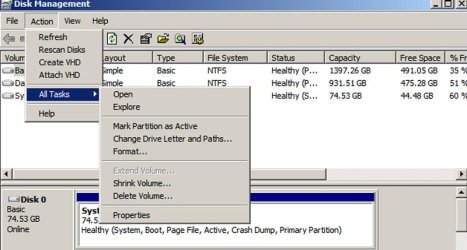
Go to the Action menu and choose "all tasks".
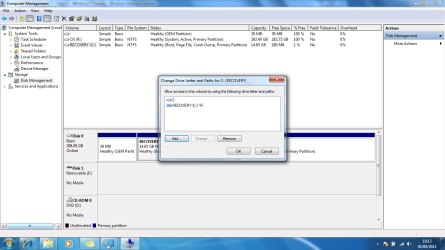
Choose "change drive letters and paths". Select some other letter for that recovery partition. R would be fine.
Then try to assign the drive letter "C" to that partition now shown as "OS". You may have to back up a step or two and click on that "OS" partition and then go back to the action menu.
After you get the OS partition renamed to C, reboot and go back to Disk Management and show us a new picture. | My System Specs | | System Manufacturer/Model Number Ignatz Special; 4 speed manual gearbox; factory air conditioning; one of one OS Windows 7 SP1, Home Premium, 64-bit CPU Intel Sandy Bridge i5-2500, not overclocked Motherboard Gigabyte H67A-UD3H-B3, full ATX Memory 4 GB Crucial DDR3-1333 Graphics Card none; graphics are integrated on CPU Sound Card onboard: Realtek ALC892; external: USB Behringer UF0-202 Monitor(s) Displays NEC 90GX2-BK 19" LCD Screen Resolution 800 x 640 Keyboard Leopold Tenkeyless with Cherry Blue switches, USB Mouse Logitech or Microsoft optical wired; either USB or PS 2 PSU Seasonic SS-560KM, modular Case Antec Solo II Cooling CPU: Scythe Big Shuriken; Case: Scythe Slipstream 800 & 500 Hard Drives System: Intel 320 Series SSD, 80 GB;
Data: Samsung Spinpoint 103SJ, 1 TB;
Backup: WD Caviar Green WD15EADS-00P8B0, 1.5TB Other Info Power consumption of this system, including monitor: 68 watts at idle; 144 watts at full load |
29 Sep 2012
|
#7 | | |
I'm not quite sure what you mean? Line 4? could you break this down please.
Also what would this do? | My System Specs | | |
29 Sep 2012
|
#8 | | Windows 7 SP1, Home Premium, 64-bit |

Quote: Originally Posted by maisha I'm not quite sure what you mean? Line 4? could you break this down please.
Also what would this do? Line 4 is:
Go to the Action menu and choose "all tasks".
What don't you understand or follow about that?
The entire procedure I outlined may solve your problem and may not.
Programs want to install to the C drive. Your current C drive is full. My idea is to rename OS to C. The OS partition is already shown as your system and active partition, which is good. | My System Specs | | System Manufacturer/Model Number Ignatz Special; 4 speed manual gearbox; factory air conditioning; one of one OS Windows 7 SP1, Home Premium, 64-bit CPU Intel Sandy Bridge i5-2500, not overclocked Motherboard Gigabyte H67A-UD3H-B3, full ATX Memory 4 GB Crucial DDR3-1333 Graphics Card none; graphics are integrated on CPU Sound Card onboard: Realtek ALC892; external: USB Behringer UF0-202 Monitor(s) Displays NEC 90GX2-BK 19" LCD Screen Resolution 800 x 640 Keyboard Leopold Tenkeyless with Cherry Blue switches, USB Mouse Logitech or Microsoft optical wired; either USB or PS 2 PSU Seasonic SS-560KM, modular Case Antec Solo II Cooling CPU: Scythe Big Shuriken; Case: Scythe Slipstream 800 & 500 Hard Drives System: Intel 320 Series SSD, 80 GB;
Data: Samsung Spinpoint 103SJ, 1 TB;
Backup: WD Caviar Green WD15EADS-00P8B0, 1.5TB Other Info Power consumption of this system, including monitor: 68 watts at idle; 144 watts at full load |
29 Sep 2012
|
#9 | | |
After line 4 then what? I dont understand line 5 either. | My System Specs | | |
29 Sep 2012
|
#10 | | Windows 7 SP1, Home Premium, 64-bit |

Quote: Originally Posted by maisha After line 4 then what? I dont understand line 5 either. What don't you understand about line 5?
Can you complete line 4? If so, do you or don't you see a choice for "change drive letter and paths", like this: | My System Specs | | System Manufacturer/Model Number Ignatz Special; 4 speed manual gearbox; factory air conditioning; one of one OS Windows 7 SP1, Home Premium, 64-bit CPU Intel Sandy Bridge i5-2500, not overclocked Motherboard Gigabyte H67A-UD3H-B3, full ATX Memory 4 GB Crucial DDR3-1333 Graphics Card none; graphics are integrated on CPU Sound Card onboard: Realtek ALC892; external: USB Behringer UF0-202 Monitor(s) Displays NEC 90GX2-BK 19" LCD Screen Resolution 800 x 640 Keyboard Leopold Tenkeyless with Cherry Blue switches, USB Mouse Logitech or Microsoft optical wired; either USB or PS 2 PSU Seasonic SS-560KM, modular Case Antec Solo II Cooling CPU: Scythe Big Shuriken; Case: Scythe Slipstream 800 & 500 Hard Drives System: Intel 320 Series SSD, 80 GB;
Data: Samsung Spinpoint 103SJ, 1 TB;
Backup: WD Caviar Green WD15EADS-00P8B0, 1.5TB Other Info Power consumption of this system, including monitor: 68 watts at idle; 144 watts at full load How to clean "Recovery C" problems? All times are GMT -5. The time now is 01:04 AM. | |