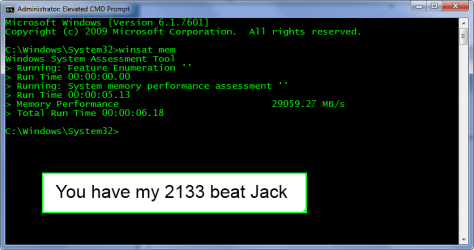
What's your memory assessment speed? [2]

Running a 1700 speed every day all day.

Microsoft Windows [Version 6.1.7601]
Copyright (c) 2009 Microsoft Corporation. All rights reserved.

C:\Windows\System32>winsat mem
Windows System Assessment Tool
> Running: Feature Enumeration ''
> Run Time 00:00:00.00
> Running: System memory performance assessment ''
> Run Time 00:00:05.13
> Memory Performance 29742.84 MB/s
> Total Run Time 00:00:12.35

C:\Windows\System32>
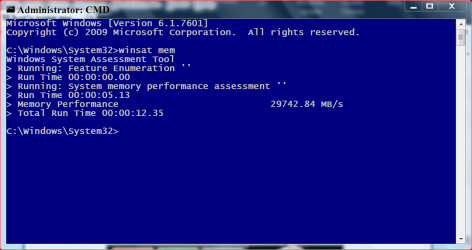
Memory speed.PNG
 

My Computer

Computer type
PC/Desktop
Computer Manufacturer/Model Number
Home made Desktop
OS
Windows 10 Pro. 64/ version 1709 Windows 7 Pro/64
CPU
Intel i7-6800K @ 4.3
Motherboard
ASUS X-99 Deluxe II
Memory
Corsair Platinum 16 gig @2400
Graphics Card(s)
EVGA GTX 1070 OC
Monitor(s) Displays
Asus 27" LED LCD/VE278Q
Screen Resolution
1920-1080 or 1280-720 HDMI
Hard Drives
INTEL SSD 730-240 Gb Sata 3.0/
PSU
EVGA Platium 1200W
Case
Phanteks Luxe Tempered Glass 8 fans/ one radiator
Cooling
XSPC/ Water Cooled CPU
Keyboard
Das 4 Professional
Mouse
Logitech M705/MX Anywhere 2-S
Internet Speed
100 mbits
Antivirus
Microsoft Security Essentials/ Malwarebytes Premium 3.0/ SAS
Browser
I.E. 11 default/Firefox/ ISP Time Warner Cable/Spectrum
Other Info
LG BluRay Burner/
Sound system-KLipsch-THX/
Icy Dock ssd Hot Swap bays.
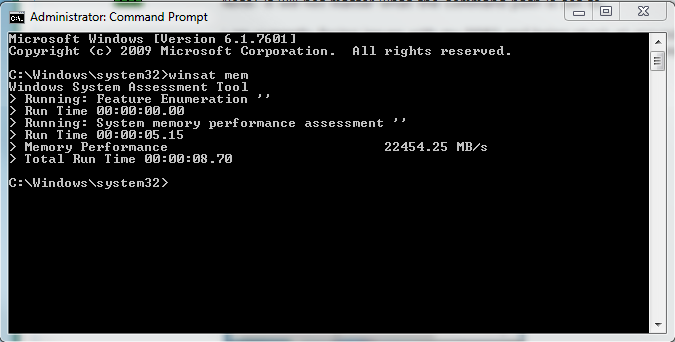
winsat.png
 

My Computer

Computer type
PC/Desktop
Computer Manufacturer/Model Number
Home Built Desktop By DataTech
OS
Windows 7 Ultimate X64 SP1
CPU
Intel i5-2550K, Differing ~4.4-4.8GHz No built in GPU
Motherboard
ASUS P8Z68-V PRO/GEN3
Memory
16GB G.Skill Sniper 1866MHz @ 2133MHz 2x8GB
Graphics Card(s)
ASUS GTX650TIB-DC2OC-2GD5, (650TI Boost)
Sound Card
Onboard Realtek 5-1
Monitor(s) Displays
Samsung P2570HD
Screen Resolution
1920x1080
Hard Drives
Samsung 840 Pro 256GB SSD for OS, 500GB Seagate Constellation (Enterprise drive) for Data
PSU
Corsair HX650W
Case
Inwin Dragon Rider
Cooling
Hyper 212 EVO w/two Noctua fans, push-pull, @1300 RPM
Keyboard
E-Z Eyes, bright yellow keys with large characters
Mouse
steelseries SENSEI Laser Pro Gaming
Internet Speed
48-51Mbs Mbs down, 11 Mbs up Xfinity Cable
Antivirus
Norton Internet Security 2013
Browser
IE 10, Opera, Pale Moon if needed
Other Info
4 case fans, LG BluRay-RE, ASUS DVD-RW, Mr. Fusion power supply, 1.21 gigawatts.
Great job, Jack. Well done.
 

My Computers

System One System Two

  • Computer type
    PC/Desktop
    Computer Manufacturer/Model Number
    ALWAYS UNDER CONSTRUCTION
    OS
    Windows 11 Pro
    CPU
    Ryzen 9 5900X
    Motherboard
    Asus X570 Crosshair Viii Hero
    Memory
    32GB G Skill DDR4-3600
    Graphics Card(s)
    EVGA RTX 3080 FTW 3 Ultra
    Sound Card
    On Board/Sennheiser PC37X Headset
    Monitor(s) Displays
    3 X Asus 27"
    Screen Resolution
    2560x1440
    Hard Drives
    2 X 1 TB NVME drives
    PSU
    EVGA 850
    Case
    Phanteks Eclipse P400A
    Cooling
    EVGA 280 AIO
    Keyboard
    Logitech G510s/ Logitech G13
    Mouse
    Logitech G502
    Internet Speed
    24/1
    Antivirus
    ESET/MBAM Pro/SAS Pro
    Browser
    Chrome/ Firefox/ Edge
  • Computer type
    Laptop
    System Manufacturer/Model Number
    Dell 16 Plus
    OS
    Windows 11 Pro
    CPU
    Intel Ultra 9 288V
    Memory
    32 GB LPDDR5X 8533
    Monitor(s) Displays
    16" Mini-LED HDR600 Touch 90 Hz
    Screen Resolution
    2560X1600
    Hard Drives
    1 TB NVME
This is a DELL VOSTRO laptop with OS Win 7 Pro 64 bit laptop. I get a low memory warning after a few minutes of internet use. I have run all the programs (PC claeaner, TuneUp Utility 13) I can find and cannot get the system to perform normally. Using the task manager the IE usage rapidly gets to 350,000KB. How can I limit this or work around it? Any suggestioned will be appreciated.
Only using 350mb...? That's actually pretty low, especially for IE.. If you look at my attached screenshot, Chrome is currently using up over 1GB of my RAM.

As for memory usage vs performance, you might find the info in this answer on the MS community forums somewhat helpful.

Second I would uninstall PC cleaner and Tune up utility and any other such programs you have. Those programs are counter productive with Windows 7 and will ruin an OS. Dell ships completely full of trial programs and other stuff that will keep the OS from running as efficiently as possible. You may want to consider, http://www.sevenforums.com/tutorials/219487-clean-reinstall-factory-oem-windows-7-a.html after that, I think you will find your system runs much better.
Personally I wouldn't brand all PC health type applications as counter productive, although I'll admit I have seen many of them damage a Windows installation. I've used TuneUp Utils (both 2011 and now 2012) on my setup since I first got Win7. As with anti-virus programs though, it's more damaging to try use more than one app like that at a time, often they both end up trying to do similar things at the same time and they have conflicts.

I've had the same install for almost 2 years now, which has survived 5 different graphics cards (including ATI and Nvidia), 4 CPUs, countless virus scares and actual infections, and recently a complete motherboard change.. It's still running beautifully. But having a fake PC health app, or a even good one setup incorrectly, definitely has a heavy impact.

At the end of the day though, I'd say it's a combination of all the things done to and in Windows that make the biggest difference to system reliability and stability. A clean install will always be a nice fresh start, but if you apply the same mentality to how you maintain Windows after that, the whole cycle will repeat yet again.
 

Attachments

  • Chrome Memory Usage.PNG
    Chrome Memory Usage.PNG
    31 KB · Views: 9

My Computer

Computer type
PC/Desktop
OS
Win 10 x64 Pro x64 / Ubuntu 15.10 x64
CPU
Intel i7-4960X
Motherboard
Asus Rampage IV Black Edition
Memory
4x8GB Corsair Dominator Platinum @2400MHz 10-12-12-31
Graphics Card(s)
2x MSI GTX780Ti 3GB (SLI)
Sound Card
Onboard SupremeFX (Cirrus Logic CS4398)
Monitor(s) Displays
3x LG Cinema 27" IPS LED (27MP65)
Screen Resolution
[1920x1080]x3
Hard Drives
Crucial M500 120GB, Crucial M500 480GB, Toshiba DT01ACA200 2TB
PSU
CoolerMaster V1000
Case
Corsair Obsidian 750D
Cooling
ThermalTake Water 3.0 Extreme, 4xSP120, 3xAF120
Keyboard
Moshi Luna
Mouse
Logitech G700s / Roccat Tyon
Internet Speed
4Mb uncapped ADSL (Afrihost)
Antivirus
MS Security Essentials
Browser
Chrome... Duh. (:
Tune Up Utilities must be used with a deft hand. I've used it since 2005 with XP. w7 is much different so I don't use their Turbo mode or let it decide what programs to disable. I mainly use the System configs and icon packs. The Tune Up defrag is not used either, the built in one works fine.
 

My Computer

Computer type
PC/Desktop
Computer Manufacturer/Model Number
Home Built Desktop By DataTech
OS
Windows 7 Ultimate X64 SP1
CPU
Intel i5-2550K, Differing ~4.4-4.8GHz No built in GPU
Motherboard
ASUS P8Z68-V PRO/GEN3
Memory
16GB G.Skill Sniper 1866MHz @ 2133MHz 2x8GB
Graphics Card(s)
ASUS GTX650TIB-DC2OC-2GD5, (650TI Boost)
Sound Card
Onboard Realtek 5-1
Monitor(s) Displays
Samsung P2570HD
Screen Resolution
1920x1080
Hard Drives
Samsung 840 Pro 256GB SSD for OS, 500GB Seagate Constellation (Enterprise drive) for Data
PSU
Corsair HX650W
Case
Inwin Dragon Rider
Cooling
Hyper 212 EVO w/two Noctua fans, push-pull, @1300 RPM
Keyboard
E-Z Eyes, bright yellow keys with large characters
Mouse
steelseries SENSEI Laser Pro Gaming
Internet Speed
48-51Mbs Mbs down, 11 Mbs up Xfinity Cable
Antivirus
Norton Internet Security 2013
Browser
IE 10, Opera, Pale Moon if needed
Other Info
4 case fans, LG BluRay-RE, ASUS DVD-RW, Mr. Fusion power supply, 1.21 gigawatts.
Tune Up Utilities must be used with a deft hand. I've used it since 2005 with XP. w7 is much different so I don't use their Turbo mode or let it decide what programs to disable. I mainly use the System configs and icon packs. The Tune Up defrag is not used either, the built in one works fine.

I don't use the turbo mode either, or any of the other live optimisation features.. Pretty much all I use from it is the scheduled maintenance option to do drive and registry defrags, and set it to watch for programs I haven't run in 3 months. Basically just to try keep the areas of Windows that tend to change more often under slightly better control. Works pretty well for me.
 

My Computer

Computer type
PC/Desktop
OS
Win 10 x64 Pro x64 / Ubuntu 15.10 x64
CPU
Intel i7-4960X
Motherboard
Asus Rampage IV Black Edition
Memory
4x8GB Corsair Dominator Platinum @2400MHz 10-12-12-31
Graphics Card(s)
2x MSI GTX780Ti 3GB (SLI)
Sound Card
Onboard SupremeFX (Cirrus Logic CS4398)
Monitor(s) Displays
3x LG Cinema 27" IPS LED (27MP65)
Screen Resolution
[1920x1080]x3
Hard Drives
Crucial M500 120GB, Crucial M500 480GB, Toshiba DT01ACA200 2TB
PSU
CoolerMaster V1000
Case
Corsair Obsidian 750D
Cooling
ThermalTake Water 3.0 Extreme, 4xSP120, 3xAF120
Keyboard
Moshi Luna
Mouse
Logitech G700s / Roccat Tyon
Internet Speed
4Mb uncapped ADSL (Afrihost)
Antivirus
MS Security Essentials
Browser
Chrome... Duh. (:
Thanks for the suggestions. I was running some of the Windows help programs (wish I had known about them earlier) and in test it reported that either I didn't have an antivirus or it was not performing. Norton (I have 360) ran tests for about 4 hours and said they found a few problems. I ran the same Windows Health System test and got the same results. The Norton Tech said that the test was bad. I found several programs that I had not intended to install that I was able to delete (they apparenty loaded when I installed Chrome and Foxfire even though I opted NO to every thing but the basic browser). I still get the IE warning that memory is low and I should close the program. I am going to go through the suggestions made here and see if I can get it back to where it was a week or so ago. Thanks again for all the suggestions and kind words. ><>clancy<><
 

My Computer

Computer type
PC/Desktop
Computer Manufacturer/Model Number
DELL
OS
Windows 7 Pro 64-bit

My Computer

Computer type
PC/Desktop
Computer Manufacturer/Model Number
Home Built Desktop By DataTech
OS
Windows 7 Ultimate X64 SP1
CPU
Intel i5-2550K, Differing ~4.4-4.8GHz No built in GPU
Motherboard
ASUS P8Z68-V PRO/GEN3
Memory
16GB G.Skill Sniper 1866MHz @ 2133MHz 2x8GB
Graphics Card(s)
ASUS GTX650TIB-DC2OC-2GD5, (650TI Boost)
Sound Card
Onboard Realtek 5-1
Monitor(s) Displays
Samsung P2570HD
Screen Resolution
1920x1080
Hard Drives
Samsung 840 Pro 256GB SSD for OS, 500GB Seagate Constellation (Enterprise drive) for Data
PSU
Corsair HX650W
Case
Inwin Dragon Rider
Cooling
Hyper 212 EVO w/two Noctua fans, push-pull, @1300 RPM
Keyboard
E-Z Eyes, bright yellow keys with large characters
Mouse
steelseries SENSEI Laser Pro Gaming
Internet Speed
48-51Mbs Mbs down, 11 Mbs up Xfinity Cable
Antivirus
Norton Internet Security 2013
Browser
IE 10, Opera, Pale Moon if needed
Other Info
4 case fans, LG BluRay-RE, ASUS DVD-RW, Mr. Fusion power supply, 1.21 gigawatts.
I will, my son has recommended I do a clean restore, if I continue to have problems, I will post them on the other thread. Thanks.
 

My Computer

Computer type
PC/Desktop
Computer Manufacturer/Model Number
DELL
OS
Windows 7 Pro 64-bit
Acer laptop 5745DG; i3-370M 2.46GHz 3MB L3 cache; 4GB DDR3

Windows System Assessment Tool
> Running: Feature Enumeration ''
> Run Time 00:00:00.00
> Running: System memory performance assessment ''
> Run Time 00:00:05.10
> Memory Performance 5867.12 MB/s
> Total Run Time 00:00:06.71
 

My Computer

Computer type
Laptop
Computer Manufacturer/Model Number
Acer 5745DG
OS
Microsoft Windows 7 Home Premium 64-bit 7601 Multiprocessor Free Service Pack 1
CPU
Intel(R) Core(TM) i3 CPU M 370 @ 2.40GHz
Motherboard
Acer ZR7D
Memory
4.00 GB
Graphics Card(s)
NVIDIA GeForce GT 425M
Sound Card
(1) High Definition Audio Device (2) NVIDIA High Definitio
Screen Resolution
1366 x 768 x 32 bits (4294967296 colors) @ 119 Hz
Hard Drives
WDC WD3200BEVT-22A23T0
3 partitions
S/N W -DXW167AM03248
Size 298.09 GB
Internet Speed
6690
Antivirus
Avast Pro
Browser
Firefox 28
Other Info
Sound:
Card 1 - Microsoft High Definition Audio Device
Card 2 - High Definition Audio Device
Card 3 - High Definition Audio Device
Card 4 - NVIDIA Virtual Audio Device (Wave Extensible) (WDM)
Card 5 - NVIDIA High Definition Audio
Card 6 - NVIDIA High Definition Audio
VideoController1 - NVIDIA GeForce GT 425M
Video Processor - GeForce GT 425M
Video Driver Version - 9.18.13.2723
Video Driv
I am still waiting on my SSD in the mail. I don't really see a need to mess with my timing yet.
 

Attachments

  • pic1.JPG
    pic1.JPG
    103.1 KB · Views: 13
  • pic2.JPG
    pic2.JPG
    41.1 KB · Views: 20

My Computer

Computer type
PC/Desktop
Computer Manufacturer/Model Number
Custom Build
OS
Windows 7 Ultimate x64
CPU
FX 8350 @ 4.8ghz, turbo clocked to 5.4ghz
Motherboard
Asus Sabertooth FX990 Gen 3.0 R2.0
Memory
Mushkin Enhanced Blackline 16GB 1760mhz 10-10-9-24 T1
Graphics Card(s)
Gigabyte-660 Windforce OC- GPU Clock 1212MHz /3504MHz ram
Sound Card
Creative Sound Blaster Recon3D PCIe Sound Card
Monitor(s) Displays
Samsung SyncMaster S27B350H (HDMI)
Screen Resolution
1920x1080 60HZ
Hard Drives
1 x SSD Crucial M4 256GB (Primary OS)
3 x HDD WD 1TB
4 x HDD 2TB
1 x HDD 160GB (Secondary Backup OS)
Raid SATA III 6GB/s 4-port PCI-e Controller Card, Marvel 88SE9215 chipset
PSU
Chieftec-650-14CS (Modular) 80 Plus Gold-650 Watt
Case
Akasa Venom Toxic Gaming Big tower ( Custom Black ) Ver 2.0
Cooling
Water 2.0 PRO / GEIL Cyclone VRM / 6x120mm 2x220mm 2x140mm
Keyboard
Logitech G19
Mouse
Wireless Notebook Presenter Mouse 8000
Internet Speed
Fiber GBS
Antivirus
Don't Announce it to the world :)
Browser
Gotta have at least 1!
4509.3 Mb/s
 

My Computer

Computer type
Laptop
Computer Manufacturer/Model Number
HP 6930p
OS
Windows 7 Ultimate 32 bit
CPU
HP
Motherboard
Intel
Memory
2.00 Gb Ram
Graphics Card(s)
Builtin
Hard Drives
160gb
Antivirus
Microsoft Security Essentials
Browser
Google Chrome
Here is mine

winsat_zpsd553898d.png


Cranky update us when you get the SSD, I plan to get one soon
 

My Computer

Computer type
PC/Desktop
Computer Manufacturer/Model Number
Dude Build
OS
Windows 10 Pro X64
CPU
Intel(R) Core(TM) i5-3570K CPU OC@ 4.5GHZ Turbo
Motherboard
MSI Z77A-G45 Gaming
Memory
8.00 GB DDR3 1600Mhz
Graphics Card(s)
MSI Gaming X GTX 1070
Sound Card
Realtek High Definition
Monitor(s) Displays
Dell S23O9W, HP L1710
Screen Resolution
DELL-1920 x 1080 HP-1280 x1024
Hard Drives
Crucial m4 256 SSD, WD 7200RPM 500GB WD 1TB
PSU
Seasonic X650 GOLD
Case
Zalman Z12
Cooling
Antec Kuhler 920
Keyboard
Logitech
Mouse
MSI DS100 Interceptor
Internet Speed
50 down and 5 up
Antivirus
MSE
Browser
Chrome, IE 11
Other Info
Logitech X-620 Speakers
Here is mine
<snip>

I'm still amazed by the memory speeds with the Sandy and Ivy Bridge chips... I've got a 2x4GB Patriot G2 kit, also running at 1600MHz, and I only get just over 17k MB/s.
picture.php
 

My Computer

Computer type
PC/Desktop
OS
Win 10 x64 Pro x64 / Ubuntu 15.10 x64
CPU
Intel i7-4960X
Motherboard
Asus Rampage IV Black Edition
Memory
4x8GB Corsair Dominator Platinum @2400MHz 10-12-12-31
Graphics Card(s)
2x MSI GTX780Ti 3GB (SLI)
Sound Card
Onboard SupremeFX (Cirrus Logic CS4398)
Monitor(s) Displays
3x LG Cinema 27" IPS LED (27MP65)
Screen Resolution
[1920x1080]x3
Hard Drives
Crucial M500 120GB, Crucial M500 480GB, Toshiba DT01ACA200 2TB
PSU
CoolerMaster V1000
Case
Corsair Obsidian 750D
Cooling
ThermalTake Water 3.0 Extreme, 4xSP120, 3xAF120
Keyboard
Moshi Luna
Mouse
Logitech G700s / Roccat Tyon
Internet Speed
4Mb uncapped ADSL (Afrihost)
Antivirus
MS Security Essentials
Browser
Chrome... Duh. (:
Here's the best score mine has managed so far :D
2 x 4Gb corsair vengeance 1600Mhz
 

Attachments

  • Winsat Mem 4.5Ghz.png
    Winsat Mem 4.5Ghz.png
    32.1 KB · Views: 17

My Computer

Computer type
PC/Desktop
Computer Manufacturer/Model Number
Custom build
OS
Win7 Home Premium x64 SP1
CPU
i7 4770k
Motherboard
Asus maximus VI Hero
Memory
8Gb Kingston HyperX Beast 2400MHz @2133MHz 11-12-11-30
Graphics Card(s)
MSI GTX 780ti Gaming Oc x2
Sound Card
Onboard ROG SupremeFX
Monitor(s) Displays
Asus VG248QE
Screen Resolution
3840X1080 144Hz
Hard Drives
Samung Evo 256Gb, OCZ Agility4 128Gb
1x1TB hitachi storage
PSU
EVGA Supernova 1000w Platinum
Case
Corsair Air 540
Cooling
Corsair H100i
Keyboard
Coolermaster Quickfire Pro
Mouse
Corsair M65 RGB
Internet Speed
74mb dwn/16up
Antivirus
MSE,Malwarebytes
Browser
Chrome
Ryan very good scores there mate. that's a really good AMD system. :D
 

My Computer

Computer type
PC/Desktop
Computer Manufacturer/Model Number
Home Built Desktop By DataTech
OS
Windows 7 Ultimate X64 SP1
CPU
Intel i5-2550K, Differing ~4.4-4.8GHz No built in GPU
Motherboard
ASUS P8Z68-V PRO/GEN3
Memory
16GB G.Skill Sniper 1866MHz @ 2133MHz 2x8GB
Graphics Card(s)
ASUS GTX650TIB-DC2OC-2GD5, (650TI Boost)
Sound Card
Onboard Realtek 5-1
Monitor(s) Displays
Samsung P2570HD
Screen Resolution
1920x1080
Hard Drives
Samsung 840 Pro 256GB SSD for OS, 500GB Seagate Constellation (Enterprise drive) for Data
PSU
Corsair HX650W
Case
Inwin Dragon Rider
Cooling
Hyper 212 EVO w/two Noctua fans, push-pull, @1300 RPM
Keyboard
E-Z Eyes, bright yellow keys with large characters
Mouse
steelseries SENSEI Laser Pro Gaming
Internet Speed
48-51Mbs Mbs down, 11 Mbs up Xfinity Cable
Antivirus
Norton Internet Security 2013
Browser
IE 10, Opera, Pale Moon if needed
Other Info
4 case fans, LG BluRay-RE, ASUS DVD-RW, Mr. Fusion power supply, 1.21 gigawatts.
Yeah as Gary says, amazing scores on an AMD rig there Ryan, infact they would be amazing scores on an Intel system!:cool:
 

My Computer

OS
Windows 7 Professional 64 bit
I do use a ram cooler but I don't really know that I need it.

Have ddr2 on my old computer. Shut it down after 5h gaming. took of the side of and checkes the temps. My ram was roomtemp almost. Could hold on top of the ram modules with my finger and i could bearly feal heat, no cooling pins.
 

My Computer

Computer type
PC/Desktop
Computer Manufacturer/Model Number
Custom Built
OS
Windows 10 64Bit
CPU
Intel i7 6700K Cooled by Noctua NH-U14S
Motherboard
ASUS Z170 Pro Gaming
Memory
16GB 2133MHZ DDR4 Corsair
Graphics Card(s)
ASUS Direct CUII OC GTX 660
Sound Card
Supreme FX (On-Board)
Monitor(s) Displays
1: 24" Asus 144hz 2: 21.5" Benq 3: 20" Hp 2009m
Screen Resolution
1:1920x1080 2:1920x1080 3:1600:900
Hard Drives
Primary/OS: Samsung 850 EVO SSD 250GB
Secondary/Main: Seagate 1TB SSHD 3.5"
Media/Backups: WD Green 2TB HDD 3.5"
PSU
Corsair RM 650W
Case
Fractal Design R4
Cooling
2 140mm Noctua NF-A14 ULN, Noctua NH-U14S Cpu cooler
Keyboard
Corsair K70 RGB
Mouse
ROCCAT Kone XTD
Internet Speed
100 Mbit/s Download 100MBit/s Upload
Antivirus
F-Secure SAFE
Browser
Chrome, Firefox
Other Info
I hope hanging up your harddrives in rubber-bands for noise reasons isn't too harmful for the drives :S, but eh, rather silence than lasting drives.. :|
:D Cheers chaps
 

My Computer

Computer type
PC/Desktop
Computer Manufacturer/Model Number
Custom build
OS
Win7 Home Premium x64 SP1
CPU
i7 4770k
Motherboard
Asus maximus VI Hero
Memory
8Gb Kingston HyperX Beast 2400MHz @2133MHz 11-12-11-30
Graphics Card(s)
MSI GTX 780ti Gaming Oc x2
Sound Card
Onboard ROG SupremeFX
Monitor(s) Displays
Asus VG248QE
Screen Resolution
3840X1080 144Hz
Hard Drives
Samung Evo 256Gb, OCZ Agility4 128Gb
1x1TB hitachi storage
PSU
EVGA Supernova 1000w Platinum
Case
Corsair Air 540
Cooling
Corsair H100i
Keyboard
Coolermaster Quickfire Pro
Mouse
Corsair M65 RGB
Internet Speed
74mb dwn/16up
Antivirus
MSE,Malwarebytes
Browser
Chrome
Here is mine
<snip>

I'm still amazed by the memory speeds with the Sandy and Ivy Bridge chips... I've got a 2x4GB Patriot G2 kit, also running at 1600MHz, and I only get just over 17k MB/s.
picture.php

ZaLiTH, Are you sure it is in Dual channel? I had an issue with mine when setting to 1600, it was at 17k until moving the RAM to dual channel and it went up to 21.9k (close to dude's)

(I am running on an AMD platform with an FX chip)

http://www.sevenforums.com/overcloc...-increasing-ram-speed-set-channel-single.html
 

My Computer

Computer type
Laptop
Computer Manufacturer/Model Number
ASUS G60-RBBX05
OS
Win7 Home Premium 64x
CPU
Intel Core 2 Duo P7450 / 2.13 GHz (2.29 with Extreme Turbo)
Memory
4 GB PC-6400 Hyundai (2X2) at 800Mhz
Graphics Card(s)
NVIDIA GeForce GTX 260M 1GB DDR3 VRAM
Monitor(s) Displays
16" LED Backlit
Screen Resolution
1366 x 768 on laptop 1600x1050 max res on 22" external mon
Hard Drives
OCZ Agility 3 60GB SSD / 320 GB - Serial ATA-150 - 7200 rpm
PSU
6-cell Lithium ion { lasts 1.5 hours }
Case
ASUS G60 Laptop
Keyboard
Chicklet type back-lit (white light) keyboard
Mouse
Logitech G9 Laser Mouse 3200dpi and 1000 reports per minute
Internet Speed
Comcast 8.60mb/s up - 3.11mb/s down
Antivirus
MSE
Browser
Firefox
Other Info
General mid-budget gaming Comp. Low batterylife - High FrameRates - currently overheating problems :(

2nd Rig: Case: Rosewill BLACKHAWK Gaming ATX Mid Tower Computer Case

Mobo: GIGABYTE GA-990FXA-UD3
CPU: AMD FX-6200 Zambezi 3.8GHz (4.1GHz Turbo)
Heatsink: COOLER MASTER V8 CPU Cooler
RAM: Patriot Viper 3 8GB (2 x 4GB) 240-Pin DDR3 SDRAM 1866 (PC3 15000)
GPU: SAPPHIRE Radeon HD 6850 1GB 2
Back
Top