Windows 7 Forums


Windows 7: What's your memory assessment speed? [2]

16 Mar 2009   #1

Windows 7 7600 x64 (16385) Ultimate,Windows Vista x64 Ultimate
Australia
 
 
What's your memory assessment speed? [2]

Note   Note


I decided to open a thread to show what people are getting with there current memory settings, what improvements are shown with various timing tweaks, speed settings ect.

to access this you MUST have UAC turned off, OR choose 'Run as administrator'. open the command prompt window first, either by opening 'Run' from the start menu and typing 'cmd' --this will only work if UAC is deactivated--, or go to accessories in your start menu locate 'Command Prompt' right click, select 'Run as administrator'.

once opened simply type:
winsat mem

Note: it will not matter what the command path is set to.

i am currently facing issues with my DDR3 and being stuck at around 8500mb/s any suggestions why feel free. Dual channel and tri channel play a huge factor in this benchmark, so keep that in mind before comparing with others

so here is my winsat score:
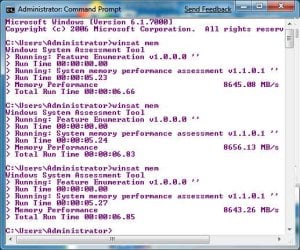
What's your memory assessment speed? [2]-screen01.jpg

with the current timings:

What's your memory assessment speed? [2]-screen04.jpg


post em up and let other people know what basic timings and MHz your set at (DDR2 950MHz 4/4/4/12 ect) and channel configuration (dual/tri channel) your using.


thanks to smarteyeball for pointing out the admin trick with cmd.exe!


Rick.
My System SpecsSystem Spec

11 Aug 2012   #2

Windows 7 Home Premium 64 bit. SP-1
Northern Ohio


I don't know what it means but this is what I got.
icrosoft Windows [Version 6.1.7601]
opyright (c) 2009 Microsoft Corporation. All rights reserve

:\Windows\system32>WINSAT MEM
indows System Assessment Tool
Running: Feature Enumeration ''
Run Time 00:00:00.00
Running: System memory performance assessment ''
Run Time 00:00:05.15
Memory Performance 27971.93 MB/s
Total Run Time 00:00:06.40

:\Windows\system32>
I also don't know of any program that will read ram temps. I use a Infrared Thermometer to read temps.
My System SpecsSystem Spec
11 Aug 2012   #3

Windows 7 Ultimate X64 SP1
Mt. Crumpit/Whoville


Quote   Quote: Originally Posted by Layback Bear View Post
I don't know what it means but this is what I got.
Running: System memory performance assessment ''
Run Time 00:00:05.15
Memory Performance 27971.93 MB/s
Total Run Time 00:00:06.40

:\Windows\system32>
I also don't know of any program that will read ram temps. I use a Infrared Thermometer to read temps.
That's a pretty nice score.
there is no way to read RAM temps with software, motherboard don't have a sensor for it. I wouldn't even worry about RAM temp, it rarely overheats.
My System SpecsSystem Spec
.


12 Aug 2012   #4

Windows 7 Home Premium 64 bit. SP-1
Northern Ohio


I do use a ram cooler but I don't really know that I need it.
My System SpecsSystem Spec
12 Aug 2012   #5

Windows 7 Ultimate X64 SP1
Mt. Crumpit/Whoville


In my experience RAM coolers aren't needed but may make cooler air available to your CPU cooler just by having more air circulation.

I have done some reading and most think they are not needed unless some exteme RAM over volting and overclocking is being tried. Many believe even then they serve no real benefit.

I have 16GB 2133MHz RAM and I have run Prim95 and Intel Burn Test on max simultaneously and the RAM was barely warm, in fact no more than at idle.

It is more important to provide adequate cooling for the CPU and GPU.

If you make the top Noctua fans both intake it will do better RAM cooling and overall cooling for you I think.
My System SpecsSystem Spec
12 Aug 2012   #6

Windows 7 Home Premium 64 bit. SP-1
Northern Ohio


I have read the good, bad and I don't know about ram cooling. I'm still in the I don't know group. I do know it can't hurt to cool them a little more. I already have added 6 Noctua fans to my case along with keep the two OEM fans. NA I probably don't need ram cooling but it's got pretty lights.
My System SpecsSystem Spec
12 Aug 2012   #7

Windows 7 Ultimate SP1 X64/ linux in VM
NW Florida


Well, I'm in the school of I don't think they are necessary or needed, but they sure do look cool.
My System SpecsSystem Spec
12 Aug 2012   #8

Windows 7 Professional SP1 64bit


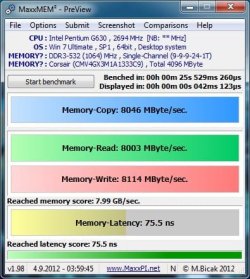
What's your memory assessment speed? [2]-untitled.jpg

Last edited by Wrend; 12 Aug 2012 at 10:05 PM..
My System SpecsSystem Spec
12 Aug 2012   #9

Windows 7 Home Premium x64 SP1
Bay Area Peninsula


Great numbers! (You know your system is screaming for a SSD, right? )

A Guy
My System SpecsSystem Spec
12 Aug 2012   #10

Windows 7 Professional SP1 64bit


Thanks, and yeah... I hear ya. I'm not too worried about boot speeds though, and have a good amount of RAM for SuperFetch caching and whatnot.

Last edited by Wrend; 12 Aug 2012 at 10:03 PM.. Reason: OCDness
My System SpecsSystem Spec
Reply

 What's your memory assessment speed? [2] problems?


Thread Tools


Similar help and support threads for: What's your memory assessment speed? [2]
Thread Forum
What's your memory assessment speed? Performance & Maintenance
Memory speed Performance & Maintenance
What's your hard drive assessment speed? Performance & Maintenance
Memory Assessment Speed Performance & Maintenance
Memory speed Hardware & Devices


All times are GMT -5. The time now is 10:28 AM.


Seven Forums Android App Seven Forums IOS App Follow us on Facebook

Windows 7 Forums is an independent web site and has not been authorized,
sponsored, or otherwise approved by Microsoft Corporation.
"Windows 7" and related materials are trademarks of Microsoft Corp.
© Designer Media Ltd
  

1 2 3 4 5 6 7 8 9 10 11 12 13 14 15 16 17 18 19 20 21 22 23 24 25 26 27 28 29 30 31 32