| Windows 7: Can not get a chkdsk log in Events Viewer |
03 Nov 2012
|
#1 | | Windows 7 Pro 64bit SP1 / XP Pro 32bit Phoenix |
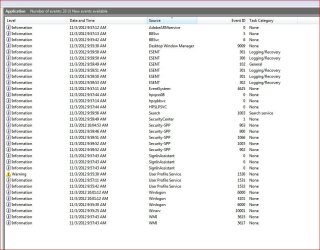
Can not get a chkdsk log in Events Viewer I can not get a log saved in Events/Windows Logs/Applications.
Have run chkdsk/f from Administrator CMD prompt...chkdsk runs at reboot...but no log is created in Events Viewer as it always had been previously ?
Any ideas on why and/or where the reboot chkdsk/f logs are ?
jpg is after a reboot and running at startuup of chkdsk/f | My System Specs |
| System Manufacturer/Model Number Self built OS Windows 7 Pro 64bit SP1 / XP Pro 32bit CPU AMD FX-6100 Six-Core Processor Motherboard M5A78L-M LX PLUS Memory 2ea Corsair-1333MHz-PC3-10666-240-pin-CMX4GX3M1A1333C9 Graphics Card NVIDIA GeForce 9500 GT Sound Card OnBoard Via High Def Audio Monitor(s) Displays Samsung 204B main - ViewSonic VX2035wm secondary Screen Resolution 1600x1200 main - 1680x1050 secondary Keyboard MS USB dual Wireless Keyboard - IntelliType Pro Mouse MS USB dual Wireless Mouse - IntelliPoint PSU Antec 650 watt Cooling Multiple case fans Hard Drives Hitachi Deskstar 750GB Win7 Pro 64bit - Seagate 640GB Sata B/U - Maxtor 500GB Sata B/U - Maxtor 200GB Sata XP Pro SP3 Internet Speed Cox Cable Other Info Hauppaguge Win TV HVR-1250 (Model 22xxx, Hybrid ATSC/QAM)
Samsung HD103SI USB 1TB Desktop Drive - Backup & Disk Image storage |
03 Nov 2012
|
#2 | | Windows 7 SP1, Home Premium, 64-bit |
If the chkdsk is run on a reboot, as it would for a C drive, the results should be under a “wininit” listing in the source column, rather than under chkdsk. | My System Specs | | System Manufacturer/Model Number Ignatz Special; 4 speed manual gearbox; factory air conditioning; one of one OS Windows 7 SP1, Home Premium, 64-bit CPU Intel Sandy Bridge i5-2500, not overclocked Motherboard Gigabyte H67A-UD3H-B3, full ATX Memory 4 GB Crucial DDR3-1333 Graphics Card none; graphics are integrated on CPU Sound Card onboard: Realtek ALC892; external: USB Behringer UF0-202 Monitor(s) Displays NEC 90GX2-BK 19" LCD Screen Resolution 800 x 640 Keyboard Leopold Tenkeyless with Cherry Blue switches, USB Mouse Logitech or Microsoft optical wired; either USB or PS 2 PSU Seasonic SS-560KM, modular Case Antec Solo II Cooling CPU: Scythe Big Shuriken; Case: Scythe Slipstream 800 & 500 Hard Drives System: Intel 320 Series SSD, 80 GB;
Data: Samsung Spinpoint 103SJ, 1 TB;
Backup: WD Caviar Green WD15EADS-00P8B0, 1.5TB Other Info Power consumption of this system, including monitor: 68 watts at idle; 144 watts at full load |
04 Nov 2012
|
#3 | | Windows 7 Pro 64bit SP1 / XP Pro 32bit Phoenix |

Quote: Originally Posted by ignatzatsonic If the chkdsk is run on a reboot, as it would for a C drive, the results should be under a “wininit” listing in the source column, rather than under chkdsk. Thanks..but that's my problem...I've run chkdsk/f from the admin cmd prompt dozens of times in the past...but now I am not getting any "wininit" entry as I always generated previously ??
I cleared the logs previous to running chkdsk/f...so the jpg is all that was generated after last reboot chkdsk/f
TiminAz | My System Specs | | System Manufacturer/Model Number Self built OS Windows 7 Pro 64bit SP1 / XP Pro 32bit CPU AMD FX-6100 Six-Core Processor Motherboard M5A78L-M LX PLUS Memory 2ea Corsair-1333MHz-PC3-10666-240-pin-CMX4GX3M1A1333C9 Graphics Card NVIDIA GeForce 9500 GT Sound Card OnBoard Via High Def Audio Monitor(s) Displays Samsung 204B main - ViewSonic VX2035wm secondary Screen Resolution 1600x1200 main - 1680x1050 secondary Keyboard MS USB dual Wireless Keyboard - IntelliType Pro Mouse MS USB dual Wireless Mouse - IntelliPoint PSU Antec 650 watt Cooling Multiple case fans Hard Drives Hitachi Deskstar 750GB Win7 Pro 64bit - Seagate 640GB Sata B/U - Maxtor 500GB Sata B/U - Maxtor 200GB Sata XP Pro SP3 Internet Speed Cox Cable Other Info Hauppaguge Win TV HVR-1250 (Model 22xxx, Hybrid ATSC/QAM)
Samsung HD103SI USB 1TB Desktop Drive - Backup & Disk Image storage |
05 Nov 2012
|
#4 | | Windows 7 Pro 64bit SP1 / XP Pro 32bit Phoenix |

Quote: Originally Posted by trinaz 
Quote: Originally Posted by ignatzatsonic If the chkdsk is run on a reboot, as it would for a C drive, the results should be under a “wininit” listing in the source column, rather than under chkdsk. Thanks..but that's my problem...I've run chkdsk/f from the admin cmd prompt dozens of times in the past...but now I am not getting any "wininit" entry as I always generated previously ??
I cleared the logs previous to running chkdsk/f...so the jpg is all that was generated after last reboot chkdsk/f
TiminAz Ok...here's whats up...
Chkdsk/f is not running...I get a flash message that some software had affected chkdsk/f
But...so far....I'm unable to correct the errors...
Can I run chkdsk or some disk service from the install/repair dvd to repair/correct what ever is causing chkdsk/f to fail at normal cmd reboot for chkdsk/f
TiminAz
Last edited by trinaz; 05 Nov 2012 at 11:09 AM..
Reason: clarify
| My System Specs | | System Manufacturer/Model Number Self built OS Windows 7 Pro 64bit SP1 / XP Pro 32bit CPU AMD FX-6100 Six-Core Processor Motherboard M5A78L-M LX PLUS Memory 2ea Corsair-1333MHz-PC3-10666-240-pin-CMX4GX3M1A1333C9 Graphics Card NVIDIA GeForce 9500 GT Sound Card OnBoard Via High Def Audio Monitor(s) Displays Samsung 204B main - ViewSonic VX2035wm secondary Screen Resolution 1600x1200 main - 1680x1050 secondary Keyboard MS USB dual Wireless Keyboard - IntelliType Pro Mouse MS USB dual Wireless Mouse - IntelliPoint PSU Antec 650 watt Cooling Multiple case fans Hard Drives Hitachi Deskstar 750GB Win7 Pro 64bit - Seagate 640GB Sata B/U - Maxtor 500GB Sata B/U - Maxtor 200GB Sata XP Pro SP3 Internet Speed Cox Cable Other Info Hauppaguge Win TV HVR-1250 (Model 22xxx, Hybrid ATSC/QAM)
Samsung HD103SI USB 1TB Desktop Drive - Backup & Disk Image storage |
05 Nov 2012
|
#5 | | Windows 7 SP1, Home Premium, 64-bit |
I can't recall seeing this issue before, so I have few ideas.
Have you run sfc /scannow to see if your system files are complete and uncorruped?
Will any other form of chkdsk run?? Without the /f switch?
Do you have any other disk utilities installed?
When did chkdsk /f last run properly and can you recall any system changes since that date?
Have you considered a system restore to a date when chkdsk /f was known to run properly? | My System Specs | | System Manufacturer/Model Number Ignatz Special; 4 speed manual gearbox; factory air conditioning; one of one OS Windows 7 SP1, Home Premium, 64-bit CPU Intel Sandy Bridge i5-2500, not overclocked Motherboard Gigabyte H67A-UD3H-B3, full ATX Memory 4 GB Crucial DDR3-1333 Graphics Card none; graphics are integrated on CPU Sound Card onboard: Realtek ALC892; external: USB Behringer UF0-202 Monitor(s) Displays NEC 90GX2-BK 19" LCD Screen Resolution 800 x 640 Keyboard Leopold Tenkeyless with Cherry Blue switches, USB Mouse Logitech or Microsoft optical wired; either USB or PS 2 PSU Seasonic SS-560KM, modular Case Antec Solo II Cooling CPU: Scythe Big Shuriken; Case: Scythe Slipstream 800 & 500 Hard Drives System: Intel 320 Series SSD, 80 GB;
Data: Samsung Spinpoint 103SJ, 1 TB;
Backup: WD Caviar Green WD15EADS-00P8B0, 1.5TB Other Info Power consumption of this system, including monitor: 68 watts at idle; 144 watts at full load |
09 Nov 2012
|
#6 | | Windows 7 Pro 64bit SP1 / XP Pro 32bit Phoenix |
Well it was a struggle but I'm back to chkdsk /f running at reboot and event log creating the wininit logs
Tried a number of restore points but some failed and the 2 that 'worked' didn't solve the issue
So...I restored image by image going backward...and found the 9/24 image restored worked fine.
Had to bring everything up to date but now all is well and event viewer is logging the chkdsk after chkdsk/f or chkdsk /r as entered into CMD prompt and runs at reboot !
Thanks...TiminAz | My System Specs | | System Manufacturer/Model Number Self built OS Windows 7 Pro 64bit SP1 / XP Pro 32bit CPU AMD FX-6100 Six-Core Processor Motherboard M5A78L-M LX PLUS Memory 2ea Corsair-1333MHz-PC3-10666-240-pin-CMX4GX3M1A1333C9 Graphics Card NVIDIA GeForce 9500 GT Sound Card OnBoard Via High Def Audio Monitor(s) Displays Samsung 204B main - ViewSonic VX2035wm secondary Screen Resolution 1600x1200 main - 1680x1050 secondary Keyboard MS USB dual Wireless Keyboard - IntelliType Pro Mouse MS USB dual Wireless Mouse - IntelliPoint PSU Antec 650 watt Cooling Multiple case fans Hard Drives Hitachi Deskstar 750GB Win7 Pro 64bit - Seagate 640GB Sata B/U - Maxtor 500GB Sata B/U - Maxtor 200GB Sata XP Pro SP3 Internet Speed Cox Cable Other Info Hauppaguge Win TV HVR-1250 (Model 22xxx, Hybrid ATSC/QAM)
Samsung HD103SI USB 1TB Desktop Drive - Backup & Disk Image storage Can not get a chkdsk log in Events Viewer problems? All times are GMT -5. The time now is 07:13 AM. | |