| Windows 7: Some very cool little tweaks, (imo) |
25 Sep 2009
|
#1 | | Windows 7 Ultimate x64 (Retail) Honolulu, HI, USA |
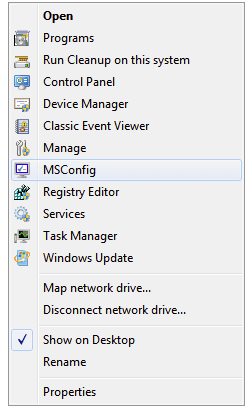
Some very cool little tweaks, (imo) I don't know if this is common knowledge around here, but I came across what I thought were some very cool and useful registry hacks on the "Tweaking with Vishal" site. I especially liked this one that lets you pick and choose to separately add (or later uninstall) lots of useful system shortcuts like Control Panel, Task Manager, Device Manager, etc., (with icons) in the "Computer" right click context menu.
So your Computer right click context menu could look like the screen shot below if you added all of them. But you can add or remove each one separately which I think is nice. Maybe this is old hat to most of you but I thought it was cool.
Anyway, here's the link to the page that further describes this procedure and contains the link to download the .reg files. | My System Specs |
| System Manufacturer/Model Number HP DV8t quad OS Windows 7 Ultimate x64 (Retail) CPU i7-Q 720 Motherboard Motherboard Chipset Intel Ibex Peak-M PM55, Intel Lynnfield Memory 6 GB Graphics Card nVidia GeForce GT 230M (1GB) Sound Card IDT High Definition Audio CODEC Monitor(s) Displays 18.4 inch HP Infinity FHD (Samsung 184HT03-001) Screen Resolution 1920 x 1080 Keyboard laptop Mouse Logitech VX Revolution Cooling Zalman NC-2000 notebook cooling pad Hard Drives Hitachi 500GB 7200 rpm (x2)
Seagate FreeAgent 1.5 TB External USB (x2)
Thermaltake BlacX eSATA/USB 2.0 3.5/2.5 HD dock Other Info Backup Unit: Lenovo T61p |
26 Sep 2009
|
#2 | | |
Thanks harpua, I just downloaded it and added a few of them to my context menu. | My System Specs | | System Manufacturer/Model Number Acer Veriton L460 UD4500P OS Win7 Ultimate x86 CPU E4500 2.2Ghz Memory 2 GB Graphics Card Intel GMA 3100 Sound Card Integrated 7.1 Screen Resolution 1900x1200 Hard Drives WD 320GB 7200RPM |
27 Sep 2009
|
#3 | | Windows 7 Ultimate x64 ®™ West Yorkshire |
I've never understood the need to install and use such simple programs to carry out the simplest of tasks, or use 3rd party programs to do what you can in Windows already, like my sister for example, Windows own picture viewer wasn't enough so she installed her camera software, then when she had pictures developed, installed the Kodak software, then had some developed at Boots, so installed that too. | My System Specs | | System Manufacturer/Model Number Sony Vaio FZ21Z OS Windows 7 Ultimate x64 ®™ CPU Intel Core 2 Duo (2.2 GHz) Motherboard Sony (Intel Chipset) Memory 2x 2GB Corsair (667 MHz) Graphics Card NVIDIA 8600M GS (256MB) Sound Card Sigmatel Monitor(s) Displays 15.4" TFT X-Black Screen Resolution 1280x800 Mouse Logitech Anywhere MX Hard Drives Western Digital 300GB Scorpio Black (7200rpm) Internet Speed Sky 5MB |
06 Oct 2009
|
#4 | | Windows 7 Ultimate x64 (Retail) Honolulu, HI, USA |
I just thought I should point out in response to your post that the little tweak mentioned here doesn't involve installing any applications, "simple" or otherwise. It merely involves some .reg files that implement some simple registry tweaks, that merely provide convenient links to some native windows utilities.
Second, if you don't find this useful, that's perfectly fine. It's clearly not everyone's cup of tea.
There are obviously many different ways to accomplish the same tasks in Windows. It amounts to personal preference which way or what program one elects to use. Obviously, some simple 3rd party apps are better than others. Some are certainly not worth installing, but quite a few of them are, at least, imo.
For example, imo, windows own picture viewer (to use the app you mentioned) is woefully deficient compared to a free 3rd party app like Faststone Image viewer. It's one of the first things I install after taking care of security apps. Of course, YMMV. You may prefer the native windows photo app.
A few others I prefer to the native windows solution include: Acronis TI Home (for backup), MPC-HC x64 (w AC3 Filter) (for video player), AIMP2 latest rc (for audio player), Comodo Internet Security (for the firewall only), and there probably are others that I can't think of atm. But this illustrates one of the great things about the windows platform and that is that there are so many interesting and useful choices available.
Last edited by harpua; 08 Oct 2009 at 03:11 PM..
| My System Specs | | System Manufacturer/Model Number HP DV8t quad OS Windows 7 Ultimate x64 (Retail) CPU i7-Q 720 Motherboard Motherboard Chipset Intel Ibex Peak-M PM55, Intel Lynnfield Memory 6 GB Graphics Card nVidia GeForce GT 230M (1GB) Sound Card IDT High Definition Audio CODEC Monitor(s) Displays 18.4 inch HP Infinity FHD (Samsung 184HT03-001) Screen Resolution 1920 x 1080 Keyboard laptop Mouse Logitech VX Revolution Cooling Zalman NC-2000 notebook cooling pad Hard Drives Hitachi 500GB 7200 rpm (x2)
Seagate FreeAgent 1.5 TB External USB (x2)
Thermaltake BlacX eSATA/USB 2.0 3.5/2.5 HD dock Other Info Backup Unit: Lenovo T61p |
06 Oct 2009
|
#5 | | |

Quote: Originally Posted by FZ21Z I've never understood the need to install and use such simple programs to carry out the simplest of tasks, or use 3rd party programs to do what you can in Windows already, The primary reason of course is that the included tools are usually the most basic of tools and people need more functionality.
For example, Windows can handle compressed folders automatically...but I always install 7zip instead as it can handle more file types (rar, zip, 7z, bzip, gzip, etc) as well as do things like create self-extracting EXE files.
Windows has the ability to burn files to cd...but standalone 3rd party burner tools like ImgBurn give you the ability to actually create ISO files and the like which are helpful from time to time. | My System Specs | | System Manufacturer/Model Number Self-Built in July 2009 OS Windows 7 Ultimate x64 CPU Intel Q9550 2.83Ghz OC'd to 3.40Ghz Motherboard Gigabyte GA-EP45-UD3R rev. 1.1, F12 BIOS Memory 8GB G.Skill PI DDR2-800, 4-4-4-12 timings Graphics Card EVGA 1280MB Nvidia GeForce GTX570 Sound Card Realtek ALC899A 8 channel onboard audio Monitor(s) Displays 23" Acer x233H Screen Resolution 1920x1080 Keyboard ABS M1 Mechanical Mouse Logitech G9 Laser Mouse PSU Corsair 620HX modular Case Antec P182 Cooling stock Hard Drives Intel X25-M 80GB Gen 2 SSD
Western Digital 1TB Caviar Black, 32MB cache. WD1001FALS Internet Speed 15/2 cable modem Other Info Windows and Linux enthusiast. Logitech G35 Headset. |
06 Oct 2009
|
#6 | | Windows 7 Ultimate x64 (Retail) Honolulu, HI, USA |
Oh yes, Imgburn, 7Zip, and Winrar, are a few more of my favorite augmentations to Windows. | My System Specs | | System Manufacturer/Model Number HP DV8t quad OS Windows 7 Ultimate x64 (Retail) CPU i7-Q 720 Motherboard Motherboard Chipset Intel Ibex Peak-M PM55, Intel Lynnfield Memory 6 GB Graphics Card nVidia GeForce GT 230M (1GB) Sound Card IDT High Definition Audio CODEC Monitor(s) Displays 18.4 inch HP Infinity FHD (Samsung 184HT03-001) Screen Resolution 1920 x 1080 Keyboard laptop Mouse Logitech VX Revolution Cooling Zalman NC-2000 notebook cooling pad Hard Drives Hitachi 500GB 7200 rpm (x2)
Seagate FreeAgent 1.5 TB External USB (x2)
Thermaltake BlacX eSATA/USB 2.0 3.5/2.5 HD dock Other Info Backup Unit: Lenovo T61p |
08 Oct 2009
|
#7 | | Windows 7 Ultimate x64 ®™ West Yorkshire |
Perhaps I spoke too soon eh. Don't get me wrong, I understand the need for little programs like Winrar, Winamp, Office 2007 and when I think about it, quite a few more, but still think certain Windows apps are sufficient enough for a lot of users. | My System Specs | | System Manufacturer/Model Number Sony Vaio FZ21Z OS Windows 7 Ultimate x64 ®™ CPU Intel Core 2 Duo (2.2 GHz) Motherboard Sony (Intel Chipset) Memory 2x 2GB Corsair (667 MHz) Graphics Card NVIDIA 8600M GS (256MB) Sound Card Sigmatel Monitor(s) Displays 15.4" TFT X-Black Screen Resolution 1280x800 Mouse Logitech Anywhere MX Hard Drives Western Digital 300GB Scorpio Black (7200rpm) Internet Speed Sky 5MB |
08 Oct 2009
|
#8 | | Windows 7 Ultimate The Southern Hinterlands |
Just keep in mind that the converse is true as well.. | My System Specs | | System Manufacturer/Model Number ASUSTeK Computer INC. CM5675 OS Windows 7 Ultimate CPU Core(TM) i5 CPU 650 @ 3.20GHz Motherboard ASUSTeK Computer INC. CM5675 Memory 6.00 GB Graphics Card Intel(R) HD Graphics Sound Card Intel HD integtrated Monitor(s) Displays Samsung 24' Screen Resolution 1900/1020 Hard Drives (1) INTEL SSD SA2M120G2GC ATA Device (2) ST31000528AS ATA Device Internet Speed 30mb |
08 Oct 2009
|
#9 | | Windows 7 Ultimate x64 (Retail) Honolulu, HI, USA |

Quote: Originally Posted by FZ21Z Perhaps I spoke too soon eh. Don't get me wrong, I understand the need for little programs like Winrar, Winamp, Office 2007 and when I think about it, quite a few more, but still think certain Windows apps are sufficient enough for a lot of users. No you didn't speak too soon. It's just that you picked an inappropriate thread to make your initial comment because the tweak at issue here does not involve installing any additional apps or replacing any native windows utilities or functions, which is what your initial post was about or seemed to assume. On the contrary, this tweak merely provides another, arguably more convenient, way of accessing some native windows utilities or functions. | My System Specs | | System Manufacturer/Model Number HP DV8t quad OS Windows 7 Ultimate x64 (Retail) CPU i7-Q 720 Motherboard Motherboard Chipset Intel Ibex Peak-M PM55, Intel Lynnfield Memory 6 GB Graphics Card nVidia GeForce GT 230M (1GB) Sound Card IDT High Definition Audio CODEC Monitor(s) Displays 18.4 inch HP Infinity FHD (Samsung 184HT03-001) Screen Resolution 1920 x 1080 Keyboard laptop Mouse Logitech VX Revolution Cooling Zalman NC-2000 notebook cooling pad Hard Drives Hitachi 500GB 7200 rpm (x2)
Seagate FreeAgent 1.5 TB External USB (x2)
Thermaltake BlacX eSATA/USB 2.0 3.5/2.5 HD dock Other Info Backup Unit: Lenovo T61p |
09 Oct 2009
|
#10 | | Windows 7 x64, MAC, BT4, Vista x64, server 2003 ent (DC) UK |

Quote: Originally Posted by harpua 
Quote: Originally Posted by FZ21Z Perhaps I spoke too soon eh. Don't get me wrong, I understand the need for little programs like Winrar, Winamp, Office 2007 and when I think about it, quite a few more, but still think certain Windows apps are sufficient enough for a lot of users. No you didn't speak too soon. It's just that you picked an inappropriate thread to make your initial comment because the tweak at issue here does not involve installing any additional apps or replacing any native windows utilities or functions, which is what your initial post was about or seemed to assume. On the contrary, this tweak merely provides another, arguably more convenient, way of accessing some native windows utilities or functions. Harpua,
You are only creating shortcuts to commands that are already there which is a good thing for some people however, most people just use the run command and typing the function you require.. Its always been that way.
But hey its just personal preference.
~Mike | My System Specs | | System Manufacturer/Model Number Hand Built OS Windows 7 x64, MAC, BT4, Vista x64, server 2003 ent (DC) CPU Intel Core 2 Duo E6550 2.33GHz 1333FSB Socket 775 4MB Cache Motherboard Gigabyte GA-P35C-DS3R Socket 775 8 Channel Audio ATX Memory Corsair 4GB Kit (2x2GB) DDR2 800MHz/PC2-6400 Dominator Graphics Card Sapphire RADEON X1950PRO 512MB GDDR3 Sound Card Sound blaster Audigy PCI Monitor(s) Displays Samsung SM223BW 21.6" TFT Widescreen 1680x1050 3000:1 Screen Resolution 1680X1050 Keyboard Logitech Mouse Logitech PSU OCZ GameXStream 600W PSU - 120mm Fan SLI Ready Case Antec 900 Nine Hundred - Gaming Case Cooling OCZ Vindicator AMD and Intel Socket 754 939 940 AM2 775 Hard Drives Western Digital WD5000AAKS 500GB SATAII 7200RPM 16MB Cache
Samsung F1 Spinpoint 1TB SATAII 5400RPM 32MB Cache Internet Speed 5800 kbps DN & 800 kbps up "on a good day" Other Info Because I can :-D
My score is 5.8 CPU lagg even overclocked @ 3.1 per core Some very cool little tweaks, (imo) problems? All times are GMT -5. The time now is 06:31 PM. | |