How to decrease CPU usage. I thought ram is what did the job. HELP!

AFTW951

New member
This is just normal internet surfing I was watching youtube vids had two tabs open. One was youtubes main page,and the page I was watching the video on. I do my best to keep all non needed programs closed and not in use but I am still getting 100 percent CPU usage? It says its only using 1.3gigs but I have 3.5gigs of ram why is it so slow ?

N4OVA.png

BHDbI.png
 

My Computer

Computer Manufacturer/Model Number
Private
OS
Windows 7 Home Premium 32 bit
CPU
Intel Pentium D 3.42Ghz
Memory
3gigs
Graphics Card(s)
NVIDA Gforce 210
Monitor(s) Displays
Acer
You will have to "show processes from all users". The other 35 processes and the 84% cpu usage not shown will reveal the "culprits".
 

My Computer

OS
Windows 7 Home Premium x64
You will have to "show processes from all users". The other 35 processes and the 84% cpu usage not shown will reveal the "culprits".
MqFnw.png


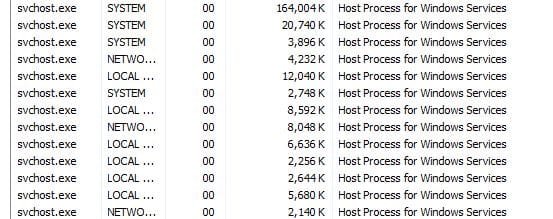
Wtf is "hot proccess for windows services" I think thats what causes it...The whole speed thing fluctuates sometimes it lags and sometimes it wont...

Like now - this is now... Again im still doing simple web surfing.
B89gi.png

How does that make sense...1.03 GB usage with a max avg of 30 percent CPU usage where as when I have 1.30+ GB usage the max avg is above the maximum of 100

Someone please help me figure out a solution.. Its just so frustrating that the speed fluxuates I know that can't be right since my ram isnt even in full usage I have yet to see it say 3.5 GB usage or anywhere close to that
 

My Computer

Computer Manufacturer/Model Number
Private
OS
Windows 7 Home Premium 32 bit
CPU
Intel Pentium D 3.42Ghz
Memory
3gigs
Graphics Card(s)
NVIDA Gforce 210
Monitor(s) Displays
Acer
RAM has nothing to do with your problem, forget about it. RAM is not the only factor for performance. When you are getting this 100% CPU problem again create a screen shot all the processes for us to see.
 

My Computer

Computer type
PC/Desktop
Computer Manufacturer/Model Number
Alienware Aurora ALX R4
OS
Windows 10 Pro (x64)
CPU
Intel Core i7-3930K (3.2GHz - 4.5GHz)
Motherboard
Alienware Aurora-R4 x79
Memory
4x Samsung 4GB PC3-12800 DDR3 (16GB 1600MHz)
Graphics Card(s)
Nvidia Geforce GTX 690
Sound Card
SteelSeries Siberia Elite
Monitor(s) Displays
Dell UltraSharp U3011
Screen Resolution
2560x1600
Hard Drives
Samsung 850 Pro 256 GB, Seagate 1TB Desktop Hybrid HDD, 2x Western Digital 4TB Green HDD
PSU
875W Some Dell PSU <.<
Case
Alienware Aurora ALX
Cooling
Custom Liquid Cooling (EK CPU & GPU blocks) dual EK 480RAD
Keyboard
Logitech G710+ Mechanical
Mouse
Logitech G700s
Internet Speed
Verizon Fios (50 mbps average)
Other Info
Server: Intel NUC D54250WYK: i5-4250U, 16GB, 256 GB mSATA, Windows Server 2012 R2
Host Processes is what makes Windows run.
Capture.JPG
 

My Computer

Computer type
PC/Desktop
Computer Manufacturer/Model Number
Home Built Desktop By DataTech
OS
Windows 7 Ultimate X64 SP1
CPU
Intel i5-2550K, Differing ~4.4-4.8GHz No built in GPU
Motherboard
ASUS P8Z68-V PRO/GEN3
Memory
16GB G.Skill Sniper 1866MHz @ 2133MHz 2x8GB
Graphics Card(s)
ASUS GTX650TIB-DC2OC-2GD5, (650TI Boost)
Sound Card
Onboard Realtek 5-1
Monitor(s) Displays
Samsung P2570HD
Screen Resolution
1920x1080
Hard Drives
Samsung 840 Pro 256GB SSD for OS, 500GB Seagate Constellation (Enterprise drive) for Data
PSU
Corsair HX650W
Case
Inwin Dragon Rider
Cooling
Hyper 212 EVO w/two Noctua fans, push-pull, @1300 RPM
Keyboard
E-Z Eyes, bright yellow keys with large characters
Mouse
steelseries SENSEI Laser Pro Gaming
Internet Speed
48-51Mbs Mbs down, 11 Mbs up Xfinity Cable
Antivirus
Norton Internet Security 2013
Browser
IE 10, Opera, Pale Moon if needed
Other Info
4 case fans, LG BluRay-RE, ASUS DVD-RW, Mr. Fusion power supply, 1.21 gigawatts.
This is just normal internet surfing I was watching youtube vids had two tabs open. One was youtubes main page,and the page I was watching the video on. I do my best to keep all non needed programs closed and not in use but I am still getting 100 percent CPU usage? It says its only using 1.3gigs but I have 3.5gigs of ram why is it so slow ?

First of all, Adobe Flash is notorious for raising the CPU usage of a relatively old CPU like Pentium D close to 100% (especially on 1080p) when the CPU does all the work i.e. no GPU hardware acceleration. Try updating your graphics drivers as well as your browser and Adobe Flash then check if you still get constant 90 to 100 CPU usage when watching YouTube.
 

My Computer

Computer type
Laptop
Computer Manufacturer/Model Number
Dell Optiplex SX270, Lenovo Z470
OS
Windows 7 Professional x64 SP1
CPU
Intel® Pentium® 4 @ 2.26 GHz, Intel Core i7-2670QM @ 2.20 GH
Motherboard
Dell, Lenovo
Memory
512MB Dual channel DDR SDRAM @ 400MHz 2.5-3-3-7, 8 GB DDR3
Graphics Card(s)
Intel 82865G, Nvidia GeForce 520M Graphics
Sound Card
SoundMax Integrated Audio, Integrated HD Audio
Monitor(s) Displays
LG W1952
Screen Resolution
1440x900, 1366 x 768
Hard Drives
40 GB 2.5" IDE 4200 RPM HDD, 500 GB 5400 RPM Sata 1.5 + 32 GB SSD
PSU
Dell 145 Watt, Lenovo 120 Watt Power Adapter
Case
Optiplex SX270 Small Form Factor, Laptop
Cooling
Dell Proprietary Air Cooling, Stock laptop cooling
Keyboard
Dell SK-8125 USB Keyboard
Mouse
Dell PS/2 2 button ball mouse with wheel scroll
Internet Speed
300 Mbit down / 20 Mbps up Time Warner Cable
Antivirus
MSE, Malwarebytes Scanner
Browser
Internet (Aizawa) Explorer 11
Other Info
Running Windows Server 2012 Datacenter on a virtual machine to run Metro Apps.
Back
Top