chkdsk not available for raw drives problem

masplin

New member
Member
VIP
Local time
11:48 PM
Messages
246
Hi. I have a Win 7 Pro 64-bit pc with VMWARE player installed on a second partition on the main HD U:/. I recently starting getting errors when using the VM saying that the operation on the file U:/xxxxxxx/windows 7 x64.vmdk failed. I tried to run chkdsk /f /r on the U: drive and got the error above saying the type of file system is RAW. I went into computer managment/disk management and U: still says NTFS. I use the U: drive for all my data files with the C: drive containing OS and programme files. I am not getting any errors when accessing other files on the U: drive just the VM. i managed to copy the offending file .vmdk to another drive.

Just not sure what to do next as reluctant ot use some random tool without knowing what exactly I am shooting at. You guys are always so helpful I thought it best to get it from the horses mouth.

I have a system image of my C: drive but not the U: drive. I keep daily backups of the U: drive using Windows backup.

Thanks for any advice

Mike
 

My Computer My Computer

At a glance

Windows 7 64 bitintel quad Q6600 2.4GHz4GBATI Radeon HD 4850 512Mb
Computer Manufacturer/Model Number
Dell XPS 430
OS
Windows 7 64 bit
CPU
intel quad Q6600 2.4GHz
Motherboard
Intel X48
Memory
4GB
Graphics Card(s)
ATI Radeon HD 4850 512Mb
Sound Card
ATI High Def
Monitor(s) Displays
Dell 1707FPV
Hard Drives
640GB RAID 0
320GB
PSU
425W
Keyboard
Logitech MX3000
Mouse
Logitech M-RAG97
Internet Speed
7Mb
Good on you for keeping it backed up. You'll likely need it since RAW normally means a failed/failing HD.

Test your HD with maker's HD Diagnostic extended CD scan.

To try to pull the partition back use Partition Wizard Partition Recovery Wizard - Video Help.

If disk has failed or PW won't restore it I wouldn't bother with data recovery if you have it backed up. Just replace the HD and copy data onto a new Partition or Volume - Create New

Enter BIOS setup to make sure SMART monitoring is enabled so you get advance notice in the future, or use from the desktop CrystalDiskInfo - Software
 
Stupid me I just realised my main HD is RAID 0 assembly so I should have 2 copies fo everything. Overkill on backup for just this event. Unfortunately that means I can't use device manger to tell me what the HD are as just says Volume0. Its a Dell so guess WD.

Does having RAID affect the other instructions?
 

My Computer My Computer

At a glance

Windows 7 64 bitintel quad Q6600 2.4GHz4GBATI Radeon HD 4850 512Mb
Computer Manufacturer/Model Number
Dell XPS 430
OS
Windows 7 64 bit
CPU
intel quad Q6600 2.4GHz
Motherboard
Intel X48
Memory
4GB
Graphics Card(s)
ATI Radeon HD 4850 512Mb
Sound Card
ATI High Def
Monitor(s) Displays
Dell 1707FPV
Hard Drives
640GB RAID 0
320GB
PSU
425W
Keyboard
Logitech MX3000
Mouse
Logitech M-RAG97
Internet Speed
7Mb
Stupid me I just realised my main HD is RAID 0 assembly so I should have 2 copies fo everything.
You're thinking of RAID1, aka mirroring. Your data on a RAID0 array is split among the two drives, making it twice as likely for data loss. Sounds like you may have a corrupt array, and could try RAID repair utilities.
 

My Computer My Computer

At a glance

Windows 7 Ultimate x64 SP1Intel Core i7-260012 GB Patriot Extreme DDR3-1333Nvidia GTX 470
OS
Windows 7 Ultimate x64 SP1
CPU
Intel Core i7-2600
Motherboard
Gigabyte GA-P67A-UD3P-B3
Memory
12 GB Patriot Extreme DDR3-1333
Graphics Card(s)
Nvidia GTX 470
Monitor(s) Displays
Dell UltraSharp 2209WA
Hard Drives
OCZ Agility3 240 GB, WD5001AALS, WD7501AALS
PSU
OCZ ModStream 700W
Case
CoolerMaster HAF 912 Advanced
Cooling
CoolerMaster Hyper 212 Plus
Getting confused it is RAID1, but device manager calles it Volume0.
 

My Computer My Computer

At a glance

Windows 7 64 bitintel quad Q6600 2.4GHz4GBATI Radeon HD 4850 512Mb
Computer Manufacturer/Model Number
Dell XPS 430
OS
Windows 7 64 bit
CPU
intel quad Q6600 2.4GHz
Motherboard
Intel X48
Memory
4GB
Graphics Card(s)
ATI Radeon HD 4850 512Mb
Sound Card
ATI High Def
Monitor(s) Displays
Dell 1707FPV
Hard Drives
640GB RAID 0
320GB
PSU
425W
Keyboard
Logitech MX3000
Mouse
Logitech M-RAG97
Internet Speed
7Mb
Ran the WD DataLifeguard extended test and it finished in under a second which doesn't sound right. Also says capacity 0GB. Trying the Seagate extended test. Running the free home edition of partition wizard. my RAID drive shows a FAT16 LBA 63-224909 Lost/Deleted and rest are all Existing. That small partition is labelled SYSTEM RESERVED in the disk management and think that was something to do with the recovery for the DELL factory installed OS (which I changed to Win7). Will leave them both running.

If this is a hardware issue I assume only 1 of the RAID disks should be an issue. If this is the case I asusme I can take out the offending disk and replace and and reclone the RAID. Question is how do I know which disk is the problem? Do I manually disconnect them and rerun the test and see which one throws an error?
 

My Computer My Computer

At a glance

Windows 7 64 bitintel quad Q6600 2.4GHz4GBATI Radeon HD 4850 512Mb
Computer Manufacturer/Model Number
Dell XPS 430
OS
Windows 7 64 bit
CPU
intel quad Q6600 2.4GHz
Motherboard
Intel X48
Memory
4GB
Graphics Card(s)
ATI Radeon HD 4850 512Mb
Sound Card
ATI High Def
Monitor(s) Displays
Dell 1707FPV
Hard Drives
640GB RAID 0
320GB
PSU
425W
Keyboard
Logitech MX3000
Mouse
Logitech M-RAG97
Internet Speed
7Mb
I have been running CHKDSK overnight and 10 hours into it it has got stuck (or running incredibly slowly) at 25% of stage 4 "verifying file data". Pesumably I should just leave it even if it takes several days to complete?
 

My Computer My Computer

At a glance

Windows 7 64 bitintel quad Q6600 2.4GHz4GBATI Radeon HD 4850 512Mb
Computer Manufacturer/Model Number
Dell XPS 430
OS
Windows 7 64 bit
CPU
intel quad Q6600 2.4GHz
Motherboard
Intel X48
Memory
4GB
Graphics Card(s)
ATI Radeon HD 4850 512Mb
Sound Card
ATI High Def
Monitor(s) Displays
Dell 1707FPV
Hard Drives
640GB RAID 0
320GB
PSU
425W
Keyboard
Logitech MX3000
Mouse
Logitech M-RAG97
Internet Speed
7Mb
CHKDSK hgas eventually completed, but now my U: drive properties says 0 used and nothing works. Help!!!!

Tried the WD disk check and it says too many bad sectors. Should the pc run ok if I disconnect one of the RAID disks?
 

My Computer My Computer

At a glance

Windows 7 64 bitintel quad Q6600 2.4GHz4GBATI Radeon HD 4850 512Mb
Computer Manufacturer/Model Number
Dell XPS 430
OS
Windows 7 64 bit
CPU
intel quad Q6600 2.4GHz
Motherboard
Intel X48
Memory
4GB
Graphics Card(s)
ATI Radeon HD 4850 512Mb
Sound Card
ATI High Def
Monitor(s) Displays
Dell 1707FPV
Hard Drives
640GB RAID 0
320GB
PSU
425W
Keyboard
Logitech MX3000
Mouse
Logitech M-RAG97
Internet Speed
7Mb
If you have WD HD's then run the WD test on each separately to find out which is the bad HD.

Wipe the remaining good HD with Quick Wipe from Data Lifeguard CD, repartition in Disk Mgmt, or during booted Clean Install Windows 7 with SATA controller set to AHCI.
 
So if one disk is still good i can't just replace the bad disc and the RAID will kick in and duplicate the disc? i thoguht that was the point of RAID 1?
thanks
Mike
 

My Computer My Computer

At a glance

Windows 7 64 bitintel quad Q6600 2.4GHz4GBATI Radeon HD 4850 512Mb
Computer Manufacturer/Model Number
Dell XPS 430
OS
Windows 7 64 bit
CPU
intel quad Q6600 2.4GHz
Motherboard
Intel X48
Memory
4GB
Graphics Card(s)
ATI Radeon HD 4850 512Mb
Sound Card
ATI High Def
Monitor(s) Displays
Dell 1707FPV
Hard Drives
640GB RAID 0
320GB
PSU
425W
Keyboard
Logitech MX3000
Mouse
Logitech M-RAG97
Internet Speed
7Mb
No RAID array is sufficient for backup. Since data needs to be backed up anyway there's really no need for RAID which Windows 7 doesn't much like. In fact we only see problems with RAID here.

Have you plugged the drives in separately in DIsk Mgmt to see if they're seen, what status it says for the HD. If it's not recognized as a partition, you can try creating one but don't format. Is the data seen now?
 
hi Greg. If I connect only the drive in bay HDD0 and try to run the WD Datalifeguard test it fails with "too many bad sectors". The disc in bay HDD1 on the other hand passes the quick test OK and I'm just running the extended test.

Would I be right thinking that if I did replace the disc on bay HDD0 I could just rebuild the array or have I completely misunderstood?

As i understand your suggestion is to abandon RAID and just format the good drive as non-RAID and reinstall from the system image I have. curently I have just have an image of the C: partition. Presumably I can make an image of both C: & U: partitions before I format which will make life easier reinstalling.

Thanks
Mike
 

My Computer My Computer

At a glance

Windows 7 64 bitintel quad Q6600 2.4GHz4GBATI Radeon HD 4850 512Mb
Computer Manufacturer/Model Number
Dell XPS 430
OS
Windows 7 64 bit
CPU
intel quad Q6600 2.4GHz
Motherboard
Intel X48
Memory
4GB
Graphics Card(s)
ATI Radeon HD 4850 512Mb
Sound Card
ATI High Def
Monitor(s) Displays
Dell 1707FPV
Hard Drives
640GB RAID 0
320GB
PSU
425W
Keyboard
Logitech MX3000
Mouse
Logitech M-RAG97
Internet Speed
7Mb
You'll have to see if images will work if made from the RAID. Some will, some won't. This is why I don't like to mess with it.

But since you chose RAID1 it should be recoverable using the method given by the drive manufacturer. Someone here may know for sure. As I said I don't mess with them.

What I can advise is that if you follow the steps in Clean Reinstall - Factory OEM Windows 7
sticking with the tools and methods that work best with Win7, you'll have a perfect install that will live on via image for the life of the OS.
 
Thanks for the advice greg. I'm just working off the one working HD for time being while I work out what to do. One little question. I thought I would run CHKDSK on the U: partition on this drive only but again I get system is RAW. I used the partition wizard when I had both drives conected and removed a few overlaping sections and CHKDSK did run eventually on the whole thing. I just wondered is this not running on the single drive (nor can I get into computer management) because it is still seen as part of a RAID assembly (disk is seen as a member of a degraded assembly) or should it run ok if disk is completely fine? If both drives have some issues I might as well start from scratch as you suggest. If this is drive is fine popping in a second drive is the fastest solution as I am run off my feet with work.

Thanks

Mike
 

My Computer My Computer

At a glance

Windows 7 64 bitintel quad Q6600 2.4GHz4GBATI Radeon HD 4850 512Mb
Computer Manufacturer/Model Number
Dell XPS 430
OS
Windows 7 64 bit
CPU
intel quad Q6600 2.4GHz
Motherboard
Intel X48
Memory
4GB
Graphics Card(s)
ATI Radeon HD 4850 512Mb
Sound Card
ATI High Def
Monitor(s) Displays
Dell 1707FPV
Hard Drives
640GB RAID 0
320GB
PSU
425W
Keyboard
Logitech MX3000
Mouse
Logitech M-RAG97
Internet Speed
7Mb
Hi Mike,

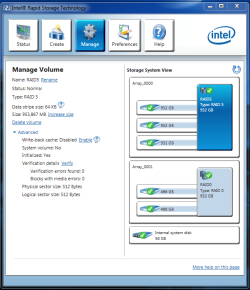
Inserting a 2nd drive should allow the RAID1 to rebuild itself - it depends on the controller and how its implemented. IRST will allow you to examine the entire array, as well as elements of the array (e.g. a single disk) to determine its health.

capture.png

Longer term, I would advise against an installation on an array - they seem to be more trouble than they are worth.

Regards,
Golden
 

My Computer My Computer

At a glance

Windows 10 Pro x64 ; Xubuntu x64Intel i7 860 @ 2.80 GHz O/C'ed to 4.0GHz16GB Corsair Vengance DDR3 @ 661 MHz Dual Cha...EVGA NVidia GTX 560 1024MB
Computer type
PC/Desktop
Computer Manufacturer/Model Number
Golden Mk. I.4
OS
Windows 10 Pro x64 ; Xubuntu x64
CPU
Intel i7 860 @ 2.80 GHz O/C'ed to 4.0GHz
Motherboard
Gigabyte P55A-UD3R Rev.1. Award BIOS F13
Memory
16GB Corsair Vengance DDR3 @ 661 MHz Dual Channel (9-9-9-24)
Graphics Card(s)
EVGA NVidia GTX 560 1024MB
Sound Card
Realtek Integrated
Monitor(s) Displays
Dual Samsung SyncMaster 2494HS
Screen Resolution
1920*1080 and 1920*1080
Hard Drives
1*Samsung 840 EVO 120GB SSD;
1*OCZ Vertex 2 60GB SSD;
2*Samsung F3 SpinPoint 1TB in RAID0;
1*Samsung F1 SpinPoint 1TB;
2*Western Digital 1TB External USB 3.0
1*Western Digital 500GB External USB 3.0
1*Seagate 500GB External USB 2.0
PSU
Thermaltake ToughPower QFan 750W
Case
Thermaltake Element S VK60001W2Z
Cooling
Corsair H60 Water Cooling, 2*230mm and 2*80mm case fans
Keyboard
Logitech G110
Mouse
Logitech MX518
Seems a unaminous vote against arrays. If I want to go down that root can I convert my good RAID 1 disk into a non-RAID disk? I know Greg recommends starting from scratch with a clean install, but sounds like if I do that there is no guarantee the system image I created from the RAID1 will work. I just don't have time to rebuild my system from scratch.

If i try that and the image doesn't work woudl I still have the option of recreating the RAID 1 and then trying the system image again or have a shot my bolt?
 

My Computer My Computer

At a glance

Windows 7 64 bitintel quad Q6600 2.4GHz4GBATI Radeon HD 4850 512Mb
Computer Manufacturer/Model Number
Dell XPS 430
OS
Windows 7 64 bit
CPU
intel quad Q6600 2.4GHz
Motherboard
Intel X48
Memory
4GB
Graphics Card(s)
ATI Radeon HD 4850 512Mb
Sound Card
ATI High Def
Monitor(s) Displays
Dell 1707FPV
Hard Drives
640GB RAID 0
320GB
PSU
425W
Keyboard
Logitech MX3000
Mouse
Logitech M-RAG97
Internet Speed
7Mb
Hi,

I've never tried to "convert" a RAID1 into a singe HDD without a clean install - I'm thinking the easiest way to check is to change the controller from RAID to AHCI in the BIOS, and check to see that the system boots, but I've never tried that. I agree with Greg that a clean install is the fail-safe route.

I would try to plug in a 2nd HDD, and see if the RAID attempts to rebuild itself - it will take a long time. After that, try the image (what imaging tool did you use)? Does IRST show the array as per the screen capture image I attached?

Longer term, look to a clean install on a single HDD as recommended by Greg.

Regards,
Golden
 

My Computer My Computer

At a glance

Windows 10 Pro x64 ; Xubuntu x64Intel i7 860 @ 2.80 GHz O/C'ed to 4.0GHz16GB Corsair Vengance DDR3 @ 661 MHz Dual Cha...EVGA NVidia GTX 560 1024MB
Computer type
PC/Desktop
Computer Manufacturer/Model Number
Golden Mk. I.4
OS
Windows 10 Pro x64 ; Xubuntu x64
CPU
Intel i7 860 @ 2.80 GHz O/C'ed to 4.0GHz
Motherboard
Gigabyte P55A-UD3R Rev.1. Award BIOS F13
Memory
16GB Corsair Vengance DDR3 @ 661 MHz Dual Channel (9-9-9-24)
Graphics Card(s)
EVGA NVidia GTX 560 1024MB
Sound Card
Realtek Integrated
Monitor(s) Displays
Dual Samsung SyncMaster 2494HS
Screen Resolution
1920*1080 and 1920*1080
Hard Drives
1*Samsung 840 EVO 120GB SSD;
1*OCZ Vertex 2 60GB SSD;
2*Samsung F3 SpinPoint 1TB in RAID0;
1*Samsung F1 SpinPoint 1TB;
2*Western Digital 1TB External USB 3.0
1*Western Digital 500GB External USB 3.0
1*Seagate 500GB External USB 2.0
PSU
Thermaltake ToughPower QFan 750W
Case
Thermaltake Element S VK60001W2Z
Cooling
Corsair H60 Water Cooling, 2*230mm and 2*80mm case fans
Keyboard
Logitech G110
Mouse
Logitech MX518
Ok i'll call Dell as HD is within warranty and get a replacement and try the RAID route first. I just used Windows backup to create the systme image. I'm guessing if the RAID rebuilds i wont need the image, but if it fails I can try to install onto the RAID. If that fails it a full blown clean install.

Thanks for all the advice

Mike
 

My Computer My Computer

At a glance

Windows 7 64 bitintel quad Q6600 2.4GHz4GBATI Radeon HD 4850 512Mb
Computer Manufacturer/Model Number
Dell XPS 430
OS
Windows 7 64 bit
CPU
intel quad Q6600 2.4GHz
Motherboard
Intel X48
Memory
4GB
Graphics Card(s)
ATI Radeon HD 4850 512Mb
Sound Card
ATI High Def
Monitor(s) Displays
Dell 1707FPV
Hard Drives
640GB RAID 0
320GB
PSU
425W
Keyboard
Logitech MX3000
Mouse
Logitech M-RAG97
Internet Speed
7Mb
Dell may have a script to help you with rebuilding the RAID, even re-imaging to it.

If you do this please post back how it goes to help others.
 
Back
Top