| Windows 7: OS SSD has a 330 MB disk partition in front of C |
18 Nov 2012
|
#1 | | |
OS SSD has a 330 MB disk partition in front of C New Plextor 256 SSD and made it my OS C: drive. My brother "helped" me to clone it using the included NTI software. He ended up in Linux, unable to get out.
I had backed up my previous SSD OS (C) drive with Norton Ghost. We ended up restoring drive C from Norton Ghost to the new Plextor and it booted perfectly.
But I'm left with the following: Drive B: (the first partition on the Plextor):
319 MB NTFS healthy (Primary Partition)
Partition B contains:
Sytem Volume Information
$Recycle.Bin - this recycle bin is active and anything deleted from
drive C, is sent to this recycle bin on partition B. I emptied the
recycle bin and when I deleted something from C, it again went
to the recycle bin on B.
I tried making this recycle bin 2 mb but it wouldn't accept it. Drive C: (the second partion on the Plextor with OS etc) 238.16 GB NTFS healthy (system, boot, active, crash dump,
Primary Partition
Partition C contains what I think it should for a boot drive:
System Volume Information
Boot
Perf Logs
Windows
bootmgr
A few programs that insist or really benefit from being on C Drive C also has $Recycle.Bin but it has not been used since
the drive was cloned from Norton Ghost. Inside are a few files
with long strings of numbers dated from being used by the
previous drive from which it was cloned.
So, my concern is that I have two primary partitions on one physical drive and that the recycle bin is not used on C, but is used on the other partition which is much larger than it "should" be.
Another concern, probably of less importance, is that one of my Western Digital Black Caviar drives is active and my Intel SSD is also active. So altogether 3 drives plus one partion are all active. I believe this is because those other drives, the WD and the Intel, were once system drives. Apparently I didn't know I should do something special to stop them from continuing to be active when they were no longer system drives.
NOTE: In an effort to minimize use of the Plextor SSD, I moved virtual memory to a fast Black Caviar HD. I plan to format the old SSD and move virtual memory onto that. Would this be a good idea?
SPECS:
Asus P6x58d Premium, 24 gig Kingston DDR3 1600 HyperX memory, i7 930, one Plextor and one Intel M25 SSDs. Three Western Digital black Caviars (2 are 1 tb each and one is 2 tb). Win 7 Prof SP1, 64 bit. HIS ATI 6850 graphics card and 1000 watt power supply.
I would appreciate any and all suggestions and ideas as to how to deal with the many "idiosyncracies" of these drives and whether having two primary partitions on my SSD boot drive will eventually cause trouble. And....what about moving virtual memory to the old SSD which is still working fine but was too small.
With the above issues, the system is running quite well so I'm really not in a hurry to reinstall Windows etc.
Thanks.
Louise | My System Specs |
| System Manufacturer/Model Number Desktop made to order - Asus P6x58D Premium OS Win 7 64 Prof CPU i7 930 Motherboard Asus P6x58D Premium Memory 24 gig 1333 Graphics Card HIS ATI Radeon HD 6850 Sound Card Creative Monitor(s) Displays NEC Multisync P241W Screen Resolution 1920 x 1200 Keyboard Goldtouch Mouse Logitech G 700 used wirelessly PSU i7 930 Case Antec 183 (?) Cooling Zalman fan and heat pipe Hard Drives 2 WD 1tb each black caviar
1 WD black caviar 2tb
1 Plextor SSD SATA 6 256 gig
1 Intel generation 2 SSD 160 gig Internet Speed 19.6 Mbps up and 2.00 Mbps down Other Info 5 usb 3 hard drives used for backup. Until recently also backed up with Crashplan but discovered it was the cause of endless VSS errors and open programs stopping responding. HP Laserjet and large Epson inkjet for photography. Very old Epson Scanner. Cyberpower UPS. |
18 Nov 2012
|
#2 | | Windows 7 Ultimate SP1 (x64) South Australia |
Crikey! Sounds messy. Lets start with a nice maximized screen capture image of the Disk Management screen:
1. Click 
2. Right-click Computer
3. Click Manage
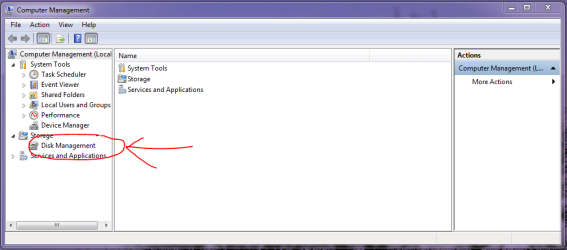
4. When Computer Management screen opens, click Disk Management
5. Resize the resulting screen so we can clearly see the partitions and information
6. Take a screen capture image, save it, and upload it here Screenshots and Files - Upload and Post in Seven Forums
Regards,
Golden | My System Specs | | Computer type PC/Desktop System Manufacturer/Model Number Golden Mk. I.3 OS Windows 7 Ultimate SP1 (x64) CPU Intel i7 860 @ 2.80 GHz Motherboard Gigabyte P55A-UD3R Rev.1. Award BIOS F13 Memory 16GB Corsair Vengance DDR3 @ 661 MHz Dual Channel (9-9-9-24) Graphics Card EVGA NVidia GTX 560 1024MB Sound Card Realtek Integrated Monitor(s) Displays Dual Samsung SyncMaster 2494HS Screen Resolution 1920*1080 and 1920*1080 Keyboard Logitech G110 Mouse Logitech MX518 PSU Thermaltake ToughPower QFan 750W Case Thermaltake Element S VK60001W2Z Cooling Corsair H60 Water Cooling, 2*230mm and 2*80mm case fans Hard Drives 1*OCZ Vertex 2 60GB SSD;
2*Samsung F3 SpinPoint 1TB in RAID0;
3*Samsung F1 SpinPoint 1TB in RAID5;
1*Western Digital 500GB External USB 3.0
1*Seagate 500GB External USB 2.0 Internet Speed Not fast enough!!! Antivirus MSE and Malwarebytes Pro Browser Chrome Version 25 Other Info Laptop: ASUS X54C, Intel Core i3-2330M @ 2.0Ghz, 4GB RAM, Intel HD on-board graphics, Windows 7 Professional SP1 (x64), LinuxMint 14 (x64), PepperMint 3 (x86) |
18 Nov 2012
|
#3 | | |
Disk Management Screen Shot 
Quote: Originally Posted by Golden Crikey! Sounds messy. Lets start with a nice maximized screen capture image of the Disk Management screen:
1. Click 
2. Right-click Computer
3. Click Manage
4. When Computer Management screen opens, click Disk Management Attachment 242023
5. Resize the resulting screen so we can clearly see the partitions and information
6. Take a screen capture image, save it, and upload it here Screenshots and Files - Upload and Post in Seven Forums
Regards,
Golden Here's the screenshot - hope it clarifies some of the things I was trying to describe as best I could.
I also have in my possession a Corsair Force 3 128 SSD which is not presently connected to the machine. It is this drive I thought I would wipe and turn into virtual memory.
Thanks for your thoughts.
Louise | My System Specs | | System Manufacturer/Model Number Desktop made to order - Asus P6x58D Premium OS Win 7 64 Prof CPU i7 930 Motherboard Asus P6x58D Premium Memory 24 gig 1333 Graphics Card HIS ATI Radeon HD 6850 Sound Card Creative Monitor(s) Displays NEC Multisync P241W Screen Resolution 1920 x 1200 Keyboard Goldtouch Mouse Logitech G 700 used wirelessly PSU i7 930 Case Antec 183 (?) Cooling Zalman fan and heat pipe Hard Drives 2 WD 1tb each black caviar
1 WD black caviar 2tb
1 Plextor SSD SATA 6 256 gig
1 Intel generation 2 SSD 160 gig Internet Speed 19.6 Mbps up and 2.00 Mbps down Other Info 5 usb 3 hard drives used for backup. Until recently also backed up with Crashplan but discovered it was the cause of endless VSS errors and open programs stopping responding. HP Laserjet and large Epson inkjet for photography. Very old Epson Scanner. Cyberpower UPS. |
19 Nov 2012
|
#5 | | |
Thanks very much for your help and the links that made it make sense.
One question: the recycle bin on partition B seems to be the only active recycle bin on drive C: If I get rid of it, will Drive C figure out to use its own recycle bin - which it does already have?
Louise | My System Specs | | System Manufacturer/Model Number Desktop made to order - Asus P6x58D Premium OS Win 7 64 Prof CPU i7 930 Motherboard Asus P6x58D Premium Memory 24 gig 1333 Graphics Card HIS ATI Radeon HD 6850 Sound Card Creative Monitor(s) Displays NEC Multisync P241W Screen Resolution 1920 x 1200 Keyboard Goldtouch Mouse Logitech G 700 used wirelessly PSU i7 930 Case Antec 183 (?) Cooling Zalman fan and heat pipe Hard Drives 2 WD 1tb each black caviar
1 WD black caviar 2tb
1 Plextor SSD SATA 6 256 gig
1 Intel generation 2 SSD 160 gig Internet Speed 19.6 Mbps up and 2.00 Mbps down Other Info 5 usb 3 hard drives used for backup. Until recently also backed up with Crashplan but discovered it was the cause of endless VSS errors and open programs stopping responding. HP Laserjet and large Epson inkjet for photography. Very old Epson Scanner. Cyberpower UPS. |
19 Nov 2012
|
#7 | | |
OS SSD has a 330 MB disk partition in front of C 
Quote: Originally Posted by mlg3000 Thanks very much for your help and the links that made it make sense.
One question: the recycle bin on partition B seems to be the only active recycle bin on drive C: If I get rid of it, will Drive C figure out to use its own recycle bin - which it does already have?
Louise Thank you so much. Things are looking a LOT better. I was able to make all the extra disks inactive and was able to get rid of almost all of the partition in front of drive C. I used Partition Wizard bootable CD: Partition Wizard Resize Partition Video Help. However, when it came to extending drive C to its full size and thereby doing away with the unallocated space, Partition Wizard said that there was a bug in the program and that it couldn't do this without overwriting something. It didn't sound good so I left it with now only 8 mb of unallocated space in front of Drive C. I also tried Easus and it couldn't get rid of that 8 mb either. And really, I don't care much  Here's a picture of how things look now - is it ok? QUESTION: I took your suggestion and moved virtual memory back to drive C (SSD). I read Mark Russenivich's description of how to accurately determine peak virtual memory by litterally running everything you sometimes run. Since I'm a photographer, I am often running Lightroom, Photoshop and Outlook and at least one browser etc. When I brought all the programs up and let them run a while, the peak was 50 GB. Russenvich then says to make your minimum, the peak minus actual memory. So I now have virtual memory on drive C set for a minimum of 26 gb and a max of 50 gb. Does this seem excessive?
ALSO, I need a lot of memory disk space: virtual memory, cache memory for camera raw in Photoshop and Lightroom, and Scratch Disk memory for Photoshop to work more quickly. I've got them divided up on different drives according to Adobe's recommendations. Since I have an extra 148 gig Corsair Force 3 SSD and an extra SATA port, wouldn't it be better to put virtual memory on that Corsair and just use it for virtual memory. I'm thinking it would put less stress on the new Plextor.
Anyway, thank you so much for all your help. I feel much more comfortable knowing that my disks are functioning appropriately. I also think the machine is faster and I haven't gotten a single instance of "application not responding" - even when I was running all those programs.
Louise
Last edited by mlg3000; 19 Nov 2012 at 10:06 PM..
Reason: picture not loading
| My System Specs | | System Manufacturer/Model Number Desktop made to order - Asus P6x58D Premium OS Win 7 64 Prof CPU i7 930 Motherboard Asus P6x58D Premium Memory 24 gig 1333 Graphics Card HIS ATI Radeon HD 6850 Sound Card Creative Monitor(s) Displays NEC Multisync P241W Screen Resolution 1920 x 1200 Keyboard Goldtouch Mouse Logitech G 700 used wirelessly PSU i7 930 Case Antec 183 (?) Cooling Zalman fan and heat pipe Hard Drives 2 WD 1tb each black caviar
1 WD black caviar 2tb
1 Plextor SSD SATA 6 256 gig
1 Intel generation 2 SSD 160 gig Internet Speed 19.6 Mbps up and 2.00 Mbps down Other Info 5 usb 3 hard drives used for backup. Until recently also backed up with Crashplan but discovered it was the cause of endless VSS errors and open programs stopping responding. HP Laserjet and large Epson inkjet for photography. Very old Epson Scanner. Cyberpower UPS. |
19 Nov 2012
|
#8 | | Win7 x 6 PC's California, Florida, Boston |
Louise, if the other SSD is as fast then I don't see why you couldn't put the paging file there. I would see how fast it runs on the OS SSD first.
I also never change Paging File from System Managed because Windows 7 has never presented a problem with that and appears to have perfected its own management of this. Have you tried System Managed fully yet? | My System Specs | | |
19 Nov 2012
|
#9 | | |

Quote: Originally Posted by gregrocker Louise, if the other SSD is as fast then I don't see why you couldn't put the paging file there. I would see how fast it runs on the OS SSD first.
I also never change Paging File from System Managed because Windows 7 has never presented a problem with that and appears to have perfected its own management of this. Have you tried System Managed fully yet? Actually the Corsair ran at WEI 7.9 and so does the Plextor, so they are equally fast. No, I haven't tried system managed but I will.
So for now I'll make virtual memory system managed on the C drive SSD (Plextor), and I'll keep the Corsair for extra storage or a replacement. If I feel there is a slowdown, then I'll go ahead and switch virtual memory to a separate disk.
Thank you again.
Louise | My System Specs | | System Manufacturer/Model Number Desktop made to order - Asus P6x58D Premium OS Win 7 64 Prof CPU i7 930 Motherboard Asus P6x58D Premium Memory 24 gig 1333 Graphics Card HIS ATI Radeon HD 6850 Sound Card Creative Monitor(s) Displays NEC Multisync P241W Screen Resolution 1920 x 1200 Keyboard Goldtouch Mouse Logitech G 700 used wirelessly PSU i7 930 Case Antec 183 (?) Cooling Zalman fan and heat pipe Hard Drives 2 WD 1tb each black caviar
1 WD black caviar 2tb
1 Plextor SSD SATA 6 256 gig
1 Intel generation 2 SSD 160 gig Internet Speed 19.6 Mbps up and 2.00 Mbps down Other Info 5 usb 3 hard drives used for backup. Until recently also backed up with Crashplan but discovered it was the cause of endless VSS errors and open programs stopping responding. HP Laserjet and large Epson inkjet for photography. Very old Epson Scanner. Cyberpower UPS. |
19 Nov 2012
|
#10 | | Win7 x 6 PC's California, Florida, Boston |
You're most welcome.
If performance is good and there's nothing else then when ready you can mark the thread Solved at the top. | My System Specs | | OS SSD has a 330 MB disk partition in front of C problems? All times are GMT -5. The time now is 03:51 PM. | |