Windows 7 Forums


Windows 7: what is \\?\volume in defragment is it safe?

04 Dec 2012   #1

Windows 7 Home Premium 64
 
 
what is \\?\volume in defragment is it safe?

I have recently reformatted a lenovo laptop. I have done nothing except installing windows updates, anti virus and anti malware.

When I open the disk defragment I saw 2 drive C:\ and D:\ and a extra \\?\volume{} before I reformat the laptop it wasn't there it only appear after reformat. What is that and how do I make it such that it return to the former state like before I reformatted the laptop.


I am not saying that I want the laptop to be return to the former state just the \\?\volume{}.
My System SpecsSystem Spec

04 Dec 2012   #2

Windows 7 Home Premium 32-Bit - Build 7600 SP1
Houston, Texas


Quote   Quote: Originally Posted by L0newolf View Post
I have recently reformatted a lenovo laptop. I have done nothing except installing windows updates, anti virus and anti malware.

When I open the disk defragment I saw 2 drive C:\ and D:\ and a extra \\?\volume{} before I reformat the laptop it wasn't there it only appear after reformat. What is that and how do I make it such that it return to the former state like before I reformatted the laptop.

I am not saying that I want the laptop to be return to the former state just the \\?\volume{}.
Is it a 100 MB partition size? If so, that is your boot partition. It is fine. == If that is not what you see, post a screenshot of your Disk Management, expanding the colums so we can read all of the print. Use your Snipping Tool to post it. Use this tutorial if you need help. Screenshots and Files - Upload and Post in Seven Forums
My System SpecsSystem Spec
04 Dec 2012   #3

Windows 7 Home Premium 64


How do I know it's partition size its not written in the disk defragment and it's not shown in My Computer.

If it is truly the boot partition is it possible to make it such that it's not \\?\volume{}. It's a bit scary like something is not right with it or will it become another name after sometime?
My System SpecsSystem Spec
.


04 Dec 2012   #4

Windows 7 Home Premium 32-Bit - Build 7600 SP1
Houston, Texas


Quote   Quote: Originally Posted by L0newolf View Post
How do I know it's partition size its not written in the disk defragment and it's not shown in My Computer.

If it is truly the boot partition is it possible to make it such that it's not \\?\volume{}. It's a bit scary like something is not right with it or will it become another name after sometime?
Follow the instructions in Post #2 and you will get help.
My System SpecsSystem Spec
04 Dec 2012   #5

Windows 7 Home Premium 64


I have uploaded the 2.
Attached Thumbnails
what is \?\volume in defragment is it safe?-dd.jpg   what is \?\volume in defragment is it safe?-dm.jpg  
My System SpecsSystem Spec
04 Dec 2012   #6

Windows 7 Professional x64 SP1
Within the radius of 25 miles from LA.


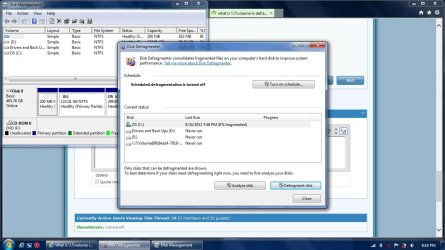
Don't worry about it. Disk Defragementer is just seeing the 200 MB "System Reserved" partition created when you clean install Windows 7. I too also have it. I use Auslogics Disk Defrag though instead of the built-in Disk Defragmenter
what is \?\volume in defragment is it safe?-untitled.jpg

Last edited by theveterans; 04 Dec 2012 at 11:20 PM.. Reason: Addition of pictures
My System SpecsSystem Spec
04 Dec 2012   #7

Windows 7 Home Premium 64


However I have reformatted my HP desktop as well and last I check it was nicely written as SYSTEM in the Disk Defragment....Is this by luck? If you are lucky it will become a word if not it is symbol
My System SpecsSystem Spec
04 Dec 2012   #8

Windows 7 Professional x64 SP1
Within the radius of 25 miles from LA.


Quote   Quote: Originally Posted by L0newolf View Post
However I have reformatted my HP desktop as well and last I check it was nicely written as SYSTEM in the Disk Defragment....Is this by luck? If you are lucky it will become a word if not it is symbol
I guess it just depends on the manufacturer and the windows DVD installation you use. In my case, I also use a Lenovo laptop, but I used the Retail Windows 7 DVD disc to clean install without formatting the entire HDD: install windows on top of the OEM windows (this creates the Windows.old folder). The 200 MB no name system reserved partition is preconfigured by Lenovo when I bought the laptop.

Last edited by theveterans; 04 Dec 2012 at 11:40 PM.. Reason: just grammar correction
My System SpecsSystem Spec
05 Dec 2012   #9

Windows 7 Home Premium 32-Bit - Build 7600 SP1
Houston, Texas


Quote   Quote: Originally Posted by L0newolf View Post
I have recently reformatted a lenovo laptop. I have done nothing except installing windows updates, anti virus and anti malware.

When I open the disk defragment I saw 2 drive C:\ and D:\ and a extra \\?\volume{} before I reformat the laptop it wasn't there it only appear after reformat. What is that and how do I make it such that it return to the former state like before I reformatted the laptop.

I am not saying that I want the laptop to be return to the former state just the \\?\volume{}.
I don't see any drive that is labeled "\\?\volume{}". The 200 MB drive is needed to boot. The 14.75 GB drive appears to be empty and could be merged to another drive. Did that answer your question?
My System SpecsSystem Spec
06 Dec 2012   #10

Windows 7 Home Premium 64


However, I just bought a new lenovo laptop but once I reach home and on the laptop and click the defragment \\?\volume is there. Is that something I should be worried as in the laptop is a used laptop?
My System SpecsSystem Spec
Reply

 what is \\?\volume in defragment is it safe? problems?


Thread Tools


Similar help and support threads for: what is \\?\volume in defragment is it safe?
Thread Forum
Uncountable Boot Volume, no Safe Mode, no recovery console! BSOD Help and Support
Disk defragment not responding in safe mode Performance & Maintenance
Safe to defragment recovery partition? Performance & Maintenance
Is it safe to delete the" System Volume Information" folder. General Discussion
Defragment. Software


All times are GMT -5. The time now is 12:21 AM.


Seven Forums Android App Seven Forums IOS App Follow us on Facebook

Windows 7 Forums is an independent web site and has not been authorized,
sponsored, or otherwise approved by Microsoft Corporation.
"Windows 7" and related materials are trademarks of Microsoft Corp.
© Designer Media Ltd
  

1 2 3 4 5 6 7 8 9 10 11 12 13 14 15 16 17 18 19 20 21 22 23 24 25 26 27 28 29 30 31 32