Windows 7 Forums


Windows 7: Active partition changing safety

04 Dec 2012   #1

Windows 7 home premium
 
 
Active partition changing safety

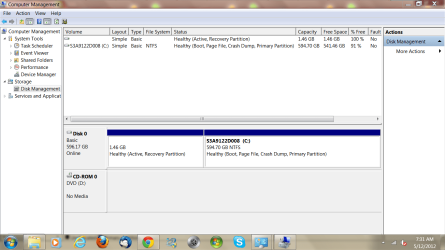
I have a few niggly windows 7 system problems unable to fix. I was doing a disc management check and there are 2 partitions, one for system recovery and the usual C disc partition with everything on it. I noticed that the recovery partition is marked as the active one. Is that correct or is it possible to change to the C drive as the active one without stuffing up. If things did go astray in changing it over how would I recover it again. The screen capture shows the status, thanks Jeff

Attached Thumbnails
Active partition changing safety-capture.png  
My System SpecsSystem Spec

04 Dec 2012   #2

Windows 7 Ultimate x64, XP Mode, W8 RP VM, Linux Mint Debian 2nd OS HD- 7 Pro x64 second case
New England


You want the C primary as the one seen as being active. Somehow the roles got switched there!

There are three methods to see the C primary remarked again explained in one guide for this to look over. One requires a 3rd party drive partitioning program like Partition Wizard. Partition - Mark as Active
My System SpecsSystem Spec
05 Dec 2012   #3

Win7 x 6 PC's
California, Florida, Boston


Some OEM's mark Recovery active so it will boot from its hotkey. Unless you changed it then I'd leave it alone.

However if you decide to do what most tech enthusiasts do and get the superior Clean Reinstall - Factory OEM Windows 7 then you can make your Recovery disks first and delete all partitions during the reinstall.
My System SpecsSystem Spec
.


05 Dec 2012   #4

Windows 7 Home Premium 64 bit. SP-1
Northern Ohio


I noticed that the recovery partition is empty. 100% free space. Is that normal.
My System SpecsSystem Spec
05 Dec 2012   #5

Windows 7 home premium


Thanks, I'm not too computer savvy but I know how to mark the C drive as active but if the machine wont boot afterwards where do I go from there.
My System SpecsSystem Spec
05 Dec 2012   #6

Windows 7 home premium


yes I thought that it was strange also that the recovery partition was 100% free, how can that be ?
My System SpecsSystem Spec
05 Dec 2012   #7

Win7 x 6 PC's
California, Florida, Boston


Recovery files are hidden. There's at least the boot files there. You can see them by unhiding System and Hidden files in Control Panel>Folder Options>View.

Why do you want to change the boot partition to C? You might be removing Recovery's ability to boot when needed. Or did you change the Active flag to Recovery and wish to undo it now?

If you want to get rid of the Recovery Partition then make the Recovery disks first and we will give you the exact steps.

Otherwise you are making trouble for yourself for what reason?

Last edited by gregrocker; 05 Dec 2012 at 02:23 AM..
My System SpecsSystem Spec
05 Dec 2012   #8

Windows 7 home premium


With my limited know how I naturally thought that C should be the main drive and that the recovery partition is just for that purpose only. I have had some niggly problems ie backup and restore no good, no info in the boot section of msconfig, slow boot and shutdown, plus hibernation stopped working
My System SpecsSystem Spec
05 Dec 2012   #9

Win7 x 6 PC's
California, Florida, Boston


Have you considered getting the superior Clean Reinstall - Factory OEM Windows 7
without the corrupting factory bloatware and duplicate utilties which have better versions built into Windows 7? Most tech enthusiasts do this.

At least I would Clean Up Factory Bloatware to regain some performance and get you more familar with Windows 7, as well as these steps to Optimize Windows 7 - Windows 7 Forums.

Then if any problems persist try working through these Troubleshooting Steps for Windows 7
My System SpecsSystem Spec
05 Dec 2012   #10

Windows 7 Home Premium 64 bit. SP-1
Northern Ohio


Thanks for the info Greg.
My System SpecsSystem Spec
Reply

 Active partition changing safety problems?


Thread Tools


Similar help and support threads for: Active partition changing safety
Thread Forum
Solved Windows Error Message after changing Active Partition Installation & Setup
help: windows 7 won't boot after changing active partit Installation & Setup
Solved How to change active partition without removing data from partition? General Discussion
Solved Changing the active boot partition. General Discussion
UAC gets active when changing private folder name System Security


All times are GMT -5. The time now is 11:44 PM.


Seven Forums Android App Seven Forums IOS App Follow us on Facebook

Windows 7 Forums is an independent web site and has not been authorized,
sponsored, or otherwise approved by Microsoft Corporation.
"Windows 7" and related materials are trademarks of Microsoft Corp.
© Designer Media Ltd
  

1 2 3 4 5 6 7 8 9 10 11 12 13 14 15 16 17 18 19 20 21 22 23 24 25 26 27 28 29 30 31 32