Windows 7 Forums


Windows 7: New GPU and PSU causing CPU Tempreture to skyrocket?

20 Dec 2012  
envy28

Windows 7 64bit
71 posts


As far as I can tell GPU is working fine, its running at around 40 degrees, I even tried putting my old GPU back in and I get the same sort of tempretures for my CPU. As for the PSU its a Corsair TX 850W 80 Plus, I think that is a pretty well known brand.

My PSU does have alot of cables coming out from it, most which are not in use, can that have an effect? Unfortunately I do not have the old PSU anymore so I cant test it.

Is there a way to test if the PSU is working properly or not?

My System SpecsSystem Spec

20 Dec 2012  
envy28

Windows 7 64bit
71 posts


Ok so I was able to get my hands on a new heatsink, and I am still having the same problem. So does this mean there is something wrong with my PSU?

Btw how accurate is Core Temp? The only reason I noticed the temps is because I decided to check, the computer has not restarted without that software being open. As a test, is it safe not to have Core Temp open and push the computer to see if it shuts off by itself? I assume the computer shuts off once it reaches 99 degrees?

Last edited by envy28; 20 Dec 2012 at 09:58 AM..
My System SpecsSystem Spec
20 Dec 2012  
pbcopter

Windows 7 Ultimate x64 SP1, Windows 8 Pro x64
860 posts
Florida, USA


I would check the temperatures in the BIOS, if you haven't already done so.

That tends to be the most accurate.
My System SpecsSystem Spec
.


20 Dec 2012  
proudtobegreek

Microsoft Windows 7 Ultimate 64-bit Service Pack 1
527 posts
Thessaloniki


Checking your temps via BIOS seems legit.Confirm with AIDA64 Extreme Downloads | AIDA64.
My System SpecsSystem Spec
24 Dec 2012  
envy28

Windows 7 64bit
71 posts


Hey guys

Since the world did not end I thought I might as well give it all another try. I brought a new fan, a basic one, and my tempretures are much better.

[img]http://s14.**************/7oyqh5hnx/Core_Temp_Scr.jpg[/img]

Do you think it is still a little high considering the computer is not doing much? I did not reapply the paste as the fan already had it pre applied on it.

Oh and Merry Christmas.
My System SpecsSystem Spec
25 Dec 2012  
proudtobegreek

Microsoft Windows 7 Ultimate 64-bit Service Pack 1
527 posts
Thessaloniki


Your link seems like a deadend...
My System SpecsSystem Spec
25 Dec 2012  
envy28

Windows 7 64bit
71 posts


Quote   Quote: Originally Posted by proudtobegreek View Post
Your link seems like a deadend...
woops... sorry about that. My temps are basically between 50 - 60 degrees when i am not really doing anything. Is that ok or is that still a little high?
My System SpecsSystem Spec
25 Dec 2012  
proudtobegreek

Microsoft Windows 7 Ultimate 64-bit Service Pack 1
527 posts
Thessaloniki


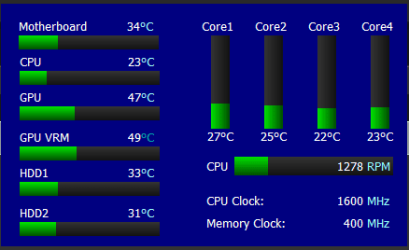
Take a look at these temps.Aircooled.One CPU fan only.GPU has its own,PSU another two.have another four,never turned on.You never admitted applying paste or did i missed it through the posts?
New GPU and PSU causing CPU Tempreture to skyrocket?-temps.png
My System SpecsSystem Spec
25 Dec 2012  
envy28

Windows 7 64bit
71 posts


Quote   Quote: Originally Posted by proudtobegreek View Post
Take a look at these temps.Aircooled.One CPU fan only.GPU has its own,PSU another two.have another four,never turned on.You never admitted applying paste or did i missed it through the posts?
Attachment 247140
Your right, I did not apply paste as the new fan already had it applied and I assumed that was good enough... so i guess i was wrong.
My System SpecsSystem Spec
26 Dec 2012  
proudtobegreek

Microsoft Windows 7 Ultimate 64-bit Service Pack 1
527 posts
Thessaloniki


Another fan or another CPU cooler?What app is giving you,your temperatures?Did you follow link Downloads | AIDA64 ?
My System SpecsSystem Spec
Reply

 New GPU and PSU causing CPU Tempreture to skyrocket? problems?


Thread Tools


Similar help and support threads for: New GPU and PSU causing CPU Tempreture to skyrocket?
Thread Forum
BSOD Help. Don't what what is causing it. BSOD Help and Support
Solved New SSD causing issues BSOD Help and Support
Is my CPU causing low FPS Hardware & Devices
Can somebody please tell me what is causing this error ? BSOD Help and Support
Hi, what is causing this BSOD ? BSOD Help and Support


All times are GMT -5. The time now is 07:13 AM.


Windows 7 Forums is an independent web site and has not been authorized,
sponsored, or otherwise approved by Microsoft Corporation.
"Windows 7" and related materials are trademarks of Microsoft Corp.
© Designer Media Ltd