Windows 7 Forums


Windows 7: CPU Usage stays at 100%

28 Dec 2012   #1

Windows 7 Home Premium 64bit
England
 
 
CPU Usage stays at 100%

Hi, my CPU usage always stays at 100% while I browse the web, I've ended all of the useless processes such as
PowerISO, Canon my printer, One Note etc....


Any advice will be appreciated
My System SpecsSystem Spec

28 Dec 2012   #2

Windows 7 Ultimate SP1 X64/ linux in VM
NW Florida


Try using Task Manager, hold down alt+control and press delete. select task manager, click the processes tab and press the CPU tab. Maybe it will tell you what is using your CPU.
My System SpecsSystem Spec
28 Dec 2012   #3

Win7 x 6 PC's
California, Florida, Boston


Also work through these Troubleshooting Steps for Windows 7
starting with a Clean Boot.

Last edited by gregrocker; 28 Dec 2012 at 11:07 PM..
My System SpecsSystem Spec
.


28 Dec 2012   #4

Windows 7 Home Premium 64bit
England


Checked it essenbe, it's the touchpad processes and Windows processes nothing else
My System SpecsSystem Spec
28 Dec 2012   #5

Win 7 Pro x64 SP1, Win 7 Ult x86 SP1
NC, USA


Does CPU usage stay at 100% when you open Task Manager?

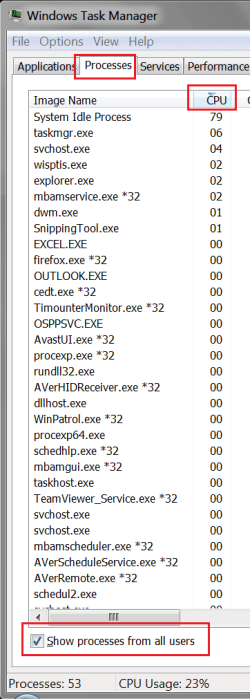
Can you post a screen print of Task Manager ordered by CPU descending?
Make sure you have "Show processes from all users" checked.

Screenshots and Files - Upload and Post in Seven Forums
My System SpecsSystem Spec
28 Dec 2012   #6

Windows 7 Home Premium 64 bit. SP-1
Northern Ohio


My System SpecsSystem Spec
29 Dec 2012   #7

Windows 7 Home Premium 64bit
England


I don't think it's Trojan Generic KDV 792778 but thanks anyway
My System SpecsSystem Spec
29 Dec 2012   #8

Windows 7 Home Premium 64bit
England


Here's a pic of task manager
Attached Thumbnails
CPU Usage stays at 100%-performance.jpg  
My System SpecsSystem Spec
29 Dec 2012   #9

Win 7 Pro x64 SP1, Win 7 Ult x86 SP1
NC, USA


You have 87 processes running, and that's a lot.

Can you post a screen print showing the Processes, ordered by CPU descending.
Make sure you have "Show processes from all users" checked.
Here is a screen print showing this.

CPU Usage stays at 100%-tmsp01.png
My System SpecsSystem Spec
29 Dec 2012   #10

Windows 7 Home Premium 64bit
England


Here you go
Attached Thumbnails
CPU Usage stays at 100%-process1.jpg   CPU Usage stays at 100%-process2.jpg   CPU Usage stays at 100%-process3.jpg  
My System SpecsSystem Spec
Reply

 CPU Usage stays at 100% problems?


Thread Tools


Similar help and support threads for: CPU Usage stays at 100%
Thread Forum
Frequent unresponsiveness, 100% hardware disk usage, 0% software usage Performance & Maintenance
CPU usage stays around 50-100% Performance & Maintenance
Solved System Restore - Current usage exceeds Max Usage Backup and Restore
Windows 7 random CPU usage and high physical memory usage!!! Performance & Maintenance
CPU usage suddenly skyrockets and stays that way Performance & Maintenance


All times are GMT -5. The time now is 03:25 AM.


Windows 7 Forums is an independent web site and has not been authorized,
sponsored, or otherwise approved by Microsoft Corporation.
"Windows 7" and related materials are trademarks of Microsoft Corp.
© Designer Media Ltd