Windows 7 Forums


Windows 7: Disk activity not showing up in Resource Monitor?

31 Dec 2012   #1

Windows 7 Ultimate x64
 
 
Disk activity not showing up in Resource Monitor?

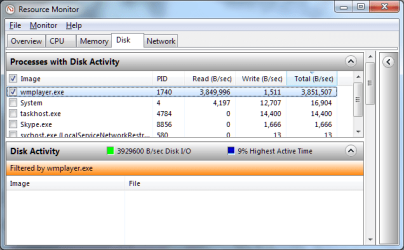
I've noticed that Windows Media Player is thrashing my hard drive whenever I play videos, so I tried to investigate with Resource Monitor. The "Processes with Disk Activity" pane shows it reading about 4Mb/s, but there's nothing to show for it in the "Disk Activity" pane.

Any ideas what's up?

Attached Thumbnails
Disk activity not showing up in Resource Monitor?-resource-monitor.png  
My System SpecsSystem Spec

31 Dec 2012   #2

Win 7 Pro 64-bit
South Central Texas


Hello gidyn and welcome to Seven Forums.

In Windows Xp and Windows Vista you would have to add additional performance counters to Task Manager to specifically monitor disk activity. The counters are I/O Reads, I/O Writes, I/O Read Bytes, and I/O Write Bytes. I'm on a work computer running XP so I can't verify if this will work on Windows 7 but you might give it a look.

Identify Processes That Cause High Disk Activity
My System SpecsSystem Spec
31 Dec 2012   #3

Windows 7 Ultimate x64


Quote   Quote: Originally Posted by marsmimar View Post
Hello gidyn and welcome to Seven Forums.

In Windows Xp and Windows Vista you would have to add additional performance counters to Task Manager to specifically monitor disk activity. The counters are I/O Reads, I/O Writes, I/O Read Bytes, and I/O Write Bytes. I'm on a work computer running XP so I can't verify if this will work on Windows 7 but you might give it a look.

Identify Processes That Cause High Disk Activity
I'm using Resource Monitor, not Task Manager. Please see the screen shot in my original post.
My System SpecsSystem Spec
.


31 Dec 2012   #4

Win 7 Pro 64-bit
South Central Texas


Quote   Quote: Originally Posted by gidyn View Post
Quote   Quote: Originally Posted by marsmimar View Post
Hello gidyn and welcome to Seven Forums.

In Windows Xp and Windows Vista you would have to add additional performance counters to Task Manager to specifically monitor disk activity. The counters are I/O Reads, I/O Writes, I/O Read Bytes, and I/O Write Bytes. I'm on a work computer running XP so I can't verify if this will work on Windows 7 but you might give it a look.

Identify Processes That Cause High Disk Activity
I'm using Resource Monitor, not Task Manager. Please see the screen shot in my original post.

Resource Monitor is a part of Task Manager. See Step 2 under Here's How.

Resource Monitor
My System SpecsSystem Spec
31 Dec 2012   #5

Windows 7 ultimate x64
Earth


Quote   Quote: Originally Posted by gidyn View Post
Quote   Quote: Originally Posted by marsmimar View Post
Hello gidyn and welcome to Seven Forums.

In Windows Xp and Windows Vista you would have to add additional performance counters to Task Manager to specifically monitor disk activity. The counters are I/O Reads, I/O Writes, I/O Read Bytes, and I/O Write Bytes. I'm on a work computer running XP so I can't verify if this will work on Windows 7 but you might give it a look.

Identify Processes That Cause High Disk Activity
I'm using Resource Monitor, not Task Manager. Please see the screen shot in my original post.
What he meant is Resource Monitor uses ETW as the engine. Perfmon exposes ETW in Performance Monitor > Data Collector Sets > System > Event Trace Sessions. look for NtfsLog... it should be started.. as a matter of fact all the sessions should be started.
My System SpecsSystem Spec
31 Dec 2012   #6

Windows 7 Ultimate x64


Quote   Quote: Originally Posted by centaur78 View Post

What he meant is Resource Monitor uses ETW as the engine. Perfmon exposes ETW in Performance Monitor > Data Collector Sets > System > Event Trace Sessions. look for NtfsLog... it should be started.. as a matter of fact all the sessions should be started.
NtfsLog is running, as are all the others. All other disk activity is monitored - it's just Media Player that somehow doesn't show up.
My System SpecsSystem Spec
31 Dec 2012   #7

Windows 7 ultimate x64
Earth


ok

Clicked Monitor > Stop Monitoring ... wait for a few sec and then select Start Monitoring.. It should probably resolved by now.
My System SpecsSystem Spec
31 Dec 2012   #8

Windows 7 Ultimate x64


Quote   Quote: Originally Posted by centaur78 View Post
Clicked Monitor > Stop Monitoring ... wait for a few sec and then select Start Monitoring.. It should probably resolved by now.
Tried it a few times.
My System SpecsSystem Spec
31 Dec 2012   #9

Windows 7 ultimate x64
Earth


ok restart and check again..
My System SpecsSystem Spec
31 Dec 2012   #10

Windows 7 Ultimate x64


Quote   Quote: Originally Posted by centaur78 View Post
ok restart and check again..
Tried it after a few restarts.
My System SpecsSystem Spec
Reply

 Disk activity not showing up in Resource Monitor? problems?


Thread Tools


Similar help and support threads for: Disk activity not showing up in Resource Monitor?
Thread Forum
Solved Unusual Hard Disk Activity in Resource Monitor Performance & Maintenance
Resource Monitor Tutorials
Solved Resource Monitor has one of my Hds always at 100% active Performance & Maintenance
Disk Activity is NOT accurate in Resource Monitor....not even close! Performance & Maintenance
Task Mgr and Resource Monitor showing only single core Hardware & Devices


All times are GMT -5. The time now is 07:42 AM.


Seven Forums Android App Seven Forums IOS App Follow us on Facebook

Windows 7 Forums is an independent web site and has not been authorized,
sponsored, or otherwise approved by Microsoft Corporation.
"Windows 7" and related materials are trademarks of Microsoft Corp.
© Designer Media Ltd
  

1 2 3 4 5 6 7 8 9 10 11 12 13 14 15 16 17 18 19 20 21 22 23 24 25 26 27 28 29 30 31 32