| Windows 7: Suddenly windows takes much longer to start |
28 Jan 2013
|
#1 | | |
Suddenly windows takes much longer to start So a couple weeks back my computer started spending quite a long time after the log-in screen (~1 min+), and then shows me a black screen with just my cursor before the desktop loads (~2 mins). The latter of these was what drew my attention to it actually, since the computer had not done this before.
As far as I know, no new installations/system changes took place around the time that this started happening. When I first noticed the issue, I tried a system restore to a few days prior, but that did not remove the issue either. Have done virus scans and spyware scans, and disabled a bunch of services and startup programs, but the issue still persists. Hard drive integrity also does not appear to be an issue.
I guess I could probably chop down on boot time by disabling pretty much everything from the startup list, but was wondering if there are any known reasons that would suddenly cause boot to take much longer, even with more startups before. As far as I can tell, system works just fine after starting up. Might not be as fast or something, but I honestly can't tell.
Thanks! | My System Specs |
| |
28 Jan 2013
|
#2 | | Windows 7 Ultimate 32bit SP1 |
Have you cleaned out all temporary files? | My System Specs | | System Manufacturer/Model Number Bruce ... somewhere in his 40's OS Windows 7 Ultimate 32bit SP1 CPU Intel(R) Core(TM)2 Quad CPU @ 2.40GHz, 2400 MHz Motherboard INTEL/D975XBX2 Memory 4 GB Graphics Card ATI Radeon HD 2600 Pro Monitor(s) Displays Samsung SyncMaster 914v Screen Resolution 1280 x 1024 Keyboard Standard PS/2 Keyboard Mouse Microsoft PS/2 Mouse PSU Rocketfish 700 W Case G.Skill Gigabyte Chassis Hard Drives 2/500GB each ... ST3500630AS ATA Device.
One is not connected Internet Speed DSL Antivirus Avira Internet Security Browser IE 9 Other Info ATI HDMI Audio |
28 Jan 2013
|
#3 | | |

Quote: Originally Posted by Jacee Have you clean out all temporary files? Yes, have run disk cleanup and defrag, latter of has always been scheduled anyway. | My System Specs | | |
28 Jan 2013
|
#4 | | WinXP / Win 7 64bit Dual Boot The Villages, Florida, USA |
If you are using a usb drive for readyboost, remove it and see what happens. I had a similar experience a few weeks ago when all of a sudden my system took forever to boot. After a couple of days going through the basics I discovered that my usb Readyboost drive went south. Don't know why that would affect boot times but it did on my system.
Just a thought | My System Specs | | System Manufacturer/Model Number DYI Water Cooled OS WinXP / Win 7 64bit Dual Boot CPU Q6600 Motherboard Asus P5K Deluxe WIFI/AP Edition Memory 4 Gb Crucial Ballistix Tracer Graphics Card EVGA e-GeForce 8800 GT 512MB Sound Card On Board Soundmax HD Monitor(s) Displays Dell 19" Flat Panel Screen Resolution 1280x1024 Keyboard Microsoft Wireless Mouse Microsoft Wireless PSU Thermaltake Toughpower 750 Case Thermaltake Black Armor Cooling Water Hard Drives WD1001 Caviar Win 7 Boot
WD500 Caviar Win XP Boot
2xWD500 Caviar (Raid 0)
WD750 Caviar (Backup) Internet Speed Cable Other Info LiteOn Lightscribe DVD Burner |
29 Jan 2013
|
#6 | | |

Quote: Originally Posted by hoganth If you are using a usb drive for readyboost, remove it and see what happens. I had a similar experience a few weeks ago when all of a sudden my system took forever to boot. After a couple of days going through the basics I discovered that my usb Readyboost drive went south. Don't know why that would affect boot times but it did on my system.
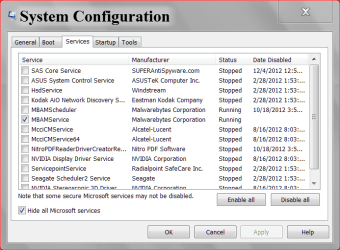
Just a thought Don't have this. Don't actually know what readyboost is, actually. The only USB devices I've got are my keyboard, mouse and webcam, and removing them have not made a difference. Don't think I've got that much stuff starting up on boot, actually. As far as I can tell it's a bunch of drivers and stuff? Main concern was actually why it suddenly slowed noticably when there was the same amount of stuff running before, and not so much the time taken but rather if it's a symptom of some underlying problem developing. http://imgur.com/5dGx6xM
Anyways, will try to do the trace thing in the meantime. Thanks! | My System Specs | | |
29 Jan 2013
|
#8 | | |

Quote: Originally Posted by gregrocker Uncheck all of those Startups and non-MS Services in msconfig as shown in the Clean Boot step in Troubleshooting Steps for Windows 7.
I see you have Symantec bloatware installed. I would uninstall all of the bloatware and run lean and mean with Microsoft Security Essentials and the Windows 7 firewall. Clean Up Factory Bloatware
If you're willing to go to all the trouble of running a Boot Trace, why not instead take the same amount of time to get the vastly superior Clean Reinstall - Factory OEM Windows 7 and have a perfect install which will stay that way as long as you stick with the tools and methods given? Thanks for the suggestions. However, running a trace seems much simpler actually, since I already have the SDK it's just essentially rebooting twice. And I wouldn't have to deal with creating a boot disk and reinstalling all of my programs that I need to work. Only question though, is who should I give the .ETL file from the trace to, or are there guides available that help to break down the information within?
Running the trace instead of a fresh install will (hopefully) also be more useful in finding out why there was a sudden change in the boot times, and more importantly (to me) check if it is some precursor to hardware issues, as I would need to take appropriate measures to manage any expected failure/downtime. Having a very quick boot would be nice but not essential to me, and I might carry out the other actions in the future if this issue and any potential hardware concerns are addressed.
Can all non-MS startups really be safely removed though? To my untrained eye, the first 6 items appear to belong to the processor, sound and touchpad drivers respectively. I am quite confused as to why these might not need to be running from the start, and would appreciate being able to understand more before I clean up all the startups and services as per the guide. As for the symantec, that wasn't factory installed but actually added last year for my school's network. I'll probably check with them if I could use something else instead and proceed from there.
Thanks again for your help and links to the guides =) | My System Specs | | |
29 Jan 2013
|
#9 | | Win7 x 6 PC's California, Florida, Boston |
Those startups don't belong to the hardware but to the crapware programs installed by the OEM to supposedly monitor them but which are only used to spy on you - if you don't use any specialized settings which you would know about (e.g. overclocking). There are much better versions built into Windows 7 for most all of these functions.
Any other item you can google it's name to see what it does, but most likely it isn't needed. Nothing that's required to start with Windows 7 besides your AV is listed in msconfig>Startup and >Services after Hiding MS Services. The only listings that need to be enabled are a messenger or something which you must have running when the OS starts. All others are freeloaders most likely snuck in to spy on you, yielding profitable behavioral information.
There's never been a single complaint with countless thousands who have trimmed these startups. The tutorial for Startup Programs - Change has over two millions views and is the most viewed tech support tutorial on the web. | My System Specs | | |
29 Jan 2013
|
#10 | | |

Quote: Originally Posted by gregrocker Those startups don't belong to the hardware but to the crapware programs installed by the OEM to supposedly monitor them but which are only used to spy on you - if you don't use any specialized settings which you would know about (e.g. overclocking). There are much better versions built into Windows 7 for most all of these functions.
Any other item you can google it's name to see what it does, but most likely it isn't needed. Nothing that's required to start with Windows 7 besides your AV is listed in msconfig>Startup and >Services after Hiding MS Services. The only listings that need to be enabled are a messenger or something which you must have running when the OS starts. All others are freeloaders most likely snuck in to spy on you, yielding profitable behavioral information.
There's never been a single complaint with countless thousands who have trimmed these startups. The tutorial for Startup Programs - Change has over two millions views and is the most viewed tech support tutorial on the web. That's great to know. Will definitely try that out. Just to check though, should services that are already set to manual start in services.msc be disabled in msconfig too? Or do I only need to do one or the other | My System Specs | | Suddenly windows takes much longer to start problems? All times are GMT -5. The time now is 02:56 PM. | |