| Windows 7: svchost.exe high CPU - sigmatel problem or other? |
17 Oct 2009
|
#1 | | |
svchost.exe high CPU - sigmatel problem or other? Hello,
as this is my first post, I'll try to explain my problem as good as possible.
At the moment the official windows 7 build 7100 evaluation copy is running on my system (dell inspiron 6400, dual core 1,83 GHz, 2gb RAM, intel 945 chipset). It's installed since april 2009 and didn't give me problems until a few weeks.
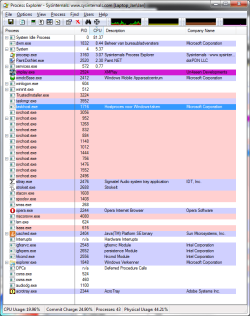
I've included several screenshots of Process Explorer to visualize my problem.
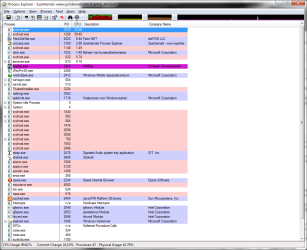
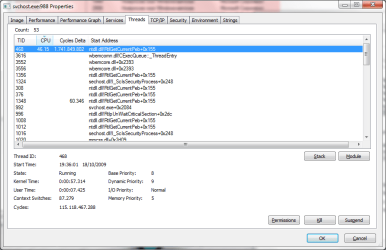
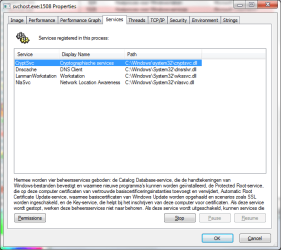
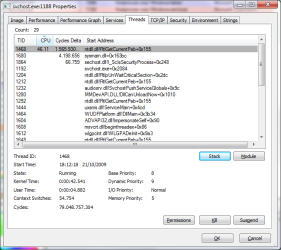
When I boot my system 2 svchost.exe's generate a high amount of CPU-usage (see image1) during the first minutes.
When I play some mp3s (with WMP or xmplay) at that moment, I can hear a lot of crackling and my systems gets more and more unresponsive. In Process Explorer, you can see even more (5-6) svchost.exe's generate high CPU-usage). Pressing pause on the mp3player gives me back the response and immediately stops the high CPU-usage of the other svchost.exe's.
But the two initial svchost.exe's keep generating high CPU untill after a certain time, they drop to 0% cpu.
After those initial minutes, I can do everything I want again.
Playing mp3s gives no more problems. No crackling, but clear sound.
I installed the latest Sigmatel High Definition Audio Driver, but that didn't resolve the problem.
I also looked up 'svchost.exe' and 'sigmatel' on this forum, but couldn't find an anwser to my specific case.
I'm not a newbie in techworld, but after wasting hours and hours on this problem, I'm ready to call for help
Thanks in advance! | My System Specs |
| System Manufacturer/Model Number Dell Inspiron 6400 OS windows 7 CPU dual core 1,83 GHz Memory 2gb ram Graphics Card Mobile Intel(R) 945 Express Chipset Family Sound Card SigmaTel Case original dell inspiron 6400 Cooling internal Hard Drives 160gb |
17 Oct 2009
|
#2 | | |
Excellent problem description. Have rep
That's not a simple issue to troubleshoot, but the good news is that it can be done.
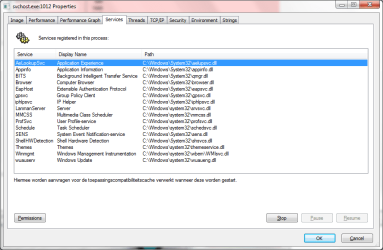
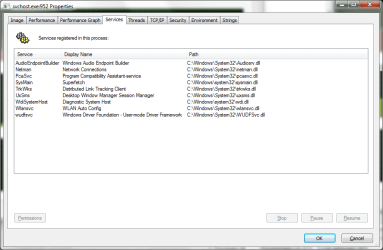
Bear in mind that SVCHOST is a container process. Multiple "services" sometimes share the same SVCHOST instance, and the key to this situation is to first work out which service is responsible for the high processor utilisation. I assume you already know that, given your screenshot above. What might not be so obvious is how to split up the services running in the shared SVCHOST so that you eventually get to a state where there's only one service, the SVCHOST is still chewing CPU, and hence you've found the service which is the culprit.
To split a service into its own SVCHOST instance, you can run this from an (elevated) CMD prompt:
SC CONFIG <service_name> TYPE= OWN
Note the space between the equals sign and the "own". The next time that service starts, it'll be in a separate SVCHOST instance which is another process, and you've either ruled it out as the cause or you've found the culprit.
To make a service revert back to its original (shared SVCHOST) state:
SC CONFIG <service_name> TYPE= SHARE
By playing with these commands and the list of services in your screenshot, and rebooting lots and lots, you'll find the service which is responsible for high processor utilisation. Half-of-the-ones-remaining is a good strategy.
There are more elegant ways to do it, but they're impractical over a web forum. Good luck with it. | My System Specs | | System Manufacturer/Model Number Multiple machines in various stages of decomposition. OS Win7x64 |
17 Oct 2009
|
#3 | | |

Quote: Originally Posted by H2SO4 There are more elegant ways to do it, but they're impractical over a web forum. Good luck with it. I just realised you're already using Process Explorer, so there may be a simpler way.
In ProcExp, go to the Options menu, "Configure symbols", and enter this into the "symbols path" field:
SRV*C:\SymCache*http://msdl.microsoft.com/download/symbols
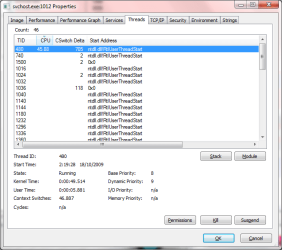
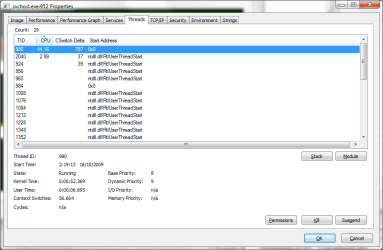
The next time the problem occurs, do another screenshot of the "Threads" ProcExp tab for the svchost which is eating the processor (just like the screenshots of the "threads" tab you did above). With the symbol path configured, it may reveal more info about what's happening in the svchost instance to cause the abnormal processor utilisation.
You should also do some thorough malware scanning, if you haven't done so already. There's the possibility that all this is caused by a virus (I don't like the way it skips around between multiple svchosts - that's somewhat suspicious). | My System Specs | | System Manufacturer/Model Number Multiple machines in various stages of decomposition. OS Win7x64 |
18 Oct 2009
|
#4 | | |
1: first I performed a scan with Malwarebytes Antimalware and AČ Free
Both programs didn't find active malware.
I installed AVG 9 Free. It found nothing after a complete scan.
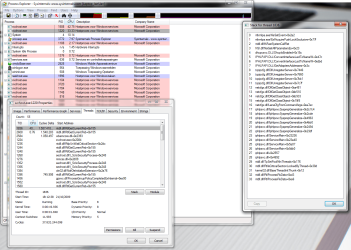
2: I did everything you asked and included a few extra screenshots.
This time only one instance of svchost.exe gave constantly high CPU.
I killed TID 468 but after a few minutes svchost.exe gave high CPU back again (seen screenshot).
I edited the 'symbols path' but couldn't find created files in C:\Symbols afterwards (I don't know how these files should be created). Did this modification work correctly?
Can I do other things?
Greetings and thanks in advance! | My System Specs | | System Manufacturer/Model Number Dell Inspiron 6400 OS windows 7 CPU dual core 1,83 GHz Memory 2gb ram Graphics Card Mobile Intel(R) 945 Express Chipset Family Sound Card SigmaTel Case original dell inspiron 6400 Cooling internal Hard Drives 160gb |
18 Oct 2009
|
#5 | | Windows 7 x64 HP, Windows 7 HP, Windows 7 Ult Weatherford, Texas |
Welcome to Seven Forums and thanks for the detailed info.
You stated that you have the latest SigmaTel dirver, is it SigmaTel High Definition Audio CODEC 6.10.0.5609 or something else? I ask because it appears that Dell has had some problems keeping up to speed - Update your Dell SigmaTel audio driver - and what you have may not be the latest. (Also, Microsoft driver updates have been a bit questionable, I have seen.) | My System Specs | | System Manufacturer/Model Number Gateway, Toshiba Laptop, and Home Brew OS Windows 7 x64 HP, Windows 7 HP, Windows 7 Ult CPU Intel I3, Cerelon, Pentium 4 @ 3Ghz Motherboard Intel, Intel, Asus Memory 8G, 3G, 3G Graphics Card On-board Intel, On-board nVidia, nVIDIA card Sound Card on-board, on-board, SoundBlaster Monitor(s) Displays Hannspree HF237, Toshiba, SyncMaster 931B Screen Resolution default (all) Keyboard standard wired (all) Mouse standard wired (all) PSU 300w, unk, 650w Case black, black, grey Cooling air (all) Hard Drives 1T internal, 320G internal, 160G internal, 1T networked Internet Speed 6M down, 768K up Other Info Home LAN through Linksys hub to 4 port and wireless switch/router. Networked HP 2600n. Wife's computer running Windows 7, and spare laptop running Ubuntu "Karmic Kola" (9.10). |
18 Oct 2009
|
#6 | | |
Shaft, driver number is 6.10.0.5614. And I downloaded it from the Dell-support site.
My soundcard works normally at the moment.
Is there any newer version available?
Thanks in advance! | My System Specs | | System Manufacturer/Model Number Dell Inspiron 6400 OS windows 7 CPU dual core 1,83 GHz Memory 2gb ram Graphics Card Mobile Intel(R) 945 Express Chipset Family Sound Card SigmaTel Case original dell inspiron 6400 Cooling internal Hard Drives 160gb |
20 Oct 2009
|
#7 | | |

Quote: Originally Posted by jeannibordelli Shaft, driver number is 6.10.0.5614. And I downloaded it from the Dell-support site.
My soundcard works normally at the moment.
Is there any newer version available?
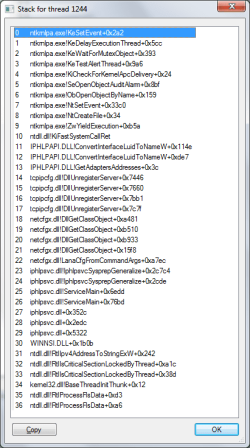
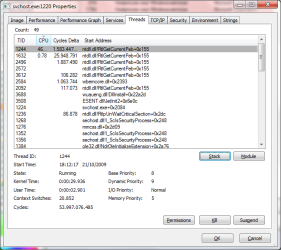
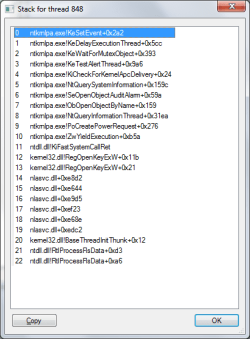
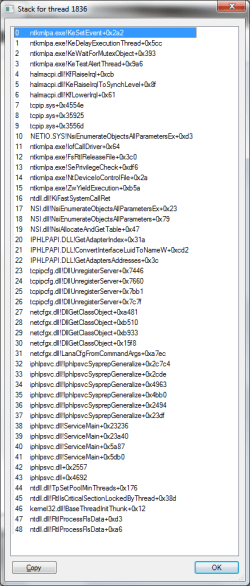
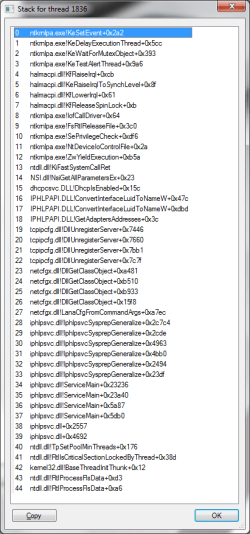
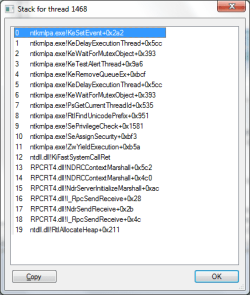
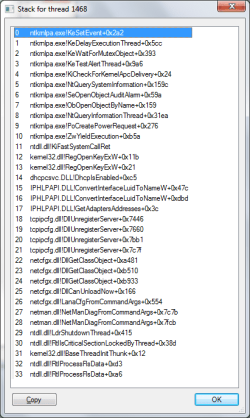
Thanks in advance! The next time you're taking a screenshot of the affected thread in ProcExp, can you please first click the "Stack" button to get more info regarding what the thread is doing.
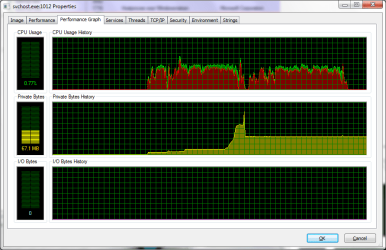
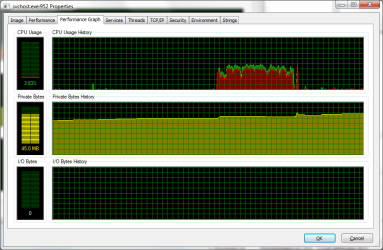
It strikes me that the vast majority of the processor utilisation is actually down in kernel-mode (red portion of the graph). Hence, it is possible that those svchost instances are just unwitting victims - the processor utilisation is being ascribed to them but it's actually driver activity. | My System Specs | | System Manufacturer/Model Number Multiple machines in various stages of decomposition. OS Win7x64 |
21 Oct 2009
|
#8 | | |
2009-10-21, Part 1 | My System Specs | | System Manufacturer/Model Number Dell Inspiron 6400 OS windows 7 CPU dual core 1,83 GHz Memory 2gb ram Graphics Card Mobile Intel(R) 945 Express Chipset Family Sound Card SigmaTel Case original dell inspiron 6400 Cooling internal Hard Drives 160gb |
21 Oct 2009
|
#9 | | |
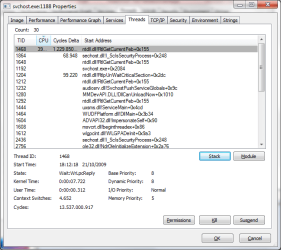
2009-10-21, Part 2 Part 2
I really hope this satisfies your need for screenshots :-) | My System Specs | | System Manufacturer/Model Number Dell Inspiron 6400 OS windows 7 CPU dual core 1,83 GHz Memory 2gb ram Graphics Card Mobile Intel(R) 945 Express Chipset Family Sound Card SigmaTel Case original dell inspiron 6400 Cooling internal Hard Drives 160gb |
28 Oct 2009
|
#10 | | |
Any actions I need to perform to solve this problem? | My System Specs | | System Manufacturer/Model Number Dell Inspiron 6400 OS windows 7 CPU dual core 1,83 GHz Memory 2gb ram Graphics Card Mobile Intel(R) 945 Express Chipset Family Sound Card SigmaTel Case original dell inspiron 6400 Cooling internal Hard Drives 160gb svchost.exe high CPU - sigmatel problem or other? problems? All times are GMT -5. The time now is 07:30 AM. | |