Windows 7 Forums


Windows 7: Win 7 RAM usage at 46% idle?

29 Oct 2009   #1

Acer Aspire 5738Z Win 7 X64 bit Home Premium
Prague, Czech Rep
 
 
Win 7 RAM usage at 46% idle?

Hi
My Win 7 Acer RAM (3GB) is running at 46% idle? This seems to be alot?
Though it does not increase that much with windows open, even when I open WMP and play music it only goes up to 49-50%.
I use the gadget on screen and double check it with task manager, they are the same.
This is more than the previous Vista Basic machine, which I returned, it ran at 40%?
Is there a way to adjust or sort this?

Oh, this morning it went up 99% and I could not switch it off, I had to hold the button to switch off?

Any help.
Thanks.
Neil

My System SpecsSystem Spec

29 Oct 2009   #2
whs

Vista, Windows7, Mint Mate, Zorin, Windows 8
Florida in winter, Black Forest/Germany


Open Task Manager > Processes tab > click on "Memory". There you will see which processes eat your RAM - ordered by size. Maybe you have too many startup programs. Have a look in msconfig and disable those that you do not need (which are probably all). On the other hand, there is nothing wrong with the system using all the RAM. I assume it's all paid for - LOL.
But when you have excessive usage (like the 99%), you can also kill the culprit process in task manager. No need to shut off the whole system.
My System SpecsSystem Spec
29 Oct 2009   #3

Acer Aspire 5738Z Win 7 X64 bit Home Premium
Prague, Czech Rep


OK thanks, but not sure what should or should n ot be running?
As for the 99% I could not even open task manager!!
My System SpecsSystem Spec
.


29 Oct 2009   #4

Acer Aspire 5738Z Win 7 X64 bit Home Premium
Prague, Czech Rep


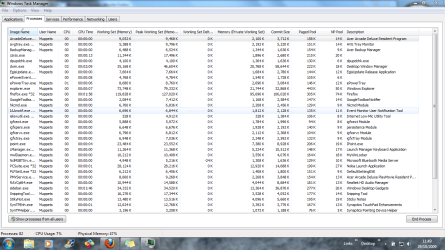
Hi here is a screen print??
Attached Thumbnails
Win 7 RAM usage at 46% idle?-capture.png  
My System SpecsSystem Spec
29 Oct 2009   #5
whs

Vista, Windows7, Mint Mate, Zorin, Windows 8
Florida in winter, Black Forest/Germany


1. when you have 99% usage, it will take a long time for the task manager to open. You'll have to be patient.
2. your screenshot looks generally ok (although there are some processes you can probably live without - check the startups) , but it does not show all the processes (you'll have to enlarge the window a little - pull it down). And click on (working set(memory)). Then it will show the big RAM eaters on top.

Last edited by whs; 29 Oct 2009 at 07:11 AM.. Reason: typo
My System SpecsSystem Spec
29 Oct 2009   #6

Acer Aspire 5738Z Win 7 X64 bit Home Premium
Prague, Czech Rep


Hi
u
here is the second shot.

So is 50% average usage?

thanks again.
Attached Thumbnails
Win 7 RAM usage at 46% idle?-capture2.png  

Last edited by jonesnewton; 29 Oct 2009 at 07:47 AM..
My System SpecsSystem Spec
29 Oct 2009   #7

Windows 7 x64 (SP1)


AVG...I bet it is AVG. Tho I could be wrong, however, a lt of people are having problems with AVG and this sort of thing.
My System SpecsSystem Spec
29 Oct 2009   #8

Acer Aspire 5738Z Win 7 X64 bit Home Premium
Prague, Czech Rep


Hi logicearth,

So you think its AVG?
But it does not show it is using much, but hey what do I know
Could you recommend something else? And is it free?

Thanks.
My System SpecsSystem Spec
29 Oct 2009   #9

Windows 7 x64 (SP1)


Mileage will vary, but I use Microsoft Security Essentials.
Amazingly Tiny, without the annoyingness, and free.
http://www.microsoft.com/security_essentials/

I don't normally run an antivirus solution, but MSE was like made for me...*shrugs*
My System SpecsSystem Spec
29 Oct 2009   #10

Acer Aspire 5738Z Win 7 X64 bit Home Premium
Prague, Czech Rep


So,, should I change AVG for MSE? Will this cover all virus protection?
I have Malwarebytes installed, can I keep this with MSE?

Also I have the Firefox browser, it seems to be using loads of resources, so is there something lighter out there?
I am looking for a mail client as Win 7 does not have Windows Mail (Vista), only Windows LIVE Mail, I am used to Outlook Express, simple for me to use and I could save mails for multiple sendings, ie CV-job applications. Outlook does not allow for saving a mail for multiple sendings, only once.

I only had the Vista machine for a short time, returned it as it did not work correctly, now I have Win 7 I need to learn what magic it has.

Thanks..
My System SpecsSystem Spec
Reply

 Win 7 RAM usage at 46% idle? problems?


Thread Tools


Similar help and support threads for: Win 7 RAM usage at 46% idle?
Thread Forum
CPU usage in idle Performance & Maintenance
60% Ram usage on idle. Performance & Maintenance
High RAM Usage At Idle 80% on Nothing Performance & Maintenance
CPU Idle usage Performance & Maintenance
What should be the ram usage at idle status Performance & Maintenance


All times are GMT -5. The time now is 03:36 AM.


Seven Forums Android App Seven Forums IOS App Follow us on Facebook

Windows 7 Forums is an independent web site and has not been authorized,
sponsored, or otherwise approved by Microsoft Corporation.
"Windows 7" and related materials are trademarks of Microsoft Corp.
© Designer Media Ltd
  

1 2 3 4 5 6 7 8 9 10 11 12 13 14 15 16 17 18 19 20 21 22 23 24 25 26 27 28 29 30 31 32