Windows 7 Forums Search
Welcome to Windows 7 Forums. Our forum is dedicated to helping you find solutions with any problems, errors or issues you are experiencing with Windows 7. The Windows 7 forum also covers news and updates and has an extensive Windows 7 tutorial section that covers a wide range of tips and tricks.


Windows 7 - Show Us Your WEI

 
12-11-2008   #51
DiamondNRG


My ram is 1.5V well below the 1.65V strict limit, wanted to be safe, not sorry.

And well yeah gaming, who cares

But the cores thing, I wasn't saying it should necessarily, just that it doesn't really make sense that I would end up with a lower score. I figured maybe it would be the same.

My System SpecsSystem Spec
12-11-2008   #52
DiamondNRG


You overclocked your CPU, that increases the bus speed for your CPU which will affect your score in other ways besides just the base speed. I highly doubt your CPU not overclocked would yield such an impressive result.

I am watching my temps closely and might decide to OC mine just a bit, but really that would be dumb as there is no reason to do it.

Also I have a feeling that WEI does not utilize hyperthreading in its scoring module, so just like how a few applications sometimes perform better on non hyperthreaded cpu's ... this may also be a case like that.
My System SpecsSystem Spec
12-12-2008   #53


Windows 7 Ultimate Vista Ultimate x64


I should see what score I get when I overclock my E8500 to 4.5Ghz with a FSB of 2000Mhz, think I might try it after I finish doing this defrag.
My System SpecsSystem Spec
.


12-12-2008   #54


Windows 7 Enterprise x64 SP1 | Windows 8 build 7989


Quite possibly because the motherboard is using its default FSB whereas the OC'd CPU is using a much higher FSB and voltage?

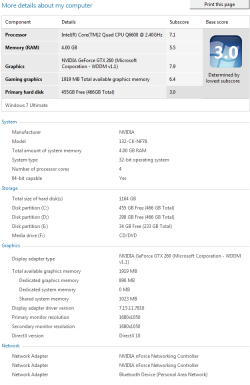
Then again I really cannot understand the rating system - it shows my dual GTX 260s at 6.0 for gaming - WTF? Then it also shows my system optimized RAM at 5.7 (Vista kept it at 5.9) and my CPU at 6.7 - and mine is a 6600 OC'd to 3.21 GHz with an FSB of 357 (1428 QDR), so....

The dual GTX 260s (SLI'd or not) giving me a 6.0 for gaming is just ... mind boggling.
My System SpecsSystem Spec
12-12-2008   #55
DiamondNRG


Quote   Quote: Originally Posted by Mr GRiM View Post
I should see what score I get when I overclock my E8500 to 4.5Ghz with a FSB of 2000Mhz, think I might try it after I finish doing this defrag.
I'm thinking about disabling HT and running it again just for comparison measures.
My System SpecsSystem Spec
12-12-2008   #56
DiamondNRG


Quote   Quote: Originally Posted by johngalt View Post
Quite possibly because the motherboard is using its default FSB whereas the OC'd CPU is using a much higher FSB and voltage?

Then again I really cannot understand the rating system - it shows my dual GTX 260s at 6.0 for gaming - WTF? Then it also shows my system optimized RAM at 5.7 (Vista kept it at 5.9) and my CPU at 6.7 - and mine is a 6600 OC'd to 3.21 GHz with an FSB of 357 (1428 QDR), so....

The dual GTX 260s (SLI'd or not) giving me a 6.0 for gaming is just ... mind boggling.
I do not have a FSB silly :P

Whad did you expect from the 260s? Higher? Lower? I don't get it.

My HD 4870 gives me only a 7.2 for gaming But I don't game, so I will just live with it. I went cheap and didn't get the X2
My System SpecsSystem Spec
12-12-2008   #57


Windows 7 Enterprise x64 SP1 | Windows 8 build 7989


Right - QPI - but yours is fixed, and quite possibly the OS does not have the mechanisms in place to recognize and benchmark the QPI-enabled architecture.

And, yes, dammit, I have a *pair* of 260s - it should count for something! Not only that, but I did my WEI when it was SLI'd and when it was not - no change.
My System SpecsSystem Spec
12-12-2008   #58


Windows 7 Ult x64(x2), HomePrem x32(x4), Server 08 (+VM), 08 R2 (VM) , SuSe 11.2 (VM), XP 32 (VM)


Quote   Quote: Originally Posted by johngalt View Post
Right - QPI - but yours is fixed, and quite possibly the OS does not have the mechanisms in place to recognize and benchmark the QPI-enabled architecture.

And, yes, dammit, I have a *pair* of 260s - it should count for something! Not only that, but I did my WEI when it was SLI'd and when it was not - no change.

if i remember correctly the tests are simple Direct 9 and 10 tests
can you see if the scores change higher or lower with one....
i remember an article on PC magazine that if your game isnt optimized for SLI or Crossfire it can actually be a hindrance i believe it has to do with the drivers having to work more to make it possible to display it...
since this is a simple test i believe this is not optimized for SLI
but hey that article was from 2003...
so i can be wrong

Quote   Quote: Originally Posted by DiamondNRG View Post
I'm thinking about disabling HT and running it again just for comparison measures.
yes you are correct disabling HT should give better perfomance...
as this is a simple test...
well here this is a better explanation

Quote:
It has six execution units capable of executing three memory operations and three calculation operations. If the execution engine can’t find sufficient parallelism of instructions to take advantage of them all, “bubbles”—lost cycles—occur in the pipeline.
Quote:
This approach can be extremely effective when the two threads are executing tasks that are highly separate. On the other hand, two threads involving intensive calculation, for example, will only increase the pressure on the same calculating units, putting them in competition with each other for access to the cache. It goes without saying that SMT is of no interest in this type of situation, and can even negatively impact performance.
The Return Of Hyper-Threading - Review Tom's Hardware : Intel Core i7 (Nehalem): Architecture By AMD?

Last edited by johngalt; 12-16-2008 at 10:43 PM..
My System SpecsSystem Spec
12-13-2008   #59


7 Ultimate x64


6956

Show Us Your WEI-6956.png


CPU and Ram have gone up from 6801... must be the overclock, or 6956 is more generous
My System SpecsSystem Spec
12-13-2008   #60


7 Ultimate x64


It's currently just a mild overclock from 2.8 to 3.2, so nothing extreme

print view still shows it @ 2.8 stock

Show Us Your WEI-stillstock.png
My System SpecsSystem Spec
Closed Thread

 Show Us Your WEI problems?


Thread Tools


Similar Threads for: Show Us Your WEI
Thread Forum
HDDs Show in BIOS, But Do Not Show in Disk Management Hardware & Devices
Changing when taskbar icons show and don't show. Customization
Show Us Your WEI (2) Performance & Maintenance
show hidden folders show file extensions thru registry General Discussion
DVD Is No Show Hardware & Devices


All times are GMT -5. The time now is 09:28 PM.


Windows 7 Forums is an independent web site and has not been authorized,
sponsored, or otherwise approved by Microsoft Corporation.
"Windows 7" and related materials are trademarks of Microsoft Corp.
© Designer Media Ltd
  

1 2 3 4 5 6 7 8 9 10 11 12 13 14 15 16 17 18 19 20 21 22 23 24 25 26 27 28 29 30