Windows 7 Forums Search
Welcome to Windows 7 Forums. Our forum is dedicated to helping you find solutions with any problems, errors or issues you are experiencing with Windows 7. The Windows 7 forum also covers news and updates and has an extensive Windows 7 tutorial section that covers a wide range of tips and tricks.


Windows 7 - Windows experience Index could not complete

 
11-14-2009   #1


Windows 7 64bit


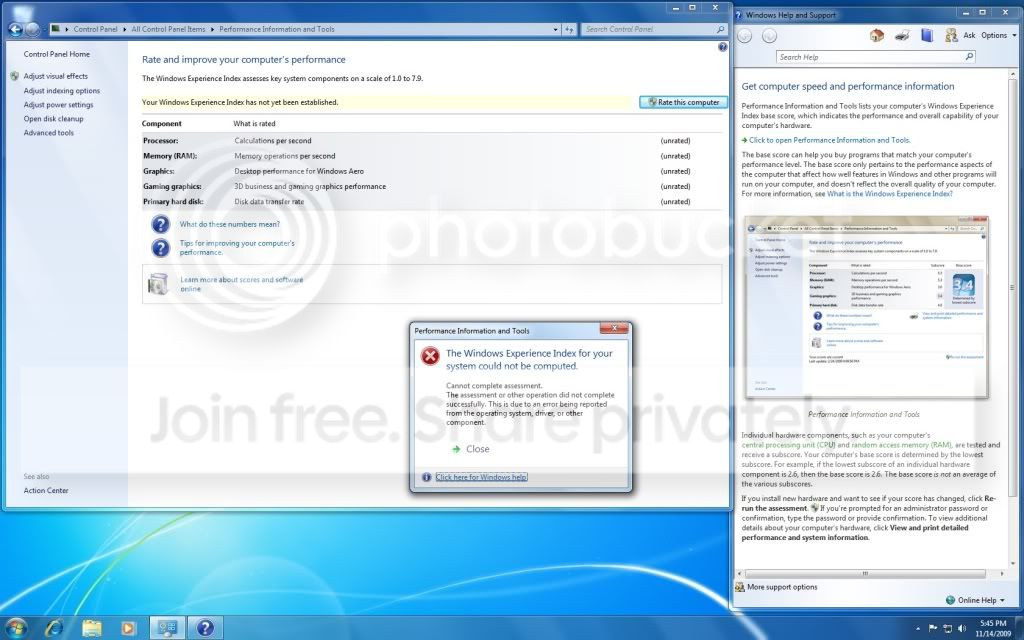
Windows experience Index could not complete

I never had any rating to start with. So when I began testing, it went all the way through then this error popped up. What is wrong?


My System SpecsSystem Spec
11-14-2009   #2


Look in the Administrative view of Event Viewer at Computer>Manage for related errors. Resolve errors by googling.

A quick run of "sfc /scannow" will reassure that all OS files are intact and uncorrupted.

A last resort would be to run the installer from the desktop to do a Repair Install which in Windows 7 is an in-place Upgrade over itself.
My System SpecsSystem Spec
11-14-2009   #3


Windows 7 64bit


Quote   Quote: Originally Posted by gregrocker View Post
Look in the Administrative view of Event Viewer at Computer>Manage for related errors. Resolve errors by googling.

A quick run of "sfc /scannow" will reassure that all OS files are intact and uncorrupted.

A last resort would be to run the installer from the desktop to do a Repair Install which in Windows 7 is an in-place Upgrade over itself.
Running "sfc /scannow" reviled no problems.

I checked Event Viewer and the major error I was getting is from Event ID 35 (kernal-procesor-power) I googled for solutions then this came up on another test:

"The device, Standard PS/2 Keyboard, is reporting "tv_ConfigMgrErr24". This device will not be available until the issue is resolved. The Plug and Play ID for this device is ACPI\PNP0303\4-136CDFB0-0." My G11 keyboard is all up to date but in my device manager it shows two "HID Keyboard Devices"... I only use one. I don't know how to fix this error.
My System SpecsSystem Spec
.


11-14-2009   #4


Try another keyboard to see what happens.

In Device manager, on keyboard Driver attempt to Update to find newer keyboard driver. See which keyboard is enabled. Try the other one, also looking for driver update. Google those keyboards listed to see what options/problems are known.

Was that the only repeat error in Event Viewer? Any critical?
My System SpecsSystem Spec
11-14-2009   #5


Windows 7 64bit


Quote   Quote: Originally Posted by gregrocker View Post
Try another keyboard to see what happens.

In Device manager, on keyboard Driver attempt to Update to find newer keyboard driver. See which keyboard is enabled. Try the other one, also looking for driver update. Google those keyboards listed to see what options/problems are known.

Was that the only repeat error in Event Viewer? Any critical?
No. Nothing critical. The number of errors died down to 1 (application error). So basically everything is good to go.

Both of these Keyboard Device are enabled and in the "Device status" both are "working properly". One of them although has an extra tab labeled "Power Management".
My System SpecsSystem Spec
11-15-2009   #6


Windows 7 Home Premium SP1, clean install, upgrade disc


Did you activate first?
My System SpecsSystem Spec
11-15-2009   #7


Windows 7 64bit


No. I have not activated online yet. I want to make sure everything is ok first. Do I need to activate it to make this work?
My System SpecsSystem Spec
11-15-2009   #8


Windows 7 Home Premium SP1, clean install, upgrade disc


I thought that I read somewhere that you did, but not really sure. Since I was not sure I thought it best to bring the issue to the table.
Since i brought up this issue, one of the others will comment.
My System SpecsSystem Spec
11-15-2009   #9


Windows 7 Professional x64 PL


Quote   Quote: Originally Posted by Zinic View Post
I never had any rating to start with. So when I began testing, it went all the way through then this error popped up. What is wrong?
On our forum there are full this kind of threads -you need better search
for example:
1)Can't rate system in windows experience

2)windows experiene index fails on win 7

3)Windows Experience Index unknown error

4)Windows Experience Index Error

there are more of course site:sevenforums.com/Performance-maintenance/ "Windows Experience Index" - Google Search

Quickly summary them:

If you have KIS 2010 surly this software is responsible for this issue so you have to contact with Kaspersky support for special hotfix

Another reasons:

-deffective drivers for video card,chipset,sometimes any issue with BIOS

so update BIOS,update all drivers,especially for video ard and chipset

Possibly other 3p security software can cause this issue as well
My System SpecsSystem Spec
11-17-2009   #10


Windows 7 Ultimate


My Windows Experience Error Message - resolution.

Quote   Quote: Originally Posted by Flavius View Post
Quote   Quote: Originally Posted by Zinic View Post
I never had any rating to start with. So when I began testing, it went all the way through then this error popped up. What is wrong?
On our forum there are full this kind of threads -you need better search
for example:
1)Can't rate system in windows experience

2)windows experiene index fails on win 7

3)Windows Experience Index unknown error

4)Windows Experience Index Error

there are more of course site:sevenforums.com/Performance-maintenance/ "Windows Experience Index" - Google Search

Quickly summary them:

If you have KIS 2010 surly this software is responsible for this issue so you have to contact with Kaspersky support for special hotfix

Another reasons:

-deffective drivers for video card,chipset,sometimes any issue with BIOS

so update BIOS,update all drivers,especially for video ard and chipset

Possibly other 3p security software can cause this issue as well
Hi. I have KIS 2010 & don't recall having received any Kaspersky update relating to this. However, I've been wrestling with the Windows Experience Error message for the past 3 weeks - including a fresh Windows 7 Ultimate install.

Tonight, I tested again & IT WORKED!!!

The only thing I can put it down to is that over the past few days I changed my 1394a FireWire driver to the Legacy Driver - which (by the way) solved another issue I'd been experiencing with my TC Electronics Studio Konnekt 48 (audio hardware) which uses the Firewire connection to my ASUS F3SV notebook.
The Firewire fault represented itself as a video stutter/freeze on the mixer for the Studio Konnekt 48.

My suggestion is; see if your computer has Firewire/1394 & if it does, then update the Driver, Search for a driver already on your computer & select the Firewire driver with the "(Legacy)" in brackets.


Hopefully this resolves the issue for you...


Good luck!


- Mi.

My System SpecsSystem Spec
Reply

 Windows experience Index could not complete problems?


Thread Tools


Similar Threads for: Windows experience Index could not complete
Thread Forum
New system complete maximum windows experience index fail Performance & Maintenance
Windows Experience Index Performance & Maintenance
Why won't Windows Experience Index run? Performance & Maintenance
Windows Experience Index Performance & Maintenance
Windows Experience Index can't run Drivers


All times are GMT -5. The time now is 09:30 PM.


Windows 7 Forums is an independent web site and has not been authorized,
sponsored, or otherwise approved by Microsoft Corporation.
"Windows 7" and related materials are trademarks of Microsoft Corp.
© Designer Media Ltd
  

1 2 3 4 5 6 7 8 9 10 11 12 13 14 15 16 17 18 19 20 21 22 23 24 25 26 27 28 29 30