
Windows 7 Forums Search
Welcome to Windows 7 Forums. Our forum is dedicated to helping you find solutions with any problems, errors or issues you are experiencing with Windows 7. The Windows 7 forum also covers news and updates and has an extensive Windows 7 tutorial section that covers a wide range of tips and tricks.


Windows 7 - Do you have enabled System Protection?


View Poll Results: Do you have enabled System Protection?
Yes, I have enabled System Protection 22 59.46%
No (please specify why) 15 40.54%
Voters: 37. You may not vote on this poll

 
11-22-2009   #1


Windows 7 Home Premium x32


Do you have enabled System Protection?

Do you have enabled System Protection in Windows 7?

A little tip, where you will find that:
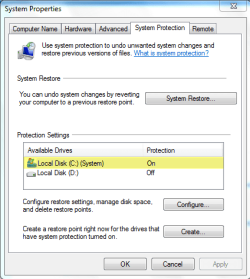
Do you have enabled System Protection?-sysprot.png

My System SpecsSystem Spec
11-22-2009   #2


yes i checked and it is on but why would you not want it on?
My System SpecsSystem Spec
11-22-2009   #3


Windows 7 Pro & Vista Home Premium


Sure, I'm the mad downloader so I create a restore point before installing play around with the software.

If I don't want it I use System restore The typical Uninstaller leaves leftover files and registry entries.
My System SpecsSystem Spec
.


11-22-2009   #4


7 Ultimate x64


Quote   Quote: Originally Posted by reghakr View Post
Sure, I'm the mad downloader so I create a restore point before installing play around with the software.
+ 1

Restore points can save more headaches than you can imagine
My System SpecsSystem Spec
11-22-2009   #5


Win 7


No,,i can usually fix whatever goes wrong,,if not just do re install,,its a learning experience..lol
My System SpecsSystem Spec
11-22-2009   #6


7 Ultimate x64


No,
in the first time only c:
now all off
don't ask why?
I just liked it that way (more thinking: install or not?)
My System SpecsSystem Spec
11-22-2009   #7


W7PRO/ULT 32/64


Never liked System Restore and the first thing I do is turn it off.

I use various imaging programs, but for Windows 7 I use it's built in Backup and Restore for the initial image. I am also using ShadowProtect to make full image backups.
My System SpecsSystem Spec
11-22-2009   #8


Windows 7 ultimate 64 bit / XP Home sp3


Mines on and I also create system restore points before I install new software. If I don't like it or don't want to keep it I just use cCleaner to remove it and then system restore.
My System SpecsSystem Spec
11-22-2009   #9


Vista (Hate Win 7)


OFF, its thrashes HDD's and that's a PIA even on quieter newer VRaptors (Raid 0), possibly not so much a big deal on SSD's.

I have a Auto Backup of all my Media etc to an external HDD if it all went wrong but as this install is 1 year old I would clean install.

System Restore is for when you mess up your PC not for uninstalling a normal bit of software you don't like, thats extreme.

I seriously doubt it removes all traces as neither did XP's or the failure in ME.

Better using a 3rd party uninstall program and then running Cleaner.

I leave System Restore on for customers PC's as they are n00bs and will someday need it, but its not there to uninstall a game when there done IMO.

Last edited by helmutcheese; 11-22-2009 at 10:21 AM.. Reason: Typo's
My System SpecsSystem Spec
11-22-2009   #10


Windows 7 Ultimate SP1 32 bit


Yes I have the Protection on why wouldn't I, at my age why would I want to live dangerously I'm all for the quiet life now
My System SpecsSystem Spec
Reply

Do you have enabled System Protection? problems?


Thread Tools


Similar Threads for: Do you have enabled System Protection?
Thread Forum
Disk Write Caching won't stay Enabled after System Restart Hardware & Devices
System protection enabled by command prompt? Crashes and Debugging
Tweak to re-enabled system-wide hotkeys when elevated app has forucs? General Discussion
Bitlocker not getting enabled on Non System drives System Security
Ive had it with System Protection... General Discussion


All times are GMT -5. The time now is 09:52 AM.


Windows 7 Forums is an independent web site and has not been authorized,
sponsored, or otherwise approved by Microsoft Corporation.
"Windows 7" and related materials are trademarks of Microsoft Corp.
© Designer Media Ltd
  

1 2 3 4 5 6 7 8 9 10 11 12 13 14 15 16 17 18 19 20 21 22 23 24 25 26 27 28 29 30