| Windows 7: I really need help, with the performance of my computer |
28 Nov 2009
|
#1 | | |
I really need help, with the performance of my computer Hi, if anyone can help me IŽll appreciated.
My system:
Windows 7 Ultimate
Intel Core 2 Duo CPU E7400@2.80GHZ 2.80GHZ
RAM: 8 GB
64-Bit Operating System
Computer:
Gateway GT3234m, it came originally with 4 GB, but after checking the manufacture website I saw that I could upgrade to 8GB, and so I did. (4, 2GB memory cards)
Problem:
Too many glitches(windows, icons, everything blinks at different times and sometimes just after blinking for a while, they go black and as soon as I get the cursor over it it stops). I have a CPU meter and is running all the way to 100% almost all the time, with any Program, window opening or task that I try to perform. Because of that is running extremely slow.
I am not a computer expert as I see most people are in here, so instead of trying to fix it my self and making it worst. I took it to "Geek Squad", in Best Buys, to get it fix, and after 2 day with them they told me that there was nothing they could do. They did see the problem, but they didnŽt know how to fix it.
To whom ever can help me, thank you in advance.
P.S. at this point, I will be willing to trust someone with a Windows Remote Assistance. | My System Specs |
| System Manufacturer/Model Number Gateway /GT3234m OS Windows 7 Ultimate CPU Intel Core 2 Duo E7400 @ 2.80 Mhz Memory 8 GB Monitor(s) Displays 21 Inches Case Tower Hard Drives 372 GB |
28 Nov 2009
|
#2 | | Win 8 Release candidate 8400 |

Quote: Originally Posted by MrM Hi, if anyone can help me IŽll appreciated.
My system:
Windows 7 Ultimate
Intel Core 2 Duo CPU E7400@2.80GHZ 2.80GHZ
RAM: 8 GB
64-Bit Operating System
Computer:
Gateway GT3234m, it came originally with 4 GB, but after checking the manufacture website I saw that I could upgrade to 8GB, and so I did. (4, 2GB memory cards)
Problem:
Too many glitches(windows, icons, everything blinks at different times and sometimes just after blinking for a while, they go black and as soon as I get the cursor over it it stops). I have a CPU meter and is running all the way to 100% almost all the time, with any Program, window opening or task that I try to perform. Because of that is running extremely slow.
I am not a computer expert as I see most people are in here, so instead of trying to fix it my self and making it worst. I took it to "Geek Squad", in Best Buys, to get it fix, and after 2 day with them they told me that there was nothing they could do. They did see the problem, but they didnŽt know how to fix it.
To whom ever can help me, thank you in advance.
P.S. at this point, I will be willing to trust someone with a Windows Remote Assistance. Hi and welcome. we might be able to help even without RDT. Most of use tend to use team view but later on that.
If you boot into safe mode (F8) is the cpu still @100%?
Do you have an anti virus running and current?
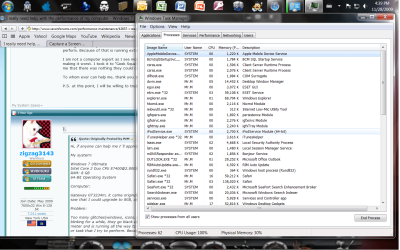
can you launch task manager (rigth click the task bar) and get us a screenshot of the process tab (make sure show all users is checked) like the pic? to upload it you can use the attachment icon as shown in the other pic.
Last edited by zigzag3143; 21 May 2011 at 06:24 AM..
| My System Specs | | System Manufacturer/Model Number HP Pavillion dv-7 1005 Tx OS Win 8 Release candidate 8400 CPU 2@2.4 Memory 4 gigs Graphics Card Nvidia 9600M Sound Card HD built-in Monitor(s) Displays 17" Wxga Screen Resolution 1440x900 Cooling none Internet Speed 45Mb down 5Mb up |
28 Nov 2009
|
#3 | | W7 x64 3rd Rock from the Sun |
Based on the information given a diagnosis, less still a cure, isn't remotely possible.
Check Task Manager for active processes. Run scans for malware and trojans. Look at your system event logs for indications of errors of any sort.
If you can post specific information you'll get some useful advice, but nobody can give you any help until you are able to go into specifics I'm afraid | My System Specs | | System Manufacturer/Model Number Custom built machine OS W7 x64 CPU Intel Q9300 2.5Ghz Quad LGA775 (Would like Q9650) Motherboard Gigabyte GA-EP45T-UD3R (F6 Bios) Memory 4Gb OCZ Gold 1,333Mhz Graphics Card Palit HD4850 O/C Sonic 512Mb DDR3, Dual DViD's Sound Card Azalia to twin Samson 50w Studio Monitors Monitor(s) Displays Twin Dell (E-IPS) U2311H 23.6" Screens Screen Resolution 1920 x 1080 @ 60Hz Keyboard Cherry PS/2 custom model Mouse Lenovo USB laser "Thinkpad" Mouse PSU OCZ 600w Case Lian-Li PC8 acoustifoamed' aluminium tower Cooling Scythe 140mm Zipang Hard Drives Crucial M4 SSD, archives on twin Western Digital Caviar Black WD2002FAEX, 2TB, 7200rpm HDD's, Samsung Ritemaster CD/DVD Burner... Internet Speed ADSL2+ @14Mbps downstream & Cat6 Gigabit Ethernet Antivirus NOD32 Browser Opera Other Info Silicon Dust HD Homerun Dual FTA (Ethernet) TV Tuners, Dray Tek Vigor 2850Vn router and 8x HP Gigabit Switch. Lian-Li CR26 Card Reader, Canon MF4430 iSensys laser printer/scanner. |
28 Nov 2009
|
#4 | | |

Quote: Originally Posted by zigzag3143 
Quote: Originally Posted by MrM Hi, if anyone can help me IŽll appreciated.
My system:
Windows 7 Ultimate
Intel Core 2 Duo CPU E7400@2.80GHZ 2.80GHZ
RAM: 8 GB
64-Bit Operating System
Computer:
Gateway GT3234m, it came originally with 4 GB, but after checking the manufacture website I saw that I could upgrade to 8GB, and so I did. (4, 2GB memory cards)
Problem:
Too many glitches(windows, icons, everything blinks at different times and sometimes just after blinking for a while, they go black and as soon as I get the cursor over it it stops). I have a CPU meter and is running all the way to 100% almost all the time, with any Program, window opening or task that I try to perform. Because of that is running extremely slow.
I am not a computer expert as I see most people are in here, so instead of trying to fix it my self and making it worst. I took it to "Geek Squad", in Best Buys, to get it fix, and after 2 day with them they told me that there was nothing they could do. They did see the problem, but they didnŽt know how to fix it.
To whom ever can help me, thank you in advance.
P.S. at this point, I will be willing to trust someone with a Windows Remote Assistance. Hi and welcome. we might be able to help even without RDT. Most of use tend to use team view but later on that.
If you boot into safe mode (F8) is the cpu still @100%?
Do you have an anti virus running and current?
can you launch task manager (rigth click the task bar) and get us a screenshot of the process tab (make sure show all users is checked) like the pic? to upload it you can use the attachment icon as shown in the other pic. Thank you for such a prompt response, and IŽm sorry I step out.
Any ways, i already have the task bar showing, my question is how do i take a screenshot?, Yes I do have an Antivirus(ESET smart security 4.0.467.0
Also and excuse my ignorance, how and what is "boot into safe mode". | My System Specs | | System Manufacturer/Model Number Gateway /GT3234m OS Windows 7 Ultimate CPU Intel Core 2 Duo E7400 @ 2.80 Mhz Memory 8 GB Monitor(s) Displays 21 Inches Case Tower Hard Drives 372 GB |
28 Nov 2009
|
#5 | | |

Quote: Originally Posted by Qdos Based on the information given a diagnosis, less still a cure, isn't remotely possible.
Check Task Manager for active processes. Run scans for malware and trojans. Look at your system event logs for indications of errors of any sort.
If you can post specific information you'll get some useful advice, but nobody can give you any help until you are able to go into specifics I'm afraid  I already checked for trojans and Viruses, and so far I have jet to find any. thanks. | My System Specs | | System Manufacturer/Model Number Gateway /GT3234m OS Windows 7 Ultimate CPU Intel Core 2 Duo E7400 @ 2.80 Mhz Memory 8 GB Monitor(s) Displays 21 Inches Case Tower Hard Drives 372 GB System Manufacturer/Model Number Gateway /GT3234m OS Windows 7 Ultimate CPU Intel Core 2 Duo E7400 @ 2.80 Mhz Memory 8 GB Monitor(s) Displays 21 Inches Case Tower Hard Drives 372 GB |
28 Nov 2009
|
#7 | | |
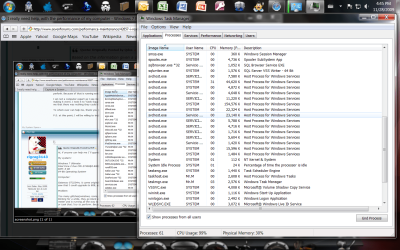
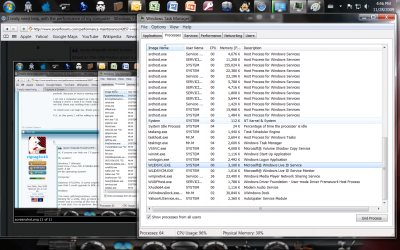
this is the rest of the screenshot | My System Specs | | System Manufacturer/Model Number Gateway /GT3234m OS Windows 7 Ultimate CPU Intel Core 2 Duo E7400 @ 2.80 Mhz Memory 8 GB Monitor(s) Displays 21 Inches Case Tower Hard Drives 372 GB |
28 Nov 2009
|
#8 | | Win 8 Release candidate 8400 |

Quote: Originally Posted by MrM this is the rest of the screenshot hi I had to find you the hard way. I checked where you had posted previously on your porfile page. the correct link for here is I really need help, with the performance of my computer. dont worry though you will learn how to do it.
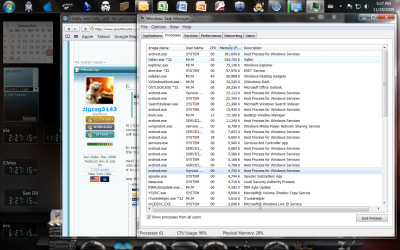
In terms of the things we need you to do. when you do a tesk manager you should click the memory at the top of the memory column so that the highest user is on top. look at mine.
next we need you to oopen task manager and click on the svchost that is highest. I think it was about 150 mb. right click on that file and click the create a dmp file. when ut is finished. zip the dmp and upload it to us.
use the attachment icon see pic to upload the smp file.
Last edited by zigzag3143; 21 May 2011 at 06:24 AM..
| My System Specs | | System Manufacturer/Model Number HP Pavillion dv-7 1005 Tx OS Win 8 Release candidate 8400 CPU 2@2.4 Memory 4 gigs Graphics Card Nvidia 9600M Sound Card HD built-in Monitor(s) Displays 17" Wxga Screen Resolution 1440x900 Cooling none Internet Speed 45Mb down 5Mb up |
28 Nov 2009
|
#9 | | |
IŽll get the hang of the forum.
Here is what you ask, my friend.
I canŽt load the zip,I keep getting a 404-error, any ideas? | My System Specs | | System Manufacturer/Model Number Gateway /GT3234m OS Windows 7 Ultimate CPU Intel Core 2 Duo E7400 @ 2.80 Mhz Memory 8 GB Monitor(s) Displays 21 Inches Case Tower Hard Drives 372 GB |
28 Nov 2009
|
#10 | | |
Now I know why I can up load it, is too big. 67MB | My System Specs | | System Manufacturer/Model Number Gateway /GT3234m OS Windows 7 Ultimate CPU Intel Core 2 Duo E7400 @ 2.80 Mhz Memory 8 GB Monitor(s) Displays 21 Inches Case Tower Hard Drives 372 GB I really need help, with the performance of my computer problems? All times are GMT -5. The time now is 02:19 PM. | |