Windows 7 Forums


Windows 7: Memory leak

01 Dec 2009   #1

Windows 7
 
 
Memory leak

Hi,

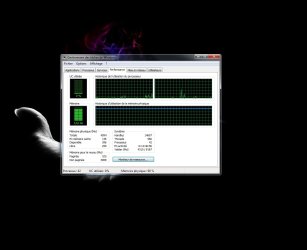
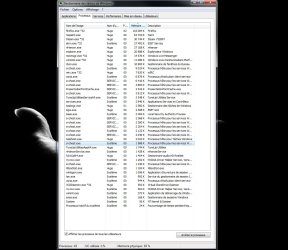
I was just downloading somes big files with jdownloader while watching a movie, but the system was slowy getting laggy, so I checked the memory usage and i was almost full (90% of physical memory in use) and perfmon could not show me anything.

Right now, about ten minutes later, the memory usage is still the same, I killed jdownloader, java and kmplayer , but it still the same. I cant find who is guilty. I post some screens.

My cfg :


Core2Duo E8400 3GHZ
4GB DDR2 PC6400
Win 7 x64 Ultimate


Notes : I use nod32 AV (not smart security). Superfetch is off.
Attached Thumbnails
Memory leak-sans-titre.jpg   Memory leak-sans-titre2.jpg  
My System SpecsSystem Spec

01 Dec 2009   #2

Windows 7 x64 (SP1)


Try uninstalling your antivirus for the time being. Usually when you are downloading something or working with large files, there realtime scanners are a pain.
My System SpecsSystem Spec
01 Dec 2009   #3

Windows 7 Ultimate x86-64


I'd update the chipset and BIOS - java may have been sucking up memory. Can you update all your drivers, reboot and see if this comes back? Use the guide in my sig. What programs do you have installed? Can you post a shot of your installed programs?. Search for snip in the start menu.
My System SpecsSystem Spec
.


01 Dec 2009   #4

Windows 7


EVERYTHING IS UP TO DATE : drivers, bios, windows updates.

I'm using steam, nhancer, virtual clone drive and irc. But i never had a problem until now. I'll try uninstalling my AV and redownload somes files with jdownloader, i get back to you.
My System SpecsSystem Spec
02 Dec 2009   #5

Windows 7


I have a similar problem, only my RAM's constantly at 50%.
Plus, I received a message that a process names "gfqhsl.exe" cannot run. I have no idea what that process is and google didn't, either. Maybe it has something to do with it, maybe it doesn't.
I have 3 GB of RAM (well, four, actually, but I use 32 bit windows).
Attached Thumbnails
Memory leak-tm.png  
My System SpecsSystem Spec
02 Dec 2009   #6

Windows 7 Ult, Windows 8 Pro,
San Diego


NOD32 has a newer version which should fix the memory leak problem it has been causing with Windows 7 for several months now. This newer version dated Oct.31 should work better. ESET NOD32 Antivirus - Free software downloads and software reviews - CNET Download.com
My System SpecsSystem Spec
08 Mar 2010   #7

7 64bit


i have a similar problem, but instead of continuosly eat memory, jDownloader would just crash. after checking up in jDownloader's forum, i found out that current Java for 64 bit Windows have a memory leak.

JDownloader work fine on Windows 7 x64 64 bit? - Page 2 - JD Community

i hope it's fixed nw...
My System SpecsSystem Spec
Reply

 Memory leak problems?


Thread Tools


Similar help and support threads for: Memory leak
Thread Forum
Troubleshooting Excessive Memory Use (Memory Leak?) after playing vid. Performance & Maintenance
IE8 Memory Leak Browsers & Mail
chkdsk high memory usage / memory leak Performance & Maintenance
[Help]Memory Leak. All memory drained and used BSOD Help and Support
Memory Leak Performance & Maintenance


All times are GMT -5. The time now is 11:47 AM.


Seven Forums Android App Seven Forums IOS App Follow us on Facebook

Windows 7 Forums is an independent web site and has not been authorized,
sponsored, or otherwise approved by Microsoft Corporation.
"Windows 7" and related materials are trademarks of Microsoft Corp.
© Designer Media Ltd
  

1 2 3 4 5 6 7 8 9 10 11 12 13 14 15 16 17 18 19 20 21 22 23 24 25 26 27 28 29 30 31 32