| Windows 7: slow 2d desktop performance |
10 Dec 2009
|
#1 | | |
slow 2d desktop performance Ok not sure where to stick this post request so posting here.
On this machine (sods law my main pc) 2d desktop performance for non aero is hideous. Ok so basically aero itself seems fine, I can drag windows around etc. However there is noticeble slowness on things like scrolling web pages and one application I use called mirc is extremely slow at scrolling text (chat program) and when using it is so slow I can see the screen (when it full screen) been physically drawn on my screen. Some other apps I can see it drawing also but less noticeable, windows XP on the same hardware was significantly faster in 2d. Disabling aero makes no difference and in fact when I turn off aero the problem becomes very obvious, dragging windows etc. with aero off leaves massive graphic lag when it should be performing like windows xp did. My research led to people having problems either on linux or some ati users and the ati users issues appeared to be fixed with newer drivers from ati. My problem is (a) I am usng nvidia and (b) there problem was fixed 2 years or so back.
The problem at a guess is my cpu seems to act weaker, using creative audio console is very noticeably laggy as well, on XP I had a slight pause between each setting page on it, but in windows 7 its over a second delay long enough to see the spinning circle. This is odd as various things are more snappy for me such as file copying and anything drive related, playing multimedia is superior. But these desktop issues are very frustrating. My rateing is 5.9 (hdd) cpu gets 6.1, ram 6.1 and graphics 6.8. My laptop which is a far lower spec cpu and ram wise doesnt suffer these problems and in particurly handles mirc a lot better. (even when I made screen res same as laptop).
Am using latest nvidia drivers. Cleartype is disabled. | My System Specs |
| System Manufacturer/Model Number home built OS windows 7 ultimate x64 CPU intel i5 750 Motherboard asus p7p55d-e modded 1601 bios to get 11.2 intel option rom Memory 16 gig ram ddr3 @ 1333 9-9-9-24 CR2 Graphics Card evga 460 GTX 1 GIG SC Sound Card asus xonar D2X Monitor(s) Displays dell 2209WA Screen Resolution 1680x1050 Keyboard microsoft business ps2 keyboard Mouse microsoft optical black mouse PSU coolermaster silent pro 600watt modular Case antec P182 Cooling artic freezer 7 pro rev 2, 3 case fans Hard Drives Samsung 830 SSD 128gig - boot device wooosh - P55
WD black cavalier 640gig WD6401AALS - P55
WD 500gig WD5000AAKS - P55
Seagate 500gig ST3500630AS - P55
Samsung 750gig HD753LG - Marvell ide mode (drive doesnt like ahci) Internet Speed 30 meg cable Other Info All drives listed as P55 using AHCI |
10 Dec 2009
|
#2 | | Windows 7 SP1, Home Premium, 64-bit |
Has all of this been true since your Win 7 installation or is it a new development?
What processes are using a lot of CPU when you are bogging down?
What startup items do you have checked when you run msconfig?
What antivirus/antispyware do you use and have done complete scans lately?
Did you do an upgrade install or a clean install? | My System Specs | | System Manufacturer/Model Number Ignatz Special; 4 speed manual gearbox; factory air conditioning; one of one OS Windows 7 SP1, Home Premium, 64-bit CPU Intel Sandy Bridge i5-2500, not overclocked Motherboard Gigabyte H67A-UD3H-B3, full ATX Memory 4 GB Crucial DDR3-1333 Graphics Card none; graphics are integrated on CPU Sound Card onboard: Realtek ALC892; external: USB Behringer UF0-202 Monitor(s) Displays NEC 90GX2-BK 19" LCD Screen Resolution 800 x 640 Keyboard Leopold Tenkeyless with Cherry Blue switches, USB Mouse Logitech or Microsoft optical wired; either USB or PS 2 PSU Seasonic SS-560KM, modular Case Antec Solo II Cooling CPU: Scythe Big Shuriken; Case: Scythe Slipstream 800 & 500 Hard Drives System: Intel 320 Series SSD, 80 GB;
Data: Samsung Spinpoint 103SJ, 1 TB;
Backup: WD Caviar Green WD15EADS-00P8B0, 1.5TB Other Info Power consumption of this system, including monitor: 68 watts at idle; 144 watts at full load |
11 Dec 2009
|
#3 | | |
since the Windows 7 installation, as I stated windows XP was better 2d performance, and very significantly better,
if I scroll mirc and it lags then it is mirc itself maxing the processor usage, so is the application itself. Yet doing the same thing in XP or in windows 7 on a different machine like my laptop uses less cpu usage.
I currently have nod32 installed however it was not installed yesterday and has no affect on the problem. I did a clean install.
startup as follows.
bcssync.exe (office 2010)
egui.exe (nod 32)
axcmd.exe (alcohol 120)
dumeter.exe (du meter)
volpanu.exe (creative x-fi)
ctxfihlp.exe (creative x-fi)
jusched.exe (java)
proxom~1.exe (proximitron)
office2~.exe (office 2010 - described as send a smiler scheduler)
When idle nothing is using processor usage, and right now I have also disabled all cpu power saving in the bios.
I dont know if this is related or not, a problem I have had since I put in the 8800gt in this pc is that the post screen/bios is very slow refresh. This didnt seem to affect windows XP and defenitly has no affect on 3d performance, but whether or not it is affecting windows 7 2d performance I have no idea but thought I would mention it. | My System Specs | | System Manufacturer/Model Number home built OS windows 7 ultimate x64 CPU intel i5 750 Motherboard asus p7p55d-e modded 1601 bios to get 11.2 intel option rom Memory 16 gig ram ddr3 @ 1333 9-9-9-24 CR2 Graphics Card evga 460 GTX 1 GIG SC Sound Card asus xonar D2X Monitor(s) Displays dell 2209WA Screen Resolution 1680x1050 Keyboard microsoft business ps2 keyboard Mouse microsoft optical black mouse PSU coolermaster silent pro 600watt modular Case antec P182 Cooling artic freezer 7 pro rev 2, 3 case fans Hard Drives Samsung 830 SSD 128gig - boot device wooosh - P55
WD black cavalier 640gig WD6401AALS - P55
WD 500gig WD5000AAKS - P55
Seagate 500gig ST3500630AS - P55
Samsung 750gig HD753LG - Marvell ide mode (drive doesnt like ahci) Internet Speed 30 meg cable Other Info All drives listed as P55 using AHCI |
13 Dec 2009
|
#4 | | |
ok first if a mod be kind enough to move this to "performance and maintenance" I would be grateful.
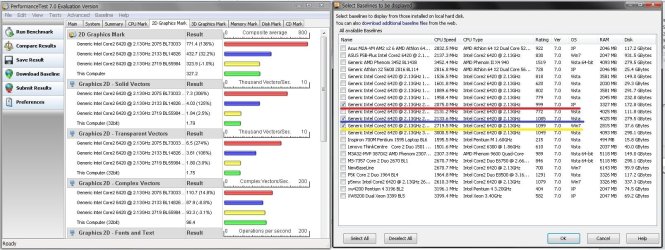
as for the problem here is an update, I did a 2d benchmark and was shall I say not too surprised by the results, I downloaded some online comparisons from people using the same hardware as me and underlined there specs on the right hand side pic using the same colours as the app allocated on the graphs, I chose a XP a vista and a Windows 7, and my Windows 7 is the last one. The XP doubles both Windows 7 machines in 2d performance and the vista outperforms Windows 7 as well.
Now I have my theories as to why its so bad. It could be just very bad drivers, poor 2d coding (although this would be a surprise since the desktop is accelerated with aero), but I wonder if its to do with 'shared video memory'.
Shared video memory is something normally associated with crappy onboard gfx controllers. According to my display control panel my gfx card 8800gt has the following memory.
available graphics memory 3327meg
dedicated video memory 512meg
system video memory 0meg
shared system memory 2815meg
at a guess 'system video memory' is probably what low end video cards have, 'shared system memory' is something I never encountered before and is using ram as graphics memory?
gpu-z tells me something else useful and that is none of my onboard gfx memory is been utilised, which may indicate my aero graphics is using ram emulated as gfx memory which 'could' explain the slow performance, all a theory from me at the moment. | My System Specs | | System Manufacturer/Model Number home built OS windows 7 ultimate x64 CPU intel i5 750 Motherboard asus p7p55d-e modded 1601 bios to get 11.2 intel option rom Memory 16 gig ram ddr3 @ 1333 9-9-9-24 CR2 Graphics Card evga 460 GTX 1 GIG SC Sound Card asus xonar D2X Monitor(s) Displays dell 2209WA Screen Resolution 1680x1050 Keyboard microsoft business ps2 keyboard Mouse microsoft optical black mouse PSU coolermaster silent pro 600watt modular Case antec P182 Cooling artic freezer 7 pro rev 2, 3 case fans Hard Drives Samsung 830 SSD 128gig - boot device wooosh - P55
WD black cavalier 640gig WD6401AALS - P55
WD 500gig WD5000AAKS - P55
Seagate 500gig ST3500630AS - P55
Samsung 750gig HD753LG - Marvell ide mode (drive doesnt like ahci) Internet Speed 30 meg cable Other Info All drives listed as P55 using AHCI |
13 Dec 2009
|
#5 | | Windows 7 Ultimate x86-64 |
Post a shot of your installed apps, update all your drivers, and then check device manager - right click any unknown devices choose update or search your pc for them. The unknown devices app at Halfdone Development can help with unknown hardware. | My System Specs | | System Manufacturer/Model Number Sony Vaio Z46GDU OS Windows 7 Ultimate x86-64 CPU P9700@2.8GHz 1066MHz FSB Motherboard Sony branded Memory 6GB DDR3 1066MHz Graphics Card 9300M GS 256MB Dedicated (Speed) + Intel4500MHD (Stamina) Sound Card Realtek HD Audio Monitor(s) Displays 13.1' WXGA Screen Resolution 1600x900 Hard Drives 320GB 7200RPM w/ 16MB cache Internet Speed 1MB/s |
14 Dec 2009
|
#6 | | |
1 - no unknown devices
2 - on latest drivers
3 - how do I post a shot of installed apps? I guess you mean apps listed in programs and features.
4 - it would seem windows 7 (and vista to a lesser extenct) have an issue with 2d performance when analysing those benchmark results.
here is list of apps I know off hand I got installed.
opera
firefox
office 2010 beta
mirc
creative software for x-fi
flashfxp
nod32 v4
securecrt (32 bit)
windows live essentials (msn messenger and movie maker only)
keepass
proximitron
alcohol 120
du meter
out of these background stuff running is
msn messenger
nod32
du meter
keepass
office 2010 smilies
proximitron
none of these hog cpu, when available 64bit version of apps installed apart from securecrt.
when I did benchmark was on fresh clean desktop after boot. | My System Specs | | System Manufacturer/Model Number home built OS windows 7 ultimate x64 CPU intel i5 750 Motherboard asus p7p55d-e modded 1601 bios to get 11.2 intel option rom Memory 16 gig ram ddr3 @ 1333 9-9-9-24 CR2 Graphics Card evga 460 GTX 1 GIG SC Sound Card asus xonar D2X Monitor(s) Displays dell 2209WA Screen Resolution 1680x1050 Keyboard microsoft business ps2 keyboard Mouse microsoft optical black mouse PSU coolermaster silent pro 600watt modular Case antec P182 Cooling artic freezer 7 pro rev 2, 3 case fans Hard Drives Samsung 830 SSD 128gig - boot device wooosh - P55
WD black cavalier 640gig WD6401AALS - P55
WD 500gig WD5000AAKS - P55
Seagate 500gig ST3500630AS - P55
Samsung 750gig HD753LG - Marvell ide mode (drive doesnt like ahci) Internet Speed 30 meg cable Other Info All drives listed as P55 using AHCI |
14 Dec 2009
|
#7 | | Windows 7 Ultimate x86-64 |
I'd get rid of the 2010 Beta and Alcohol 120. Also, uninstall your drivers, run driver sweeper and install the newest WHQL ceritifed drivers. | My System Specs | | System Manufacturer/Model Number Sony Vaio Z46GDU OS Windows 7 Ultimate x86-64 CPU P9700@2.8GHz 1066MHz FSB Motherboard Sony branded Memory 6GB DDR3 1066MHz Graphics Card 9300M GS 256MB Dedicated (Speed) + Intel4500MHD (Stamina) Sound Card Realtek HD Audio Monitor(s) Displays 13.1' WXGA Screen Resolution 1600x900 Hard Drives 320GB 7200RPM w/ 16MB cache Internet Speed 1MB/s |
15 Dec 2009
|
#8 | | |
do you have an explanation as to why you think a virtual dvd device system is affecting graphics performance and why reinstalling drivers 'again' will work?
also why other system are showing the same slower results in passmarks database?
I tried both of your suggestions today anyway, but I am afraid no difference.  If it did work then I wouldnt have been happy with permanently not usign alcohol 120 as it often saves me a lot of time not needing to burn backups of games etc.
to add sorry, not tried uninstalling office yet as that is no small task, restoring settings, accounts, emails etc. is a job that took me hours when I installed it. | My System Specs | | System Manufacturer/Model Number home built OS windows 7 ultimate x64 CPU intel i5 750 Motherboard asus p7p55d-e modded 1601 bios to get 11.2 intel option rom Memory 16 gig ram ddr3 @ 1333 9-9-9-24 CR2 Graphics Card evga 460 GTX 1 GIG SC Sound Card asus xonar D2X Monitor(s) Displays dell 2209WA Screen Resolution 1680x1050 Keyboard microsoft business ps2 keyboard Mouse microsoft optical black mouse PSU coolermaster silent pro 600watt modular Case antec P182 Cooling artic freezer 7 pro rev 2, 3 case fans Hard Drives Samsung 830 SSD 128gig - boot device wooosh - P55
WD black cavalier 640gig WD6401AALS - P55
WD 500gig WD5000AAKS - P55
Seagate 500gig ST3500630AS - P55
Samsung 750gig HD753LG - Marvell ide mode (drive doesnt like ahci) Internet Speed 30 meg cable Other Info All drives listed as P55 using AHCI |
15 Dec 2009
|
#9 | | |
It probably has to do with the age of the applications you are using. Or how the applications themselves are built. In Windows XP, the old window rendering model was using GDI+ and over the years was hardware accelerated. However, starting back in Windows Vista things have been moving away from GDI and more into the use of WPF and or DirectX. GDI is no longer hardware accelerated like DirectX or WPF. The desktop in Windows Vista and 7, to the window frames are 3D plans inside of a fullscreen DirectX application. | My System Specs | | Computer type PC/Desktop System Manufacturer/Model Number Alienware Aurora ALX R4 OS Windows 7 x64 (SP1) CPU Intel Core i7-3930K (3.2GHz, Turbo 4GHz) Motherboard Alienware Aurora-R4 x79 Memory 4x Samsung 4GB PC3-12800 DDR3 (16GB 1600MHz) Graphics Card Nvidia Geforce GTX 690 (Stock) Sound Card RealTek Integrated Audio Monitor(s) Displays Dell UltraSharp U3011 Screen Resolution 2560x1600 PSU 875W Some Dell PSU <.< Hard Drives Samsung P830 256 GB, WD Raptor 150GB, 2x 1TB HDDs Other Info Dell Inspiron Mini 10v (Intel Atom N270 1.6 GHz; 1GB; Windows 7 Ultimate) |
27 Dec 2009
|
#10 | | |
ok I have got to the bottom of this, our friend wddm 1.1 is the culprit, some info here on it. Windows 7 GDI performance: the trade-off | PC Pro blog
I installed the 182.50 drivers and I got the 2d performance back I was used to in XP, it feels a bit slower in some apps but in general now is fine, no jerky webpages etc.
In addition nvidia scaling works 100% with the wddm 1.0 drivers.
So to anyone using nvidia who either has 2D desktop issues or nvidia scaling issues then use these drivers. Maybe do a sticky post as a lot of people report scaling problems on windows 7. | My System Specs | | System Manufacturer/Model Number home built OS windows 7 ultimate x64 CPU intel i5 750 Motherboard asus p7p55d-e modded 1601 bios to get 11.2 intel option rom Memory 16 gig ram ddr3 @ 1333 9-9-9-24 CR2 Graphics Card evga 460 GTX 1 GIG SC Sound Card asus xonar D2X Monitor(s) Displays dell 2209WA Screen Resolution 1680x1050 Keyboard microsoft business ps2 keyboard Mouse microsoft optical black mouse PSU coolermaster silent pro 600watt modular Case antec P182 Cooling artic freezer 7 pro rev 2, 3 case fans Hard Drives Samsung 830 SSD 128gig - boot device wooosh - P55
WD black cavalier 640gig WD6401AALS - P55
WD 500gig WD5000AAKS - P55
Seagate 500gig ST3500630AS - P55
Samsung 750gig HD753LG - Marvell ide mode (drive doesnt like ahci) Internet Speed 30 meg cable Other Info All drives listed as P55 using AHCI slow 2d desktop performance problems? All times are GMT -5. The time now is 04:51 PM. | |