Windows 7 Forums Search
Welcome to Windows 7 Forums. Our forum is dedicated to helping you find solutions with any problems, errors or issues you are experiencing with Windows 7. The Windows 7 forum also covers news and updates and has an extensive Windows 7 tutorial section that covers a wide range of tips and tricks.


Windows 7 - Optimal HDD bios settings

 
12-20-2009   #1
Yanta


Optimal HDD bios settings

Hi,

I have a WD5000AADS-00L4B1 500gb SATA II Hard disk connected to a Gigabyte GA-EX58-UD3R mobo. I would like to set my system to the optimal performance settings. Could someone please provide guidance on the best settings for the following;

The Bios settings for this mobo include..

SATA RAID/AHCI mode (ICH10R); Currently disabled; Options Disabled, AHCI, Raid

SATA Port 0-3 Native mode; Currently Disabled (Legacy IDE mode); Options: Disabled (legacy), Enabled (Native)

Onboard SATA/IDE Device; Currently Enabled (Enables the Gigabyte SATA2 chip); Options Enabled, Disabled;

Onboard SATA/IDE Control Mode (Gigabyte SATA2 chip); Currently IDE, Options: IDE, AHCI, RAID/IDE.

There appears to be no other storage related settings (other than autodetection of drivers, boot sequence and S.M.A.R.T. capability - which is enabled).

What would be the optimal performance settings for this system, given it is running Win 7 Ultimate x64, 6gb DDR3 1600mhz RAM with a single HDD, and 2 DVD RW drives and a GTX260 graphics card.

thanks

My System SpecsSystem Spec
12-20-2009   #2


the HDD is fastest in AHCI mode but you have to modify the Windows 7 registry first to enable it if it is not a clean install
My System SpecsSystem Spec
12-20-2009   #3
Yanta


Right, so after I modify the registry AHCI setting, and the BIOS it will look like;

AHCI
Enabled
Enabled
AHCI

And I'll move my HDD connector to the GSATA2 connector (it's currently on SATA_0).
My System SpecsSystem Spec
.


12-20-2009   #4


Windows 7 Professional x64


I have done a lot of testing with my drives on AHCI and IDE. I have SSDs and normal drives.

AHCI mode give such a small amount of performance, you should not waste your time, unless you're aware of something I'm not.

I have even seen AHCI give a decrease in performance.

AHCI is used mostly for "hot-swap" a'bility in hard drives. If you're not "hot-swapping" you don't need to worry about it.

FYI
My System SpecsSystem Spec
12-20-2009   #5


Quote   Quote: Originally Posted by Yanta View Post
...

And I'll move my HDD connector to the GSATA2 connector (it's currently on SATA_0).

if your mobo requires to move the port do it - the AHCI driver should give you ~10-15% better performance over ide, all depending on the HDD, when it is working correctly.
My System SpecsSystem Spec
12-25-2009   #6
Yanta


I purchased a seagate ST3500418AS and reinstalled Windows with AHCI turned on and connected the drive to the gigabyte sata connector rather than the intel sata connector.

My HDD average read performance is now 104mb/s whereas on the WD it was 69.4. My average seek time is 14.1ms and on the WD is was 14.7.

I know the Seagate is a better performer than the WD anyway, but I think the exercise was worth it. Overall my system seems much more responsive now.
My System SpecsSystem Spec
12-25-2009   #7


Quote   Quote: Originally Posted by Yanta View Post
....

My HDD average read performance is now 104mb/s whereas on the WD it was 69.4. My average seek time is 14.1ms and on the WD is was 14.7.

I know the Seagate is a better performer than the WD anyway, but I think the exercise was worth it. Overall my system seems much more responsive now.

My WD's peak at 90MB/s on AHCI
your WD value of 69.4 suggests it run in sata/ide mode and not really AHCI

Last edited by MyWin7; 12-25-2009 at 05:28 PM..
My System SpecsSystem Spec
12-25-2009   #8
Yanta


Quote   Quote: Originally Posted by MyWin7 View Post
Quote   Quote: Originally Posted by Yanta View Post
....

My HDD average read performance is now 104mb/s whereas on the WD it was 69.4. My average seek time is 14.1ms and on the WD is was 14.7.

I know the Seagate is a better performer than the WD anyway, but I think the exercise was worth it. Overall my system seems much more responsive now.

My WD's peek at 90MB/s on AHCI
your WD value of 69.4 suggests it run in sata/ide mode and not really AHCI
Correct, but we knew that already, that's the reason for the original post
My WD peaked at 100.1, but averaged 69.4.
My System SpecsSystem Spec
01-05-2010   #9


Windows 7


Quote   Quote: Originally Posted by Yanta View Post
I purchased a seagate ST3500418AS and reinstalled Windows with AHCI turned on and connected the drive to the gigabyte sata connector rather than the intel sata connector.

My HDD average read performance is now 104mb/s whereas on the WD it was 69.4. My average seek time is 14.1ms and on the WD is was 14.7.

I know the Seagate is a better performer than the WD anyway, but I think the exercise was worth it. Overall my system seems much more responsive now.
This may be a stupid question but.. Whats a gigabyte sata connector as opposed to an Intel sata connector? And How do I know if I have one?
My System SpecsSystem Spec
01-05-2010   #10


dual: windows 7 Ultimate x64 7600 and XP SP3


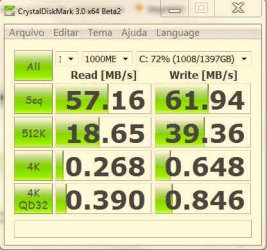
would you please help me to understand these numbers (ide x ahci)? thanks

to change reg setting from ide to ahci I've used that instructions here: How to enable AHCI in Windows 7 RC after installation | ithinkdifferent

HD's WEI is still the same: 5.9
Attached Thumbnails
Optimal HDD bios settings-ide.jpg   Optimal HDD bios settings-ahci.jpg  

Last edited by tranqueirex; 01-05-2010 at 01:01 PM.. Reason: hd wei
My System SpecsSystem Spec
Reply

 Optimal HDD bios settings problems?


Thread Tools


Similar Threads for: Optimal HDD bios settings
Thread Forum
Solved optimal settings for 60gb ssd with 1.5 tb hdd Installation & Setup
Modern Warfare 2 crashes even on optimal settings Gaming
Bios Settings ! Drivers
settings optimal for both Standard Definition and HD Media Center
My Bios Settings Performance & Maintenance


All times are GMT -5. The time now is 09:33 PM.


Windows 7 Forums is an independent web site and has not been authorized,
sponsored, or otherwise approved by Microsoft Corporation.
"Windows 7" and related materials are trademarks of Microsoft Corp.
© Designer Media Ltd
  

1 2 3 4 5 6 7 8 9 10 11 12 13 14 15 16 17 18 19 20 21 22 23 24 25 26 27 28 29 30