Windows 7 Forums


Windows 7: Recycle bin problem..??

25 Jan 2010   #1

64-Bit Windows7 Ult-SP1
UK
 
 
Recycle bin problem..??

system seems to be running very slow at the moment..
emptying the recycle bin takes ages..

- any possible reason for this..?

- only started doing this in last day..

My System SpecsSystem Spec

25 Jan 2010   #2

Windows 7 Ultimate
The Southern Hinterlands


Check you startup folder in msconfig... Check your task manager for unknown processes that may be running....
My System SpecsSystem Spec
25 Jan 2010   #3

64-Bit Windows7 Ult-SP1
UK


there was one Unknown prog relating to Language (dunno what that's about..) - so I disabled that one..

also disabled Windows Live Messenger and Steam, but problem persists..

seems that all my Office2007 progs are running very slow as well..
also boot-up is taking about three times longer than usual - what's going on..?

anyone else getting this - it's not that recent update for IE8 vulnerabilities, is it..??
My System SpecsSystem Spec
.


25 Jan 2010   #4

Windows 7 Ultimate
The Southern Hinterlands


Run a full system scan with your AV program......also, try disabling everything in your startup tab except for your AntiVirus and your firewall and see if that helps...
My System SpecsSystem Spec
25 Jan 2010   #5

64-Bit Windows7 Ult-SP1
UK


since I dumped AVG free, only AV I have MSE, will that do it..?
My System SpecsSystem Spec
25 Jan 2010   #6

Windows 7 Professional x64
Trinidad and Tobago


No. It won't.

Get Malwarebytes.
My System SpecsSystem Spec
25 Jan 2010   #7

64-Bit Windows7 Ult-SP1
UK


ran Malwarebytes - it found a HiJack entry - which I dumped..
- still behaving oddly though..

- still very slow boot-up and progs generally taking ages to be discovered by OS on start..
- and all Office2007 programs very sluggish to start as well..
My System SpecsSystem Spec
27 Jan 2010   #8

64-Bit Windows7 Ult-SP1
UK


- still no joy - all office progs running extremely slow
- all will give message "Not Responding.." if I try to action anything while the progs are running..

seems one of my SSD's is playing up - system attempts to verify it are failing..
- Office diagnostics state that system is unstable due to hardware failure..

the failing drive (G: ) is OCZ 60G SSD..
My System SpecsSystem Spec
27 Jan 2010   #9

Windows 7 Professional 64-bit


My recycle bin takes ages to appear as well. I wouldnt rely on malwarebytes solely. Try various other tools like a-squared. Having said that mine has found nothing. I think its an inherent system "feature" rather than anything malign.
My System SpecsSystem Spec
27 Jan 2010   #10

64-Bit Windows7 Ult-SP1
UK


I've a feeling that the SSD is somehow "locked" - the system still goes looking for it, hence the delays
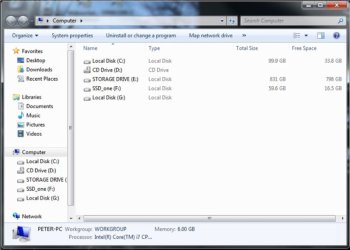
- this is the look of it:
Recycle bin problem..??-picture2.jpg

Drives C: and E: are 100G and 900G partitions on the same HD
Drive F: is SSD-one

- as you can see, Drive G: which was previously named as SSD-two has reverted to it's default identity of Local Disk..
- and has become undetectable by the OS - the green loading/progress bar doesn't complete its sweep across the address box..
- it hangs up, right near the end..

- very odd..
My System SpecsSystem Spec
Reply

 Recycle bin problem..?? problems?


Thread Tools


Similar help and support threads for: Recycle bin problem..??
Thread Forum
[Problem]$Recycle.bin / Recycle bin General Discussion
Solved Where is recycle bin? General Discussion
Solved Getting back 'Empty Recycle Bin' Context Menu On Recycle Bin Customization
locked Recycle Bin inside $Recycle.Bin General Discussion
Recycle Bin problem General Discussion


All times are GMT -5. The time now is 10:22 PM.


Seven Forums Android App Seven Forums IOS App Follow us on Facebook

Windows 7 Forums is an independent web site and has not been authorized,
sponsored, or otherwise approved by Microsoft Corporation.
"Windows 7" and related materials are trademarks of Microsoft Corp.
© Designer Media Ltd
  

1 2 3 4 5 6 7 8 9 10 11 12 13 14 15 16 17 18 19 20 21 22 23 24 25 26 27 28 29 30 31 32