Windows 7 Forums Search

Go Back Windows 7 Forums > Windows 7 help and support > Performance & Maintenance » Cannot create a new txt file in explorer - please help

Welcome to Windows 7 Forums. Our forum is dedicated to helping you find solutions with any problems, errors or issues you are experiencing with Windows 7. The Windows 7 forum also covers news and updates and has an extensive Windows 7 tutorial section that covers a wide range of tips and tricks.

Windows 7 - Cannot create a new txt file in explorer - please help


03-25-2009   #1 (permalink)


Dual boot XP Pro and Seven/7127
sarf west London


Cannot create a new txt file in explorer - please help

I used to be able to do a right click in Explorer and create a new txt file.
I found this feature very handy for quick txt notes.
This option is not available on the context menu in Seven.
What's happened to it?
Thanks,

My System SpecsSystem Spec
03-25-2009   #2 (permalink)


Vista Home Premium 32-bit & Vista Ultimate 64-bit both Service Pack 2 W7 Pro RTM 7600 32 & 64
Doncaster, UK


Hi anykey,

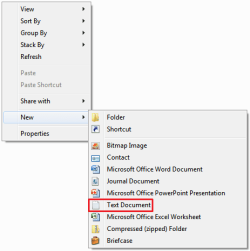
This option is still available on my system. The following image shows the right click menu from the folder Libraries > Documents.
Cannot create a new txt file in explorer - please help-capture.png
What do you get from the same location on yours?
My System SpecsSystem Spec
03-25-2009   #3 (permalink)


Dual boot XP Pro and Seven/7127
sarf west London


Hello Dwarf, righto I have done as requested and gone to the same location Libraries > Documents. (I am using build 7000)

Everything is the same as your image, with the exception of the menu item Text Document.
Instead I have the item Rich Text Document.
Which means that a MSWord Rich Text Document is created, whereas I require a straightforward Text Document like in your menu.
Any ideas please...
My System SpecsSystem Spec
.
03-25-2009   #4 (permalink)


Windows 7 RC 7100 32bit/64bit


Perhaps the default program for .txt extensions has been changed on your system.

Try creating any document, renaming it to .txt

(go to Organize - Folder Options and View , uncheck Hide Extensions for known file types )

, then right-click it , select Open With - Choose Default Program and select Notepad.

Then see if its fixed
My System SpecsSystem Spec
03-25-2009   #5 (permalink)


Party OS Ultix64
KANSAS


I'm running 7000 and I have both options Rich text and text ?


Attachment 6477

Last edited by myzr7; 05-31-2009 at 11:33 AM..
My System SpecsSystem Spec
03-25-2009   #6 (permalink)


Dual boot XP Pro and Seven/7127
sarf west London


Quote   Quote: Originally Posted by limneos View Post
Perhaps the default program for .txt extensions has been changed on your system.
Yes. I use Notepad++. I have done for a long time. I prefer it to MSNotepad.

Quote   Quote: Originally Posted by limneos View Post
Try creating any document, renaming it to .txt
(go to Organize - Folder Options and View , uncheck Hide Extensions for known file types )
, then right-click it , select Open With - Choose Default Program and select Notepad.
Then see if its fixed
Thanks limneos.
Righto, I have done what you said and re assigned the association to MSNotepad.
To test it. I clicked on a txt file and it opened in Notepad. (yuk )

Howvever, on the right click context menu, I still have no option to create new txt doc.
Poo.

I have changed my associate back to Notepad++.
Is that it then. Am I stuck without this option
My System SpecsSystem Spec
03-25-2009   #7 (permalink)


Windows 7 RC 7100 32bit/64bit


Try running this registry file I created for you.

It should add New - Text Document to your context menu and fix your problem.
Attached Files
File Type: reg new_text_document.reg (734 Bytes, 620 views)
My System SpecsSystem Spec
03-25-2009   #8 (permalink)


Dual boot XP Pro and Seven/7127
sarf west London


Umm, I am sorry to say it did not work.
Nothing is different.
The context menu is unchanged.

I even re-booted and still nothing had changed.
I then ran the reg file again.
Sorry nothing has been added nor changed.
Thanks for trying
My System SpecsSystem Spec
03-25-2009   #9 (permalink)


Windows 7 RC 7100 32bit/64bit


hmm...

Try this reg file too.

Let me know of what happens.

No need to restart, if it works, it should work at once.
Attached Files
File Type: reg txt_reg_2.reg (1.2 KB, 993 views)
My System SpecsSystem Spec
03-25-2009   #10 (permalink)


Dual boot XP Pro and Seven/7127
sarf west London


Hooray hooray hooray.
I think you may has guessed that this time it worked, ha ha.
I ran the reg file and did a right click. I could not see any change.
No, I thought.
Right clicked again and the text document option is there.
Dunno if it was there first time and I missed it. I hardly think so.
Prolly getting too excited.

Umm, now something has happened.
I have WinPatrol running - you may know the Scotty Watchdog.
Now here's a funny thing.
WinPatrol is telling me that it has detected a change in file type associations.
And get this: from Notepad++ to MSNotepad.
Would your reg file have caused that...
My System SpecsSystem Spec
Reply

Thread Tools


Similar Threads for: Cannot create a new txt file in explorer - please help
Thread Forum
Create ErrorHandler.cmd script file General Discussion
I want to create an autorun file! General Discussion
Solved How to create a file in a folder? General Discussion
Games Explorer Shortcut - Create Tutorials
Internet Explorer No Add-ons Shortcut - Create Tutorials


All times are GMT -5. The time now is 07:58 AM.


Windows 7 Forums is an independent web site and has not been authorized,
sponsored, or otherwise approved by Microsoft Corporation.
"Windows 7" and related materials are trademarks of Microsoft Corp.
© Designer Media Ltd

1 2 3 4 5 6 7 8 9 10 11 12 13 14 15 16 17 18 19 20 21 22 23 24 25 26 27 28