Windows 7 Forums


Windows 7: Paging File

06 Feb 2010   #1

Win 7
 
 
Paging File

When my system boots I get a message that there is no paging file and windows will set a tempoary one. I have 4 gigs of ram so I go through the procedure of setting a page file size and reboot after which I get the same message. Can someone tell me what I must do to correct this?

Thanks, Bob

My System SpecsSystem Spec

06 Feb 2010   #2

Windows 7 Professional x64
The Wild West


If you could un-hide protected OS files in folder options and look on the root of the C drive. (just open C) and give us a screen shot, or just see if there is a file there called "pagefile.sys" and see how big it is. This woudl be a good start.

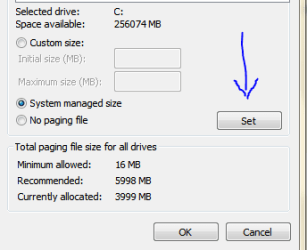
Also, you must remember to click "set" when changing the paging file (or virtual memory). If you don't hit "set" when doing this....it will not take.

Virtual Memory Paging File - Change - Vista Forums

Paging File-pagefileset.png


Check those two things and let me know.

Last edited by Brink; 06 Feb 2010 at 11:45 PM.. Reason: added link
My System SpecsSystem Spec
08 Feb 2010   #3

Win 7
 
 
Paging File

I did all that you suggested without success I did clicl on SET and I could not find pagefile.sys, I'm wondering if it could possibly be that I do not have full administrative rights. Non matter what I do it reverts back to NO PAGING FILE.
My System SpecsSystem Spec
.


Reply

 Paging File problems?


Thread Tools


Similar help and support threads for: Paging File
Thread Forum
Solved Paging File Performance & Maintenance
problem with paging file Performance & Maintenance
Solved What should I set my paging file to? Performance & Maintenance
SSD and paging file(s). Hardware & Devices
Paging file system will not set General Discussion


All times are GMT -5. The time now is 05:28 PM.


Seven Forums Android App Seven Forums IOS App Follow us on Facebook

Windows 7 Forums is an independent web site and has not been authorized,
sponsored, or otherwise approved by Microsoft Corporation.
"Windows 7" and related materials are trademarks of Microsoft Corp.
© Designer Media Ltd
  

1 2 3 4 5 6 7 8 9 10 11 12 13 14 15 16 17 18 19 20 21 22 23 24 25 26 27 28 29 30 31 32