Windows 7 Forums


Windows 7: 64bit Windows won't use all my memory

18 Feb 2010   #1

Windows 7 64bit
 
 
64bit Windows won't use all my memory

The title about sums it up, but to avoid answers that don't answer the question, let me offer a few specifics.

I have 4gb installed but only 2.75 is usable.

I have a total of 1gb of video ram on my two video cards.

I am running 64bit Windows.

My board recognizes up to 8gb of ram (though i wonder if they ever sold 2gb strips of ddr that weren't buffered . . . they don't now at any rate)

The Max Memory button on msconfig is not clicked.

My motherboard doesn't seem to have any memory options available.

I know similar posts have been made, but nothing i've read seemed to match my specific problem. Any help would be greatly appreciated.

Thanks.

My System SpecsSystem Spec

18 Feb 2010   #2

Windows 7 Ultimate Signature Edition
FL


check to see if your board has the latest bios flash update available. you may also want to use Memtest86.com - Memory Diagnostic to make sure your ram is okay.
My System SpecsSystem Spec
18 Feb 2010   #3

Win 7 Ultimate x64
Etobicoke, Ontario


mrentropy, welcome to the forums.

Quote:
My motherboard doesn't seem to have any memory options available.
Actually it does, two of them according to this I found,

Overclockers Forums - View Single Post - 4 gigs ram issue with Vista x64

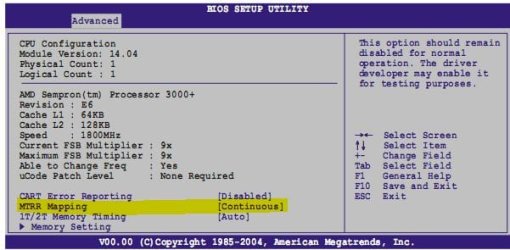
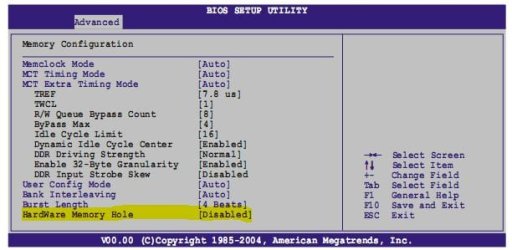
And to save you hunting for where they are,

64bit Windows won't use all my memory-mtrr.jpg
64bit Windows won't use all my memory-memhole.jpg

The second one needs to be set to enabled. Haven't been able to determine whether the MTRR needs to be set to contiguous or discrete. Make the change to the second one and boot to Windows, if it still doesn't show the full 4 GB reboot and set it to discrete.
My System SpecsSystem Spec
.


18 Feb 2010   #4

windows 7 64 bit


does it say 4gb installed 2.75 usable and by the look of it the video cards are pci not pci express 2.0 and i would bet if that is the case then they dont have onboard ram it will steel ram from the system and that is why u get this if possible take one card out and see if that helps
My System SpecsSystem Spec
14 Sep 2012   #5

Windows 7 ultimate x86


The method that solved my problem ...

First Of all i have a dual boot system..first I installed the chip-set driver in x64 Windows 7 as it was not installed.. then i booted up my x86 Windows 7 & >>start menu>>msconfig>>in the boot tab>>advanced settings/options>> uncheck the maximum memory option..
and then rebooted to my x64 Windows 7.. and wallah..
My System SpecsSystem Spec
14 Sep 2012   #6

MS Windows 7 Professional 64-bit SP1
Lancashire


Memory Hole needs to be enabled
My System SpecsSystem Spec
14 Sep 2012   #7

Windows 7 64 bit SP1


Yep ^This

Page 4-26 of your manual
My System SpecsSystem Spec
Reply

 64bit Windows won't use all my memory problems?


Thread Tools


Similar help and support threads for: 64bit Windows won't use all my memory
Thread Forum
Windows 7 64bit, Memory usage rises/computer freezes over time. Performance & Maintenance
Windows 7 64bit shows 3.73GB usable memory with 8GB installed Performance & Maintenance
Partially Solved: Strange memory issue with 64bit Windows 7 Hardware & Devices
More Memory for Windows 7 64bit Hardware & Devices
Windows 7 64bit sees no memory Hardware & Devices


All times are GMT -5. The time now is 04:05 AM.


Windows 7 Forums is an independent web site and has not been authorized,
sponsored, or otherwise approved by Microsoft Corporation.
"Windows 7" and related materials are trademarks of Microsoft Corp.
© Designer Media Ltd