Windows 7 Forums Search
Welcome to Windows 7 Forums. Our forum is dedicated to helping you find solutions with any problems, errors or issues you are experiencing with Windows 7. The Windows 7 forum also covers news and updates and has an extensive Windows 7 tutorial section that covers a wide range of tips and tricks.


Windows 7 - Multiple explorer processes.

 
01-26-2011   #11


There's another possibility: You have multiple iexplore.exe processes open when you have (or recently have had) multiple tabs open in IE. If you close your tabs, all or most of those iexplore.exe processes should end. But, sometimes what happens is that for some reason, the IE tabs that you think you've closed, haven't actually closed, and their processes continue to run in Task Manager. If you go into Task Manager and manually end those processes, you'll see that immediately thereafter, a number of IE windows will open and shut themselves down, thus clearing the iexplore.exe processes in Task Manager. By the way, even if that isn't the situation, there's no harm done in just periodically going into Task Manager and manually ending those iexplore.exe processes yourself.

My System SpecsSystem Spec
11-17-2011   #12


windows7 32 bit


Hi,
In my taskmanager , 400+ explorer.exe is running. How can i remove that. How it came is that, i have changed the default location of one of the softwares shortcut in satrt menu. please give me solution to stop explorer.exe.
My System SpecsSystem Spec
11-18-2011   #13


Windows 7 Home Premium


Quote   Quote: Originally Posted by Imperfect1 View Post
There's another possibility: You have multiple iexplore.exe processes open when you have (or recently have had) multiple tabs open in IE. If you close your tabs, all or most of those iexplore.exe processes should end.
Not Internet Explorer - Explorer. I don't use IE for anything. At all. Ever.

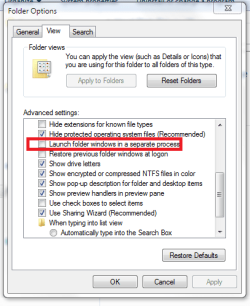
To whomever it was that suggested I unselect "launch each folder in a separate process" - it wasn't selected to begin with, though that was a good guess.
My System SpecsSystem Spec
.


11-18-2011   #14


Windows Server 2008 R2


Technically explorer.exe isn't allowed to launch separate processes unless that box is checked (or you open a new window containing a COM factory), so if you've got more than 1 with that box unchecked that really doesn't leave many alternatives other than an Explorer shell extension. I saw you talking about it previously, but what happens if you go and disable everything non-Microsoft via shellexview and rebooted to see if it continues?
My System SpecsSystem Spec
11-20-2011   #15


windows 7 premium 64 bit


they solved it siomewhere else, heres a answer

Well i've solved it.. those instances are launched when i use the 'open containing folder' command in utorrent.
My System SpecsSystem Spec
Reply

 Multiple explorer processes. problems?


Thread Tools


Similar Threads for: Multiple explorer processes.
Thread Forum
Explorer.exe - Kill all processes at once Tutorials
Solved 2 explorer.exe processes running General Discussion
IE8: Multiple internet explorer processes active with one browser open Browsers & Mail
Very slow pc, multiple processes System Security
100+ Explorer.exe Processes Running Crashes and Debugging


All times are GMT -5. The time now is 09:40 PM.


Windows 7 Forums is an independent web site and has not been authorized,
sponsored, or otherwise approved by Microsoft Corporation.
"Windows 7" and related materials are trademarks of Microsoft Corp.
© Designer Media Ltd
  

1 2 3 4 5 6 7 8 9 10 11 12 13 14 15 16 17 18 19 20 21 22 23 24 25 26 27 28 29 30