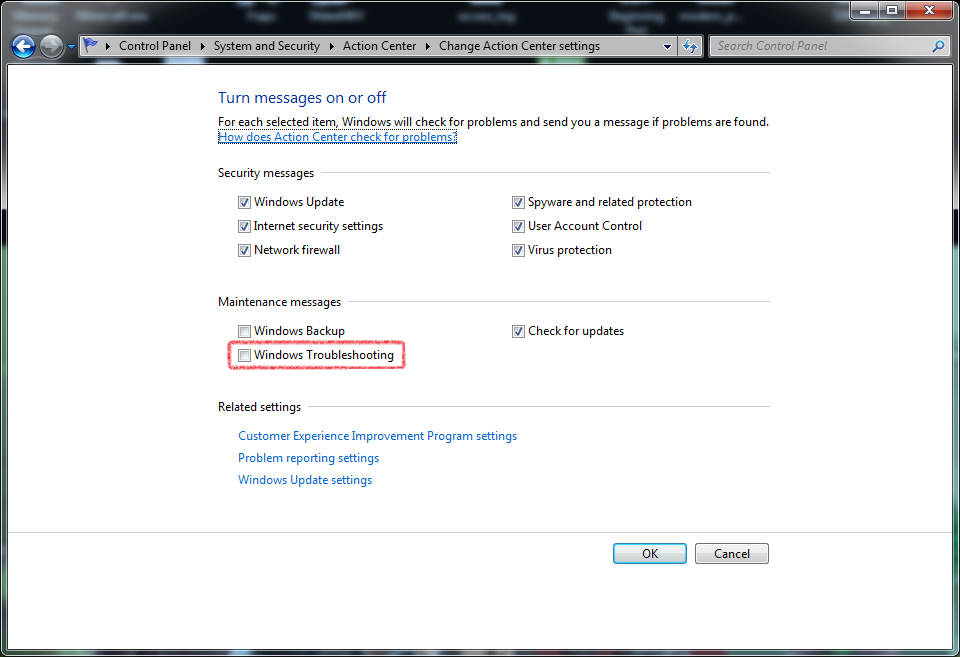
When I play some slightly demanding fullscreen games I get an annoying popup from windows. It says
Now first of all, at this point my computer is running just fine. it seems like it reacts simply because one of the cpu cores are running high, because the ram isn't even at 40% and the other cores are running with ease. I don't notice any problems in the game itself and no problems with normal tasks while it runs in the background.
With this popup I get three options:
- Change the color scheme to windows 7 basic
- Keep the current color scheme, but ask me again if my computer continues to perform slowly
- Keep the current color scheme, and don't show this message again.
I've pressed the latter atleast four times now, but still next time around it pops up again, tossing me out of fullscreen mode and annoying the crap out of me.
how can I make it stop?
Windows has detected your computer's performance is slow. This could be because there are not enough resources to run the Windows Aero color scheme. To improve performance, try changing the color scheme to windows 7 basic. Any change you make will be in effect until the next time you log on to windows.
Now first of all, at this point my computer is running just fine. it seems like it reacts simply because one of the cpu cores are running high, because the ram isn't even at 40% and the other cores are running with ease. I don't notice any problems in the game itself and no problems with normal tasks while it runs in the background.
With this popup I get three options:
- Change the color scheme to windows 7 basic
- Keep the current color scheme, but ask me again if my computer continues to perform slowly
- Keep the current color scheme, and don't show this message again.
I've pressed the latter atleast four times now, but still next time around it pops up again, tossing me out of fullscreen mode and annoying the crap out of me.
how can I make it stop?
My Computer
At a glance
Windows 7 / VistaIntel Core Quad Processor i7-860Kingston DDR3 HyperX T1 2000MHz 6GBEVGA GeForce 9800GTX 512MB
- OS
- Windows 7 / Vista
- CPU
- Intel Core Quad Processor i7-860
- Motherboard
- Gigabyte GA-P55-UD4 Socket-1156
- Memory
- Kingston DDR3 HyperX T1 2000MHz 6GB
- Graphics Card(s)
- EVGA GeForce 9800GTX 512MB
- Sound Card
- Creative Sound Blaster X-Fi Platinum Fatal1ty
- Monitor(s) Displays
- Sony 21" + BENQ 24" LCD
- Screen Resolution
- 1600x1200 + 1920x1080
- Hard Drives
- Corsair SSD P64 2,5" 64GB
Samsung SpinPoint T166 500GB
- PSU
- Thermaltake Toughpower 1200W
- Case
- Antec Nine Hundred
- Cooling
- Fans
- Keyboard
- Logitec G15
- Mouse
- Logitech G9
- Internet Speed
- 20Mb/s